The most common failure? Exposed server version information in HTTP response headers. This small detail creates avoidable risk by helping attackers map your tech stack to known exploits. Despite this, the vast majority of WordPress sites are leaving version data visible, putting themselves at a disadvantage compared to industry benchmarks.
Key Takeaways
- 98.6% of small business WordPress sites fail server banner checks
- 20.4% openly share server version details attackers can use
- Server banner fails outpace other security misconfigurations
- Closing this gap is fast and non-disruptive for most site owners
The Numbers
From May 11 to June 10, 2026, 100,192 scans across 69,101 unique small-business WordPress sites were analyzed with an average security score of just 39.5%.
What does the server banner check measure?
This test inspects the HTTP response headers sent by your website. Specifically, it looks for the Server header—if present, does it also disclose precise version information? For example, returning "Server: Apache/2.4.41" allows anyone to see what version of Apache you run.
Only sites withholding version numbers (or suppressing the banner entirely) are rated "Good" for this check. Those that reveal a version—e.g., "nginx/1.18.0" or "Apache/2.2.15"—fail.
📊 1.4% of sites (out of a measured subset) passed server banner checks
That means across 27,363 measured sites, just under 383 properly hid their server version details.
Comparatively:
- 20.4% of sites in the 30-day scan window expose server version info
- 0.4% passed all required security header checks
- 6.8% had properly hardened SSL/TLS configurations
- 88.1% passed cookie security checks (best-performing security category)
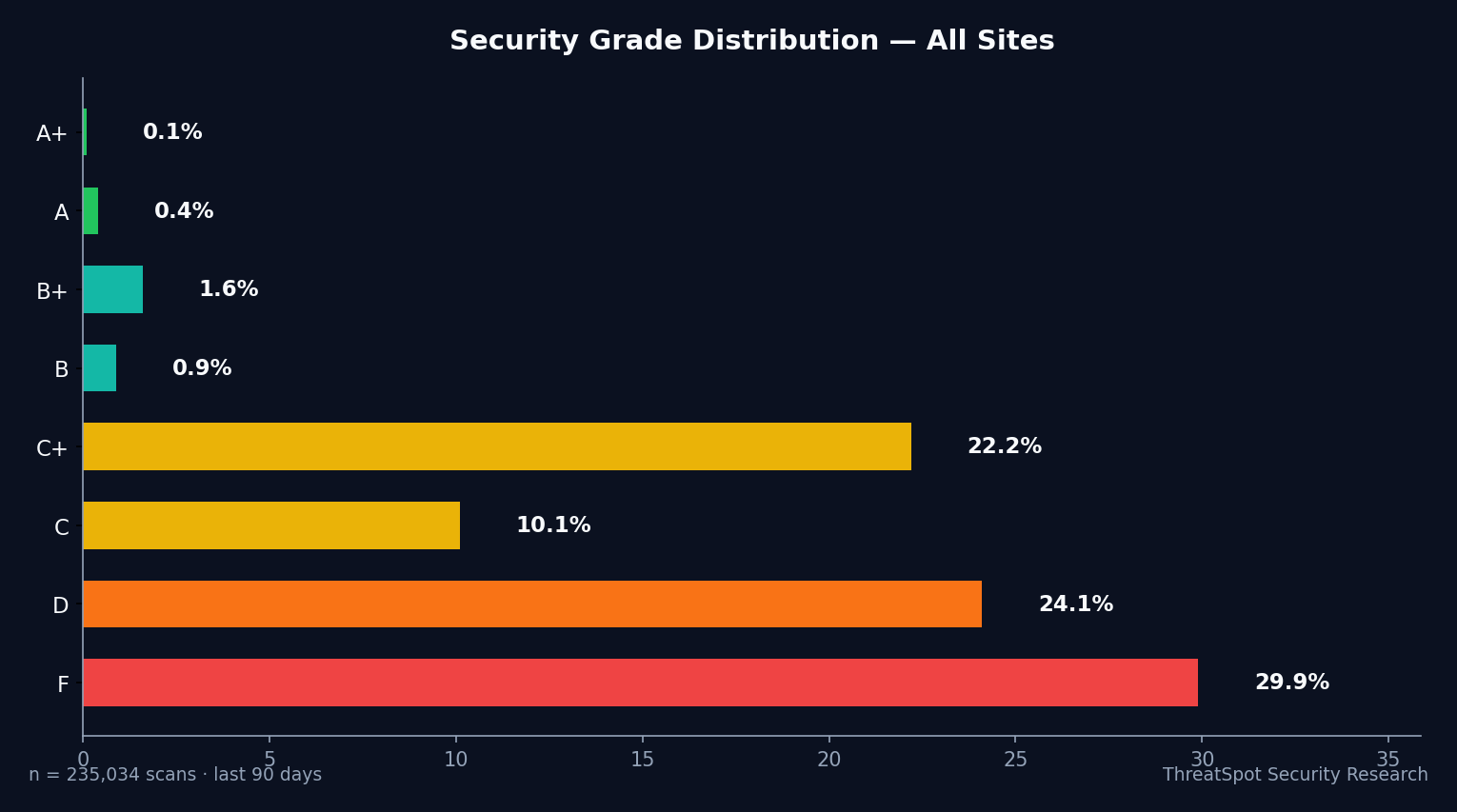
Grade Distribution (Last 30 Days)
| Grade | Count | Percent |
|---|---|---|
| A | 228 | 0.2% |
| B+ | 1161 | 1.2% |
| B | 646 | 0.6% |
| C+ | 11906 | 11.9% |
| C | 6244 | 6.2% |
| D | 27004 | 27.0% |
| F | 44884 | 44.8% |
Across the broader dataset, server banner exposure remains one of the most consistent and correctable gaps.
How WordPress Sites Compare
Server banner disclosure is not unique to WordPress, but this platform's typical hosting configurations make it especially common. Compared to other checks, WordPress sites lag behind on version masking:
- SSL/TLS Configuration: 6.8% "Good" for hardening (much better than banner)
- Cookie Security: 88.1% "Good"
- Security Headers: Just 0.4% "Good" (slightly better than server banner, but still low)
- Content Security Policy (CSP): 0.0% "Good"
📊 Server banner checks have the lowest "Good" rate of all baseline website security checks
Industry-wide, small business WordPress sites underperform versus broader hosting sectors, where many providers automate server version masking as part of managed services.
What This Means for Your Business
When server version details are exposed—especially on an unpatched site—attackers can quickly match your software to fresh exploits. Version disclosure does not mean your site is compromised, but it does lower the bar for targeted attacks and automated scans.
In practice, the business risk boils down to three points:
Automated Targeting: Public version data feeds attacker scripts, which prioritize the most vulnerable software combinations first. This kind of automation doesn’t care if your business is big or small—your version string is enough.
Incident Response Complexity: If your server banner reveals a version with known vulnerabilities, third-party researchers, regulators, and bad actors can all see the gap. This can expose you to reputation risk or adverse SEO events if your site's status ends up in security datasets.
Lost Trust and Remediation Costs: While version disclosure itself won’t cause a breach, failing a basic check can turn a single patching issue into a larger business incident—forcing downtime, raising response costs, or causing lost leads due to browser "Not Secure" signals.
Many small business owners handle site maintenance themselves or rely on shared hosts that do not default to best-practice header configuration. Simply masking this information is both non-disruptive and immediately reduces a known class of automated risk.
What You Can Do Right Now
Improving server banner security is actionable for nearly every WordPress site. Here’s how to address it, alongside other foundational steps:
Suppress server version disclosure.
Edit your web server configuration (Apache, Nginx, LiteSpeed) to remove or limit theServerheader. Many managed hosts support this on request.Regularly scan your website for exposed headers.
Use a website security scan to check for banner leaks and other configuration gaps.Patch your server software and CMS.
Keep WordPress, web server, and all plugins up to date to limit the impact if a version is visible.Configure security headers correctly.
Add CSP, X-Frame-Options, Referrer-Policy, and X-Content-Type-Options for stronger browser protections.Harden SSL/TLS.
Enable HSTS and ensure you’re using only modern, secure protocols and ciphers (not just HTTPS).Check cookie security settings.
Set Secure, HttpOnly, and SameSite flags on all session and authentication cookies.Implement regular backups.
A strong backup policy limits worst-case impact, even if a misconfiguration is exploited.Work with your host if unsure.
Many issues—server banners included—can be addressed via hosting support if you don’t manage the stack.
For additional steps that yield fast improvements, see 5 quick wins to improve your website security.
Final Thoughts
Out of 100,192 recent WordPress security scans on small business sites, 98.6% failed server banner checks and 20.4% openly disclosed version information. This is an avoidable gap that makes your site an easier target for automated attacks, even if you keep up with plugin updates and backups.
Server banner exposure is not a guarantee of compromise—but it is a signal that the basics need tightening. Suppressing version info is a quick win: minimally disruptive, and it raises your baseline security posture immediately.
If you manage a WordPress site for your business, start with a website security scan. Check exactly what your headers reveal and close any unnecessary gaps, starting with server banner masking and security headers.