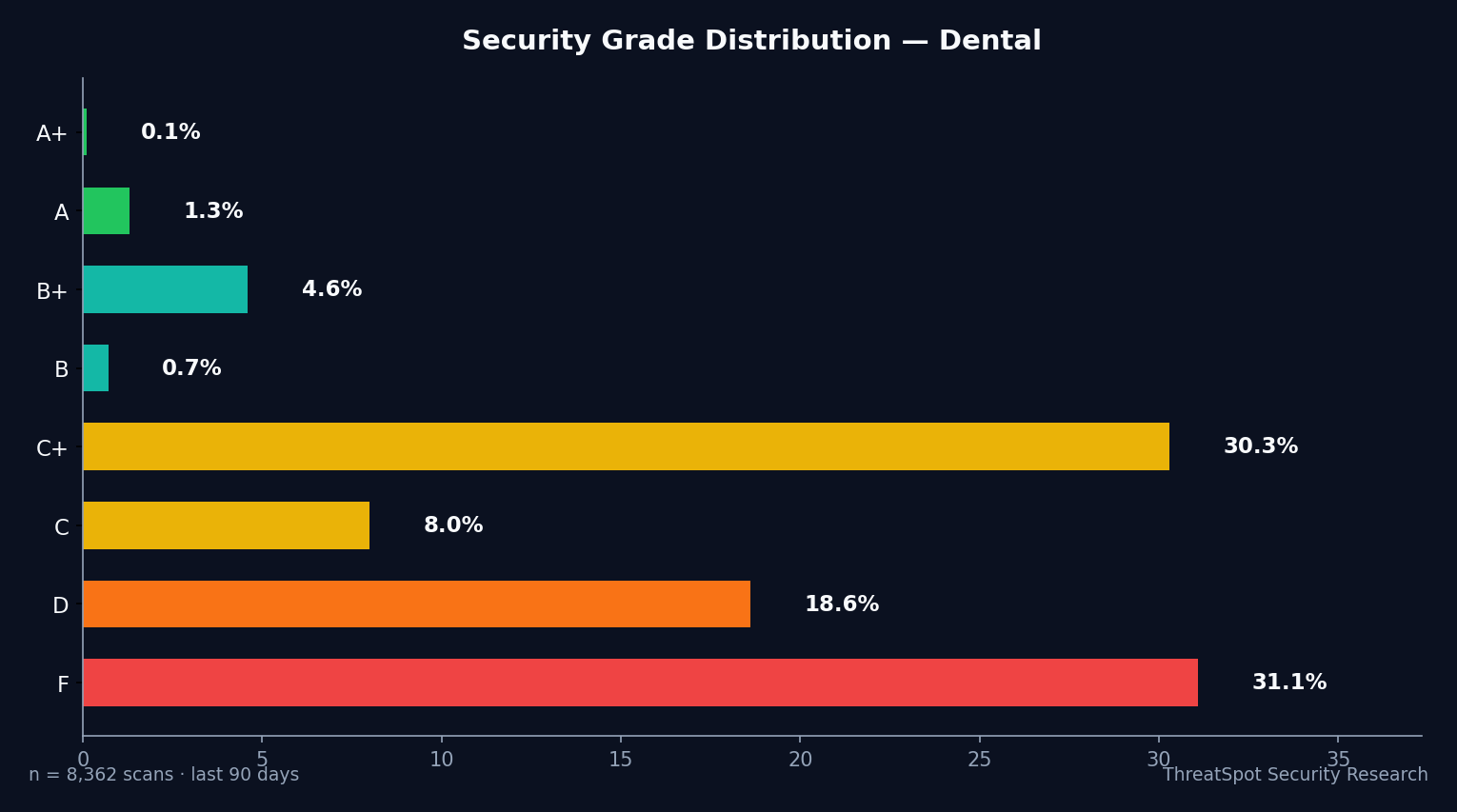
But our recent scan data shows a more troubling picture. After scanning 7,008 dental websites (comprising 3,984 unique sites), 4,785 scans—68.3%—received failing grades (D or F). Fewer than 1% delivered what security experts would call strong defense. Industry-wide benchmarks are equally stark: only 0.6% of dental sites passed all critical security header checks. The visible lock icon is only the start.
<div class="callout callout-info"> <i class="bi bi-info-circle"></i> <strong>Download the Checklist:</strong> Get our <a href="https://threatspot.ai/dental-hipaa-checklist">HIPAA Compliance Checklist for Dental Practices</a> — all 12 checks in one PDF. </div>
The true risk for dental practices? Unchecked configuration gaps may leave sensitive information and patient trust exposed to low-effort attacks. In real terms, this can mean HIPAA violation fines, damaging breach notifications, and lost business. Dental practices must know—objectively—where their websites stand, then act. Here’s a data-driven look at the security checks health regulators and security auditors will expect your WordPress dental site to pass in 2026.
Key Takeaways
- 4,785 dental site scans (68.3%) received D or F security grades.
- Only 0.6% passed all critical security header checks.
- Sites lacking basic protections face HIPAA scrutiny and higher breach risk.
- Passing these 12 checks minimizes both patient risk and regulatory exposure.
The Real Issue Behind Dental HIPAA Compliance Online
Dental websites process PHI, schedule appointments, send reminders, and facilitate payments. Each step in this digital workflow becomes a possible entry point for attackers—or a compliance gap for auditors—if basic security controls are missing.
Compliance isn’t just about encrypted forms. Regulators expect a documented effort to reduce risk: up-to-date software, strong browser-level protections, and clear boundaries against common web-based attacks. The minimal bar in 2026 is higher than most owners realize. A wordpress vulnerability scan shows the real risk: configuration failures, not advanced hacks, are the most common source of patient privacy leaks.
Why Dental Practices Are HIPAA Targets
Dental offices hold a mix of personal, insurance, and medical records. For attackers and fraudsters, this data is lucrative, and for the practice, it’s protected by law:
- Volume of PHI: Even simple appointment info qualifies as protected information under HIPAA.
- Operational reliance on the web: Scheduling, online payments, and patient messaging create new attack surfaces.
- Regulatory scrutiny: Health regulators know dental sites are often overlooked in IT audits.
- Reputation risk: Breaches lead to patient distrust and negative online presence, impacting referrals and reviews.
Each of these factors makes dental sites attractive targets for both low-level opportunists and more structured attackers. Technical configuration gaps further increase the risk that attempted attacks succeed.
Interpreting the 68.3% Failure Rate: Industry Context
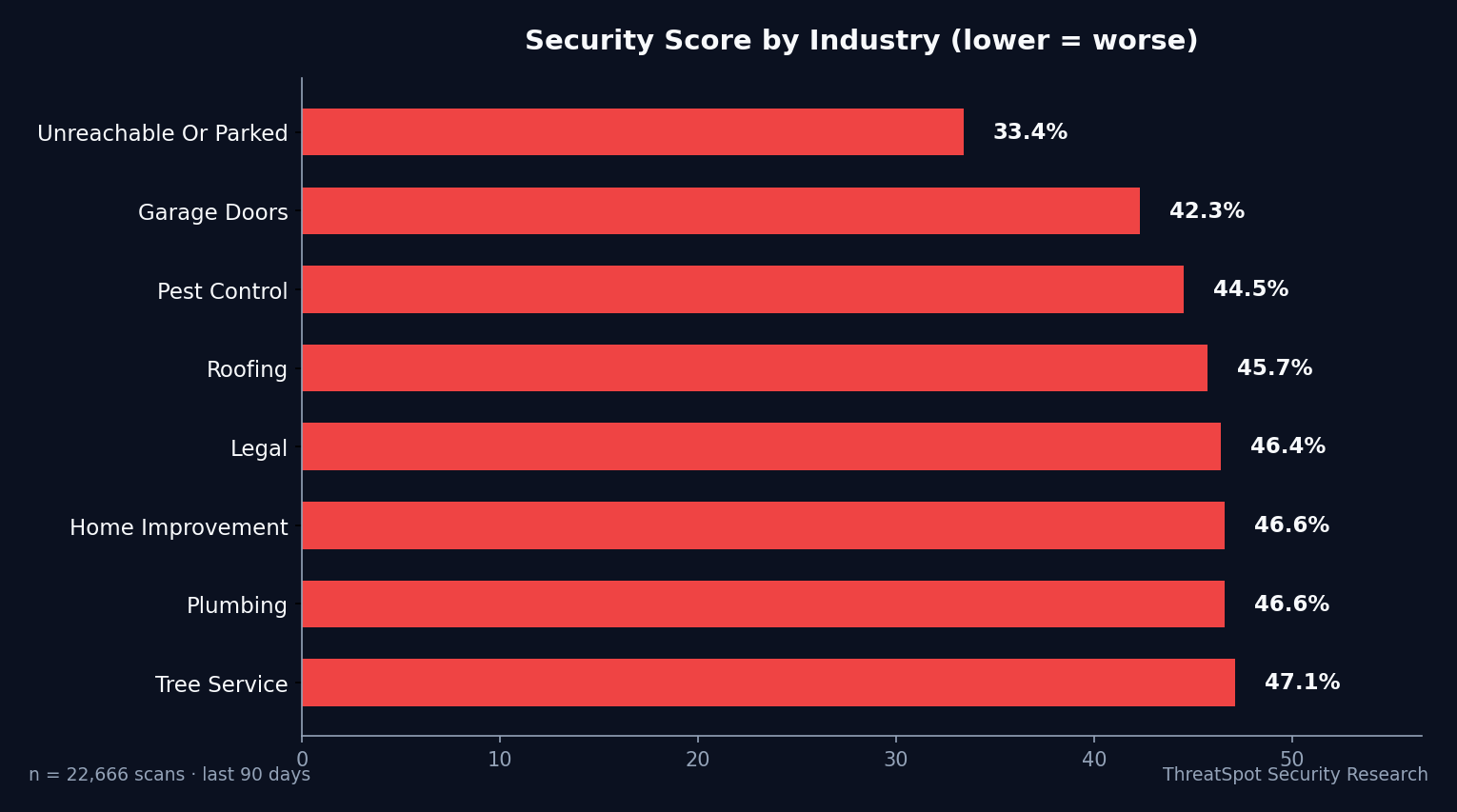
After 7,008 dental website security scans, the average site scored just 39.6%—placing dental practices on par with automotive, pool/spa, and junk removal sites, and trailing behind industry bests like manufacturing (43.5%).
Grade Distribution:
- A+/A/A-/B+: 217 scans (3.1%)
- C+/C: 1,294 scans (18.4%)
- D/F: 4,785 scans (68.3%)
| Industry | Avg Security Score | # Scans |
|---|---|---|
| Healthcare (general) | 40.4% | 2,383 |
| Manufacturing (best) | 43.5% | 882 |
| Professional Services | 37.8% | 18,097 |
| Printing (bottom 3) | 37.6% | 361 |
How is this possible, given nearly all dental sites are served over HTTPS?
Measured security checks go beyond the basics:
- Our scan rates full SSL/TLS config (not just if HTTPS is working)
- It verifies all “modern” browser security headers
- Checks for server and cookie configuration that matter for PHI
Notable breakdowns:
- Only 0.6% passed security headers (vs. 4–6% industry average)
- Just 6.9% had SSL/TLS rated “Good” (while ~95% show a valid cert)
- Less than 1% hid their server banner (disclosing server info to the web)
This leaves most practices with silent, avoidable exposure.
12 Security Checks Every Dental WordPress Site Must Pass
Below, we break down the twelve most critical WordPress security checks any dental website must pass for practical HIPAA compliance and meaningful patient protection. Each section explains the concept, what causes failure, real business impact, and a plain-language fix.
1. SSL/TLS Protocol Quality
What It Is
SSL/TLS ensures data between your patient and the site is encrypted, protecting PHI during login, scheduling, or form submissions. Passing this check requires not just any HTTPS, but modern, well-configured encryption.
Why It Happens
- Old or unsupported server protocol versions
- Weak ciphers or expired certificates
- Misconfigured intermediaries
How It Shows Up in the Real World
A patient submits their date of birth and insurance details. Weak SSL means attackers monitoring public Wi-Fi, or malicious proxies, could intercept this data—violating HIPAA’s technical safeguard requirements.
Why It Matters
HIPAA fines escalate when “reasonable” encryption measures aren’t deployed and documented. Broken or outdated SSL also triggers browser warnings, deterring appointment bookings.
How to Reduce the Risk
- Use a modern TLS 1.2+ certificate from a trusted provider
- Test using a wordpress vulnerability scan to verify “A” SSL/TLS score
- Replace or upgrade expired and weak certificates immediately
2. Security Headers Coverage
What It Is
Security headers are small instructions sent from your server to the browser, reducing the risk of data leaks, script attacks, and click fraud—especially on patient login and payment pages.
Why It Happens
- Hosting defaults lack security header configuration
- Site owners unaware of advanced browser controls
- Plugin/theme conflicts override correct settings
How It Shows Up in the Real World
Missing headers allow attackers to inject or run malicious scripts, potentially capturing patient login details or redirecting payers to fake payment forms.
Why It Matters
HIPAA penalties routinely cite “reasonable and appropriate technical controls” like these. Absence makes breach notification—and legal defense—harder.
How to Reduce the Risk
- Enable and configure all recommended headers: CSP, HSTS, X-Frame-Options, and X-Content-Type-Options
- Periodically audit headers with passive security scans
- Leverage security-specific plugins with header management features
Related reading: OWASP A05: Security Misconfiguration
3. Content Security Policy (CSP)
What It Is
The CSP header restricts what scripts, images, or media can run from a web page. This sharply limits successful phishing, cross-site scripting (XSS), and content injection.
Why It Happens
- Lack of awareness about CSP’s value
- Complexity in authoring a correct, usable policy
- Unvetted third-party integrations
How It Shows Up in the Real World
A placeholder widget or chat loads JavaScript from an outside domain. Without CSP, attackers could inject form-skimming code, silently harvesting patient info.
Why It Matters
No scanned dental website (0%) passed the CSP check, exposing nearly all to script-based attack chains—precisely the pattern HIPAA regulators flag after a breach.
How to Reduce the Risk
- Develop a restrictive CSP tailored to needed domains/resources
- Test site functionality with CSP in report-only mode first
- Use automated header tools to detect and monitor breaks
4. HTTP Strict Transport Security (HSTS)
What It Is
HSTS tells browsers to only communicate with the site over trusted, encrypted channels—no exceptions. This thwarts common downgrade attacks and session hijacking attempts.
Why It Happens
- Omissions by hosting or server setup
- Misunderstanding about HTTPS “padlock” sufficiency
- Legacy redirect logic interfering with header delivery
How It Shows Up in the Real World
A patient lands on your non-HTTPS www version, then logs in. Without HSTS, attackers can hijack or eavesdrop at this initial step.
Why It Matters
Lack of HSTS can mean credentials and patient info are exposed, even when a certificate seems present. Regulatory bodies expect enforced, not optional, encryption.
How to Reduce the Risk
- Add HSTS through .htaccess or hosting control panel
- Confirm all site variations (www/non-www) redirect to HTTPS
- Scan and periodically validate header still present
5. Secure Cookie Flags
What It Is
Cookies store session, login, and sometimes PHI data. Secure and HttpOnly flags prevent access by scripts or transfer over insecure connections.
Why It Happens
- Themes/plugins not setting correct flags
- Manual session logic fails to apply modern cookie standards
- Site migrates hosts and loses prior hardening
How It Shows Up in the Real World
An attacker drops a script via contact form. If cookies lack HttpOnly, they may steal session tokens—allowing admin takeover or PHI exposure.
Why It Matters
Cookie security is one of the few areas most dental sites do well: 89.7% pass this check. Misses here, however, create outsized risk for the few practices that fail.
How to Reduce the Risk
- Use cookies only when needed for logged-in or interactive functionality
- Set Secure and HttpOnly on all session/auth cookies
- Validate with browser developer tools or scan outputs
Related reading: 5 Quick Wins to Improve Your Website Security
6. Mixed Content Avoidance
What It Is
Mixed content is when secure (HTTPS) pages load resources over non-secure (HTTP) channels. This can silently compromise the full security of an otherwise encrypted transaction.
Why It Happens
- Legacy image or script URLs
- Plugins/themes referencing HTTP by default
- Poor migration after switching to HTTPS
How It Shows Up in the Real World
A patient uploads insurance info via an HTTPS form, but the form action or an included script runs over HTTP, allowing interception.
Why It Matters
78% of scans avoided mixed content issues—a good result, but remaining cases mean encryption is effectively rendered useless, risking cleartext PHI leaks.
How to Reduce the Risk
- Search and replace all HTTP:// URLs in media, forms, and plugin settings
- Use browser tools to alert during page reloads
- Automate ongoing checks with a passive scan
7. Server Banner Disclosure
What It Is
Your site’s server banner reveals what software, version, or operating system is running—giving potential attackers a roadmap for known exploits.
Why It Happens
- Hosting defaults expose version information
- No .htaccess/server configuration to suppress banners
- Shared hosting with little customization
How It Shows Up in the Real World
Attackers automate scans, looking for particular vulnerable server setups. Your banner leads them directly to the right exploit tool.
Why It Matters
With only 0.8% of dental sites hiding their server banners, most practices give attackers unnecessary advantage when new WordPress or server vulnerabilities emerge.
How to Reduce the Risk
- Suppress or obfuscate server information in hosting panel
- Ask host for support in removing banners
- Scan for visible server headers after any hosting/platform change
8. WordPress Core and Plugin Updates
What It Is
Outdated software is one of the leading causes of web-based attack chains. Over 97% of WordPress vulnerability exploits originate in plugins.
Why It Happens
- Infrequent update checks
- Compatibility concerns with legacy plugins or customizations
- Fear of site downtime during updates
How It Shows Up in the Real World
A popular dental appointment booking plugin releases a security patch. Delayed updates mean attackers can use public exploits—often weeks before your site patches.
Why It Matters
Regulatory frameworks cite outdated software as negligence when exploited. Plugins like Fusion Page Builder have logged over 48 CVEs.
How to Reduce the Risk
- Schedule monthly update checks for core, theme, and plugins
- Monitor plugin CVE reports and vulnerability lists
- Remove unused plugins and themes
See: Why Small Businesses Are Easy Targets for Hackers
9. XML-RPC Hardening
What It Is
XML-RPC is an old API endpoint in WordPress, frequently abused for brute-force logins and DDoS amplification.
Why It Happens
- Enabled by default on legacy sites
- Connected third-party integrations require it, so owners are reluctant to disable
- Not covered in basic WordPress security guides
How It Shows Up in the Real World
Attackers target XML-RPC for mass login attempts, overloading your server and risking account compromise.
Why It Matters
Even without a successful breach, these attacks can create denial-of-service conditions, knocking scheduling forms or patient portals offline.
How to Reduce the Risk
- Disable XML-RPC unless actively needed
- Use .htaccess rules to block or restrict access
- Regularly scan for this specific exposure
10. Database and File Permissions
What It Is
PHP files, database exports, and uploads must be locked down against unauthorized access or editing.
Why It Happens
- Misconfigured shared hosting
- Default “777” permissions for easy setup
- Backups or logs left in public directories
How It Shows Up in the Real World
An attacker guesses or scans for /wp-content/uploads/backup.sql—accessing patient files or credentials directly.
Why It Matters
HIPAA fines are steep for improper access controls. Permissions errors create direct paths to patient data loss.
How to Reduce the Risk
- Use least-privilege principle: only necessary permissions for each file/directory
- Remove backups or logs from public directories
- Scan file trees post-plugin/theme install
11. Backup and Recovery Practices
What It Is
Even best-configured sites can be compromised by zero-day attacks. Regular, tested backups limit downtime and liability after an incident.
Why It Happens
- Overreliance on host for backups
- Irregular testing or forgotten old archives
- No documented restore plan
How It Shows Up in the Real World
A ransomware attack scrambles your site; without a clean backup, appointment schedules, payment logs, and user records may be lost for days or forever.
Why It Matters
HIPAA breach notification timelines are strict. Practices without recovery plans face extended disruptions and higher fines.
How to Reduce the Risk
- Store encrypted backups in a secure, offsite location
- Test restore process at least quarterly
- Limit backup directory exposure
12. User Account and Privilege Hardening
What It Is
WordPress user accounts should be limited by need, with strong, unique passwords and MFA where possible.
Why It Happens
- Shared admin passwords among staff
- Plugin/theme installs grant too-broad permissions
- No regular account audits
How It Shows Up in the Real World
A staff member leaves, their credentials go unchanged, allowing unauthorized admin panel access for months.
Why It Matters
HIPAA’s administrative safeguards mandate user access reviews and revocation. Lax controls increase insider and external breach risk.
How to Reduce the Risk
- Audit user accounts quarterly
- Enable two-factor authentication
- Restrict administrator roles to active essential personnel
Real Breach Examples and HIPAA Fines
2019: Dental Practice, Texas – $10,000 HIPAA penalty
Cause: Website exposed unencrypted appointment data through a web form.
Lesson: “HTTPS” alone did not protect against eavesdropping or improper storage.
2024: Health SaaS, Pennsylvania – $80,000 HIPAA fine
Cause: Exposed admin scripts and outdated plugins led to credential harvesting and PHI leak.
Lesson: Incomplete plugin and header configuration created the path, not a direct hack.
Fines multiply when configuration logs (or absence thereof) show preventable gaps. Even small breaches can lead to multi-year regulatory attention.
What You Can Do Right Now
- Verify SSL/TLS configuration receives an “A” grade, not simply a green padlock
- Enable and test security headers: CSP, HSTS, X-Frame-Options, and X-Content-Type-Options
- Enforce Secure and HttpOnly cookie flags on all site cookies
- Remove all HTTP (non-secure) resource references
- Suppress server software/version banners in web host settings
- Update all WordPress core, plugins, and themes; remove unused items
- Disable XML-RPC unless strictly necessary
- Lock file/folder permissions to least privilege
- Store and test secure, offsite backups regularly
- Audit users and enforce strong password/MFA combinations
- Scan your site periodically using a passive wordpress vulnerability scan
- Document your update, backup, and hardening schedule for internal compliance
Using ThreatSpot to Assess Your Dental Site Security
Manual checks only go so far. Automated dental site security scanning measures your real-world exposure—across all 12 critical checkpoints—without requiring technical expertise. This gives you a baseline grade, plain-language fixes, and a trackable audit trail for HIPAA documentation. Run a scan, address the red flags, then rescan for measurable improvement before the next regulatory review.
Ready to raise your practice’s security posture? Download the checklist and schedule your first security scan for an instant compliance snapshot.
Final Thoughts
More than two-thirds of dental website scans fail basic HIPAA-aligned security tests. Silent configuration gaps, not advanced hacks, drive most compliance fines and breaches. By automating checks across SSL, headers, plugin updates, and user controls, practices can shrink their exposure and protect both patients and their business from easily preventable consequences.
Run a fresh scan, fix the highest-impact configuration gaps, then rescan to verify improvement. Compliance starts—and stays—with disciplined, recurring checks.
Frequently Asked Questions
Q: What makes dental WordPress sites a unique HIPAA risk?
Dental sites routinely collect, process, and transmit protected health information through web forms and portals. Even non-clinical data like appointment requests or insurance info falls under HIPAA, increasing regulatory stakes for any misconfiguration or data leak.
Q: Does HTTPS alone mean a site is HIPAA compliant?
No—while HTTPS is required, our data shows only 6.9% of dental scans earned a “Good” SSL/TLS rating. Compliance requires full-strength, modern SSL/TLS and a broader hardening strategy, including headers, secure cookies, and up-to-date plugins.
Q: How often should we scan our site for vulnerabilities?
For dental practices processing PHI, monthly scans and after every major update are strongly recommended. Automated tools help maintain continuous compliance and provide documentation for auditors.
Q: Why do security headers matter so much for HIPAA?
Security headers help browsers block common web attacks (like XSS or clickjacking) that can directly compromise patient data. HIPAA regulators view missing browser protections as a sign of negligence.
Q: Can I rely on my web host for HIPAA compliance?
Hosting providers may help with technical protections, but legal compliance is the responsibility of the practice. Regular wordpress vulnerability scan and following a documented checklist closes the gap between “hosted” and “compliant.”
Sources
OWASP A05: Security Misconfiguration - Industry standard for configuration security gaps
Chrome Transparency Report 2025 - HTTPS adoption and benchmarks
Scott Helme Security Headers Survey 2025 - Global browser security header adoption
Patchstack State of WordPress Security 2024 - Prevalence of plugin vulnerabilities
Sucuri Website Threat Research Report 2024 - WordPress infection and hack rates
For further reading, see our guide on quick security wins for immediate improvements.