SSL alone can’t stop customer data theft, checkout hijacking, or site defacement. 15238 scans landed a D or F, exposing real risk—lost sales, ruined trust, and legal headaches are common consequences. You need to move beyond SSL to protect your business and your customers.
We detail the top 5 reasons SSL isn’t enough in 2026—and why it’s costing store owners their revenue, customers, and sleep.
Key Takeaways
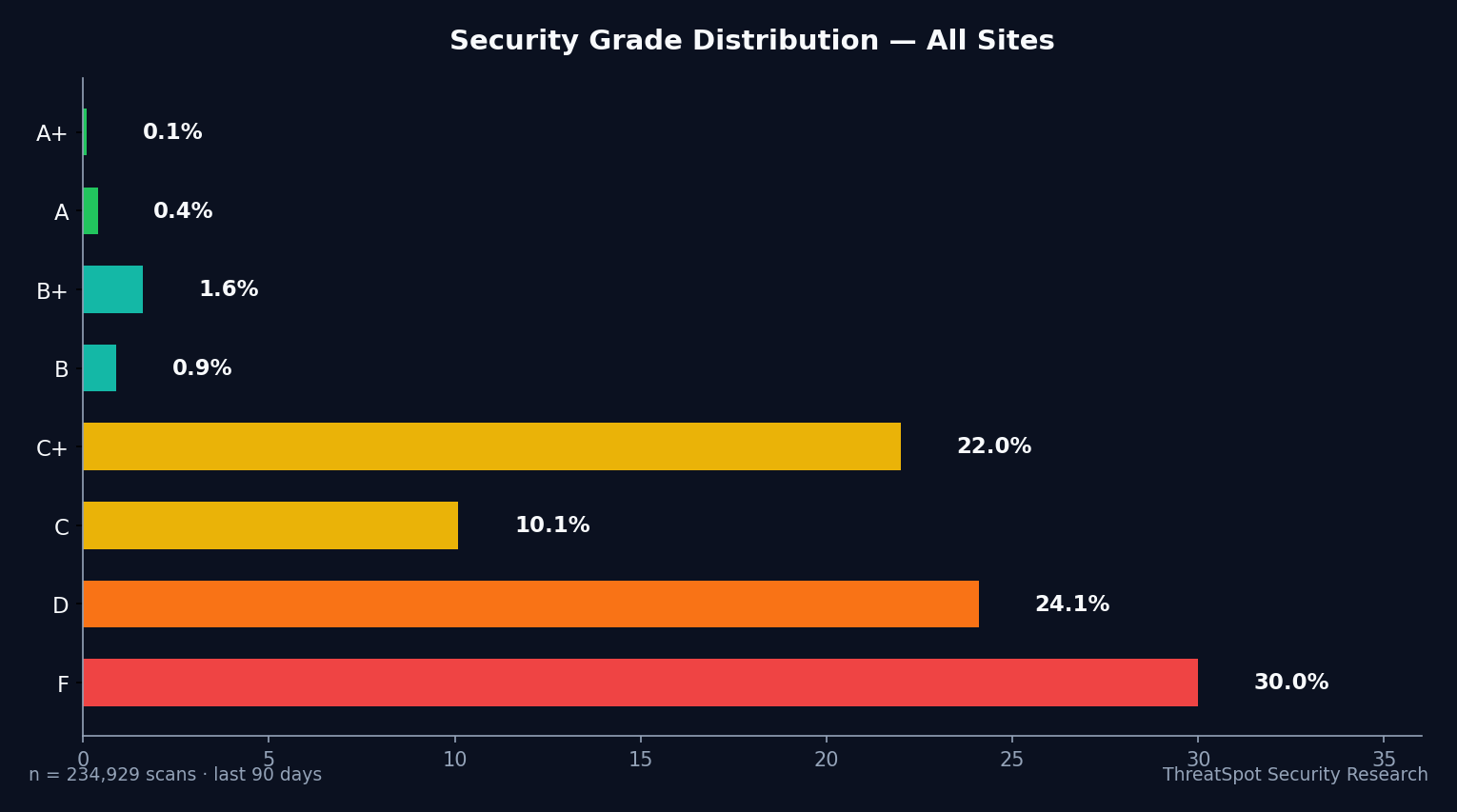
- 51.4% of WooCommerce scans scored D or F—SSL did not prevent major failures
- Only 10.4% had strong SSL/TLS configurations; padlock ≠ security
- 99.5% missed essential security headers, making checkout sessions attackable
- Without full-stack hardening, attackers bypass SSL to drain trust and revenue
The Real Issue Behind WooCommerce Security
SSL (Secure Sockets Layer) creates an encrypted tunnel between your shopper’s browser and your server. You get the little padlock icon—customers feel safe. But SSL doesn’t stop attackers from exploiting bad plugins, open admin panels, missing browser protections, or misconfigured cookies.
In 2026, with 163,874 tracked vulnerabilities and plugin attacks dominating WooCommerce breaches, SSL is just the bare minimum. Out of 29,659 WooCommerce scans across 21,888 unique stores, only 10.4% had strong SSL/TLS. Even more alarming: only 0.5% passed all essential security headers.
Trusting SSL alone leaves most stores wide open for checkout skimming, data leaks, and revenue loss. You need full-stack controls to actually stop attacks—not just encrypt traffic.
Reason 1: Weak SSL/TLS Configurations Fail More Than the Padlock Hides
What It Is
SSL certificates can be outdated, misconfigured, or use weak ciphers—opening encrypted connections to silent interception or downgrade attacks.
Why It Happens
- Many hosts offer free “basic” SSL, but don’t enforce strong protocols
- Site owners assume the green padlock means “secure”
- Neglect of regular SSL/TLS grade reviews
How It Shows Up in the Real World
On WooCommerce checkouts, attackers can exploit weak protocols to sniff login credentials at airports, hotels, or coffee shops. Merchants then face a storm of account takeovers and chargebacks, with $20K+ in monthly losses from fraud and reputation damage.
Why It Matters
SSL that scores poorly doesn’t stop interception or replay attacks. Out of 29,659 WooCommerce scans, 89.6% failed SSL/TLS configuration checks—a gaping hole that keeps customer card numbers, addresses, and passwords at risk on “encrypted” sites.
How to Reduce the Risk
- Test your real SSL/TLS grade with automated scanning
- Enforce TLS 1.2+ only; disable old protocols/ciphers
- Renew and review certificates before they expire
Related to OWASP A06 (Vulnerable and Outdated Components)
Reason 2: Missing Security Headers Leave Checkout Pages Attackable
What It Is
Security headers tell browsers how to protect shoppers from injection, hijacking, and clickjacking attacks—but only 0.5% of WooCommerce stores pass this check.
Why It Happens
- Hosts rarely set headers by default
- Plugin overload breaks or omits headers
- Owners don’t know browser-level controls exist
How It Shows Up in the Real World
A missing Content Security Policy allows hackers to inject fake credit card fields on your WooCommerce checkout. Hundreds of real customer logins skimmed before anyone notices. One campaign last year drained $65K from a single mid-sized store.
Why It Matters
Missing headers mean browsers won’t block malicious scripts or framing. On nearly every store scanned—99.5% failure—customers log in assuming safety while invisible threats harvest their data.
How to Reduce the Risk
- Set HTTP security headers: CSP, HSTS, X-Frame-Options
- Verify header presence after updates or new plugins
- Scan header health monthly
Related to OWASP A05 (Security Misconfiguration)
Reason 3: Cookie Security Is Strong—But Only for Logins, Not for Checkout Data
What It Is
Most WooCommerce sites—94.7%—set “secure” cookies for logins. But few secure their checkout and shopping cart cookies, opening session hijacks away from the login page.
Why It Happens
- Platform defaults protect only login cookies
- Shopping cart, checkout, and tracking cookies often overlooked
- Lack of insight into third-party plugin cookie settings
How It Shows Up in the Real World
During a viral sale, a store’s checkout cookie misconfiguration leaks shopping sessions. Attackers impersonate dozens of buyers, draining inventory—then resell goods on third-party sites. The business loses $30K in two weeks and faces negative reviews and chargebacks.
Why It Matters
Strong cookie security keeps logins safe, but missing controls on checkout and cart data allow session hijacks and fraudulent purchases—destroying trust and monthly revenue cycles.
How to Reduce the Risk
- Set “Secure”, “HttpOnly”, and “SameSite=Strict” on all user session cookies
- Check plugin cookies after every major update
- Use automated scans to flag cookie scope issues
Reason 4: Mixed Content Exposes Sensitive Data on “Secure” Pages
What It Is
“Mixed content” means secure pages (https://) load scripts or images over insecure (http://) links. 31.8% of WooCommerce stores fail this check.
Why It Happens
- Outdated themes and plugins still call HTTP assets
- Manual content migration misses hardcoded links
- Third-party widgets load insecurely
How It Shows Up in the Real World
A WooCommerce store’s checkout page loads an insecure product image from an old supplier. Attackers intercept the request, inject malware-laden banners, and steal credit card data. Cleanup costs the owner $10K plus a steep SEO penalty.
Why It Matters
Every insecure asset gives attackers a door—even on an HTTPS-encrypted site. 1 in 3 WooCommerce stores fail to lock down this simple risk, undermining even the best SSL.
How to Reduce the Risk
- Scan for insecure assets on all secure (HTTPS) pages
- Update all links, themes, and plugins to enforce HTTPS
- Block mixed content in your browser with a CSP policy
Related to OWASP A08 (Software and Data Integrity Failures)
Reason 5: Exposed Server Banners Broadcast Your Tech Stack to Attackers
What It Is
Server banners tell anyone online what software (and version) you run—2.1% of WooCommerce stores hide these details, meaning 97.9% leave them open.
Why It Happens
- Hosting defaults leak Apache/Nginx/WordPress versions
- Owners unaware banners reveal attack paths
- “Security through obscurity” ignored
How It Shows Up in the Real World
Attackers scrape stores for known version numbers, find a match, and run public exploits. One exploit for an old PHP version crashed hundreds of WooCommerce sites, causing $50K in downtime losses and two weeks’ worth of lost orders.
Why It Matters
Revealing your tech stack gives criminals a shortcut to known exploits. The 97.9% failure rate makes WooCommerce shops prime automated targets—SSL does nothing to hide what’s beneath the surface.
How to Reduce the Risk
- Hide or remove server/software version headers
- Update your stack and verify banner removal after every upgrade
- Schedule regular scans for open server banners
What You Can Do Right Now
- Run a full security scan (not just SSL) on your production site
- Enforce TLS 1.2+ with strong ciphers—no fallback to older protocols
- Deploy all recommended HTTP security headers, especially CSP and HSTS
- Lock down all session, cart, and authentication cookies (Secure, HttpOnly, SameSite=Strict)
- Check every checkout and login page for mixed content risks
- Remove server and software version banners from every layer (WordPress, web server, PHP)
- Update all plugins, themes, and WooCommerce components monthly
- Test regularly against WooCommerce hardening best practices
Upgrade from Single Checks to Continuous Protection
Manual SSL tests miss what automated security scanning reveals. Over 15,000 WooCommerce sites failed in real-world scans this year. Don’t assume—scan your site now and fix what SSL won’t cover.
Final Thoughts
51.4% of WooCommerce stores fail basic security, even with SSL. The green padlock is not a security strategy. Real protection means closing gaps in headers, cookies, content, and server info—the places attackers hit first. Run your site through a complete scan and see your grade before customers do.
Frequently Asked Questions
Q: Isn’t SSL enough for ecommerce security?
SSL only encrypts traffic in transit. It doesn’t block browser exploits, content injections, plugin attacks, or server leaks. Attackers bypass SSL in over 90% of WooCommerce breaches.
Q: How do missing security headers actually harm my WooCommerce store?
Missing headers mean browsers won’t block injected payment forms or malicious scripts. Attackers can hijack sessions, skim credit cards, and drain accounts—right through your checkout.
Q: If my login cookies are secure, what else do I need to watch?
Check every cookie set on your site—including cart, checkout, and tracking cookies. Attackers target weak or misconfigured cookies to hijack shopping sessions and steal customer data.
Q: What’s the risk of showing my server or software version?
If attackers know your exact software version, they use public exploits tailored for it. Server banners hand over your defense map before you’re even aware you’re a target.
Q: How often should I scan my WooCommerce store for vulnerabilities?
Scan after every major update or plugin change—at least monthly. Continuous monitoring closes critical risk windows between updates and stops new vulnerabilities before they impact shoppers.
Sources
OWASP Top 10 – Web Application Security Risks (2025) – Industry standard for web app vulnerabilities
Scott Helme Security Headers Survey (2025) – Global data on header adoption
Patchstack State of WordPress Security (2024) – Latest on vulnerable plugins and WP trends
Sucuri Website Threat Research Report (2024) – Infection rates and real-world attacks
Chrome HTTPS Transparency Report (2025) – Industry SSL/HTTPS statistics