Executive Snapshot: Technology WordPress Security Landscape
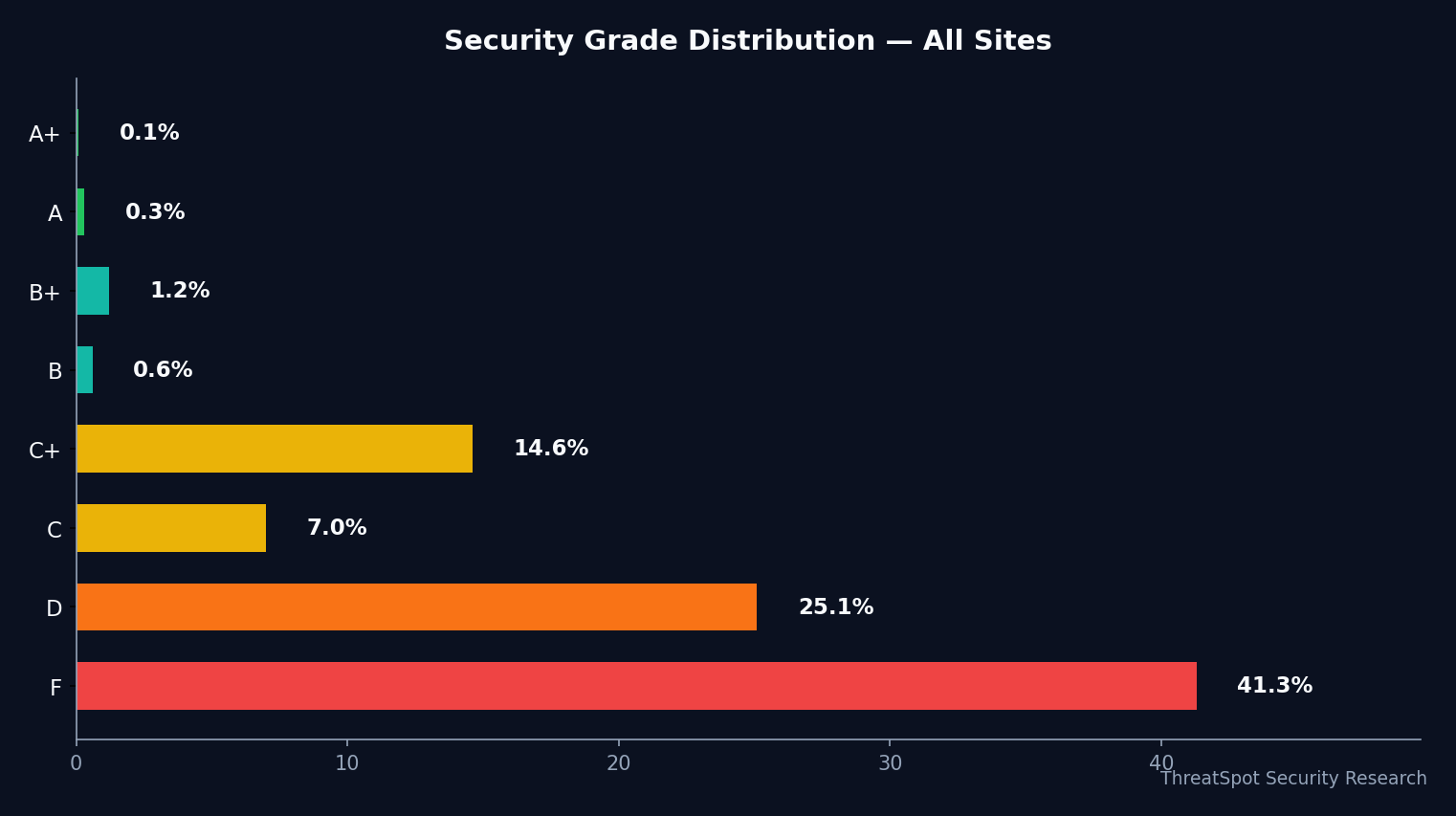
We conducted 6,773 security scans across 4,002 technology WordPress sites in the last 90 days. Only 3.3% of these scans earned an A or B security grade. The overwhelming majority—65.3%—scored a D or F.
This is not hypothetical risk. The scans measured real configuration details: SSL/TLS implementation, browser security headers, mixed content, and cookie security. Each check aligns with current security best practices and mapped industry benchmarks.
Technology firms hold themselves to high standards—yet in measured security posture, this segment scored an average of 41.3%. This puts Technology squarely in the middle of the industry ranking table, trailing far behind manufacturing (46.3%) and barely outperforming plumbing, media, and construction segments.
Why This Data Matters
A failing grade in this context means the site is missing one or more basic security protections. The absence of standard headers (like Content-Security-Policy or HSTS), weak SSL/TLS configurations, and clear version banners can all be exploited by automated attackers—or flagged by privacy-focused users and search engines.
The business consequences are tangible:
- Increased risk of automated attacks that exploit common gaps
- Higher likelihood of browser warnings for visitors (eroding trust)
- Potential impact on SEO rankings, especially with weak HTTPS and header signals
For technology companies and service providers, these flaws can be especially damaging. Sites that position themselves as experts or vendors in the tech space set expectations for security leadership. Falling short, even on basic controls, can raise questions about overall digital reliability.
Who Is Most at Risk
Small Technology Firms and Niche SaaS
The most severely affected are small and midsize technology businesses operating on WordPress without dedicated IT security resources. Our sample, drawn mostly from U.S., German, and U.K. tech sites, found that plugin mixes were generic (with contact forms and conditional fields common), but almost no sites showed evidence of proactive hardening or published security documentation.
Agencies and SaaS Businesses with Multiple Sites
Agencies and SaaS operators managing portfolios of client or product sites should pay close attention. 4,426 of the scans flagged D/F grades—meaning any inherited weak configurations could persist across dozens of digital properties.
Context: How Technology Ranks Across Industries
| Industry | Avg Security Score (%) | Failing Grades (D/F, %) |
|---|---|---|
| Retail | 44.1 | — (not supplied) |
| Technology | 41.3 | 65.3 |
| Nonprofit | 40.1 | — (not supplied) |
| Legal | 40.6 | — (not supplied) |
| Unreachable/Parked | 22.4 | — (not supplied) |
Technology’s average security score of 41.3% places it close to the median among 45 segments. Top performers outpace Technology by more than five points; the lowest performers trail far below, but most tech sites lag clear security leaders.
Security Control Breakdown: Key Findings
Our scans evaluated six key areas. Here’s how technology sites scored:
- Security Headers: Only 1.1% rated "Good"—the lowest compliance among all tests. This means over 98% are missing one or more standard browser-protection headers.
- SSL/TLS Configuration: 9.6% "Good". Despite widespread HTTPS adoption on the public web (~95%, [Chrome Transparency Report 2025]), robust encryption and modern protocol support lag significantly.
- Cookie Security: 87.3% "Good". Technology sites largely meet this requirement, indicating strong adoption of attributes like Secure and HttpOnly flags.
- Mixed Content: 72.4% "Good". Around a quarter of technology sites still risk partial content loading over HTTP, which weakens browser trust and security.
- Server Banner Exposure: Only 2.2% had this set correctly, leaving almost all sites with visible software version banners—a signal attackers use to match known exploits.
- Content-Security-Policy (CSP): 0.0% "Good". None of the scanned sites deployed a robust CSP, despite this being one of the most effective browser-driven mitigations against XSS and injection attacks.
When comparing against industry benchmarks, even the best-performing checks here fall short. For example, ~25% of all web sites surveyed by Scott Helme have HSTS; among our technology WordPress scans, nearly all are missing this and related headers.
Why These Gaps Are Dangerous
While today’s scan data did not attempt to validate exploitation, the configuration gaps we observed match common attack vectors. Exposed server banners, missing HSTS, and no CSP are exactly what automated scanners—and attackers—search for:
Real-world example: Automated attackers use version banners to discover known, exploitable vulnerabilities. For example, a disclosed WordPress version may be mapped to a public exploit (such as CVE-2021-29447), where version exposure and weak configuration allowed attackers to probe further and exploit remote file inclusion issues.
Sites missing effective headers may also be more easily tricked into executing malicious scripts in the browser or become a source of phishing and malvertising—placing both business and visitors at unnecessary risk.
Who Fails and Why
Our top failing checks—Security Headers (98.9% failed), SSL/TLS (90.4% failed), Server Banner (97.8% failed), and CSP (100% failed)—are all addressable by updating site configuration files, deploying well-established plugins, or adjusting server control panels. These are not issues requiring custom code or advanced engineering.
Misses in these categories are typically due to:
- Default WordPress or server configurations left unchanged after initial setup
- Lack of awareness of how headers and banners influence security (and, by extension, SEO and browser trust)
- Resource constraints—many technology site operators are solo founders or small teams
What You Can Do
You can address most of these issues with targeted fixes—no deep security expertise required.
Review Your HTTP Response Headers
- Use a scanner to check for missing Security Headers and visible Server Banners.
- Estimated time: 10 minutes
Update SSL/TLS Settings
- Confirm that your hosting provider enables modern TLS protocols (ideally TLS 1.2+), strong ciphers, and disables outdated cryptography.
- Estimated time: 20 minutes (hosting panel or support ticket)
Deploy Content-Security-Policy
- Add a basic CSP directive, starting with limiting script sources. Several WordPress plugins automate this.
- Estimated time: 30 minutes
Fix Mixed Content
- Run a crawler to identify insecure HTTP resources and update links or plugins to HTTPS.
- Estimated time: 15 minutes
Automated website security scanning tools can highlight gaps before they're exploited—and repeated scans validate progress as you remediate.
Final Thoughts
65.3% of technology WordPress sites received a D or F in our security scans. This signals a systemic gap between public expectations for "technology" leadership and the real state of web security among SMB tech operators.
These failing grades are not an indictment—they’re a prompt. Most issues flagged are addressable with moderate effort and do not require deep technical skills. Start with a targeted scan, prioritize header and SSL/TLS fixes, and revisit your configuration as part of your quarterly web operations.
For a practical assessment, run a security scan of your site. Knowing your grade lets you fix what matters—closing gaps attackers actively probe for while protecting your brand’s reputation and your customers’ trust.