The Four Metrics
| Metric | Value | Status |
|---|---|---|
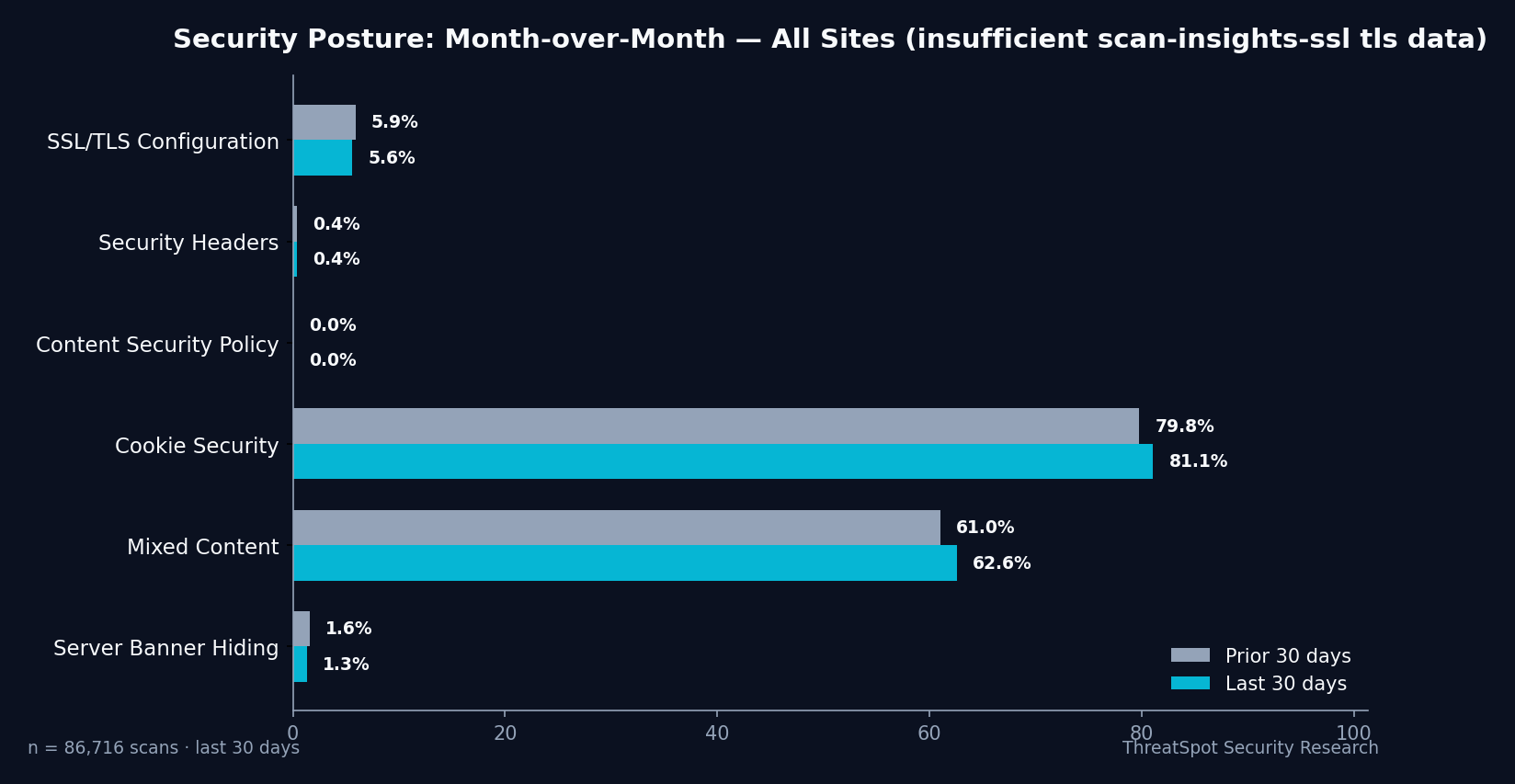
| SSL/TLS Configuration (Good) | 5.6% Good | 🔴 Critical |
| Security Headers (All Good) | 0.4% Good | 🔴 Critical |
| Cookie Security (Good) | 81.1% Good | 🟢 Pass |
Metric 1: Grade Distribution (A–F)
- Value: 30.7% F (failing), 24.9% D, 20.9% C+, 20.5% B or higher
- Status: 🔴 Critical
- What it means: Nearly one in three small-business WordPress sites received an “F” rating for overall SSL/TLS and related web security—based on 86,716 scans across 76,309 unique sites in the latest 30-day window.
- How to fix: Focus on upgrading baseline SSL/TLS, add missing security headers, and patch mixed content. A first review takes 1–2 hours for most sites.
| Grade | # Sites | % of Sites |
|---|---|---|
| A | 342 | 0.4% |
| B+ | 1,325 | 1.5% |
| B | 810 | 0.9% |
| C+ | 18,165 | 20.9% |
| C | 9,089 | 10.5% |
| D | 21,573 | 24.9% |
| F | 26,584 | 30.7% |
Metric 2: SSL/TLS Configuration (Good)
- Value: 5.6% rated Good
- Status: 🔴 Critical
- What it means: Only 5.6% of scanned sites met the “Good” standard: valid certificate, HSTS enabled, modern TLS (TLS 1.2+), and strong ciphers. Almost all sites (94.4%) had at least one gap, most often missing HSTS or allowing older protocols.
- How to fix: Deploy HSTS via your WordPress host or .htaccess, verify your certificate is current, and restrict to TLS 1.2 or above. A professional can complete most SSL/TLS hardening in under an hour.
Metric 3: Security Headers (All Required)
- Value: 0.4% rated Good
- Status: 🔴 Critical
- What it means: Only 0.4% of WordPress sites passed all four header checks (CSP, X-Frame-Options, X-Content-Type-Options, Referrer-Policy). Most sites do not have these set, which means browsers aren’t given rules to block basic attack tactics like clickjacking and MIME-sniffing.
- How to fix: Add these headers at the web server or with a recommended security plugin. Expect 15–45 minutes to implement for most admins.
Metric 4: Cookie Security (Good)
- Value: 81.1% rated Good
- Status: 🟢 Pass
- What it means: 81.1% of sites have proper Secure, SameSite, and HttpOnly flags set on cookies, reducing risk of session theft or cross-site request forgery. This is the area with the broadest adoption—high marks for basic site safety.
- How to fix: If flagged, update cookie attributes via your site’s configuration or ask your plugin vendors for compliance guidance. Fixes typically take less than 30 minutes.
What These Numbers Mean Together
SSL/TLS maturity is not just about whether your site loads over HTTPS—it’s about depth. The clear gap is that, while almost every site has an SSL certificate, only 5.6% have fully hardened SSL/TLS settings that meet today’s standards for WordPress SSL security.
Poor SSL/TLS configuration (missing HSTS, allowing outdated protocols, weak ciphers) registers as a root cause for low security scores. Security headers compound the risk when missing, as browsers lack key defenses against data leakage and content manipulation.
When both SSL/TLS and security headers are underconfigured, even properly secured cookies may not prevent exploit chains targeting unprotected traffic or outdated server banners. In this sample, 20.5% of sites still expose detailed server version info, presenting an unnecessary roadmap to attackers familiar with known WordPress and plugin vulnerabilities.
The data paints a consistent pattern: addressing SSL/TLS hardening and headers will drive the single biggest improvement in overall security grade.
Fix Path
To quickly improve your site’s SSL/TLS and web security maturity, focus on these steps, in this order:
- Check your SSL/TLS configuration: Ensure your certificate is valid, enable HSTS, and restrict to modern protocols (TLS 1.2+). Most hosts support these changes.
- Add essential security headers: At minimum, set Content Security Policy, X-Frame-Options, X-Content-Type-Options, and Referrer-Policy. Check if your server or security plugin can manage headers.
- Review mixed content warnings: Eliminate non-HTTPS links to avoid browser errors and degraded security status.
- Audit cookie attributes: Make sure cookies use Secure, SameSite, and HttpOnly flags (most WordPress setups already comply, but verify).
- Remove server version disclosure: Suppress server software version info in HTTP headers.
Final Thoughts
Most small-business WordPress sites successfully deploy SSL, but the data shows that true SSL/TLS maturity requires more than a padlock icon. In a sample of 20,425 recent scans, only 5.6% achieved comprehensive SSL/TLS hardening, and less than 1% satisfied all browser security header checks. These are fixable gaps—often within an hour—with direct impact on safety, customer trust, and compliance standing.
Proactively scan your site to measure exactly where your configuration stands and prioritize real-world fixes. Begin with a targeted website security scan to pinpoint actionable steps for your WordPress SSL security.
FAQ
What does “Good SSL/TLS configuration” actually mean?
A site earns this when it passes all checks: valid SSL certificate, HTTP Strict Transport Security (HSTS) active, modern TLS protocols in use (TLS 1.2 or above), and strong cipher suites only.
Is just having HTTPS enough for security?
No. HTTPS is the first step, but alone it does not activate protections like HSTS or block obsolete encryption.
Why do security headers matter for WordPress sites?
Headers like CSP and X-Frame-Options tell browsers how to handle your site’s content, blocking many types of common attacks without plugin bloat.
How fast can these issues be fixed?
SSL/TLS configuration, headers, and cookies can often be fixed in less than an hour per site with current hosting control panels or security plugins.
Does fixing these help with PCI, HIPAA, or GDPR compliance?
Stronger SSL/TLS and headers reduce risk and help meet security requirements for popular compliance frameworks. See how automated security scans help with compliance for more.
What this does not mean:
A failing grade does not confirm a recent or ongoing compromise. It’s a sign of missing defenses—most commonly HSTS, essential headers, or advanced SSL settings—that are widely recommended.
Sources:
Aggregate results from 86,716 scans across 76,309 unique small-business WordPress sites, data window: July 23 – August 22, 2026.
For safe, ethical, and non-intrusive scanning practices, see safe scanning policies.