Take this audit yearly—or after any major website change—and see exactly where you land on the WordPress security benchmark scale.
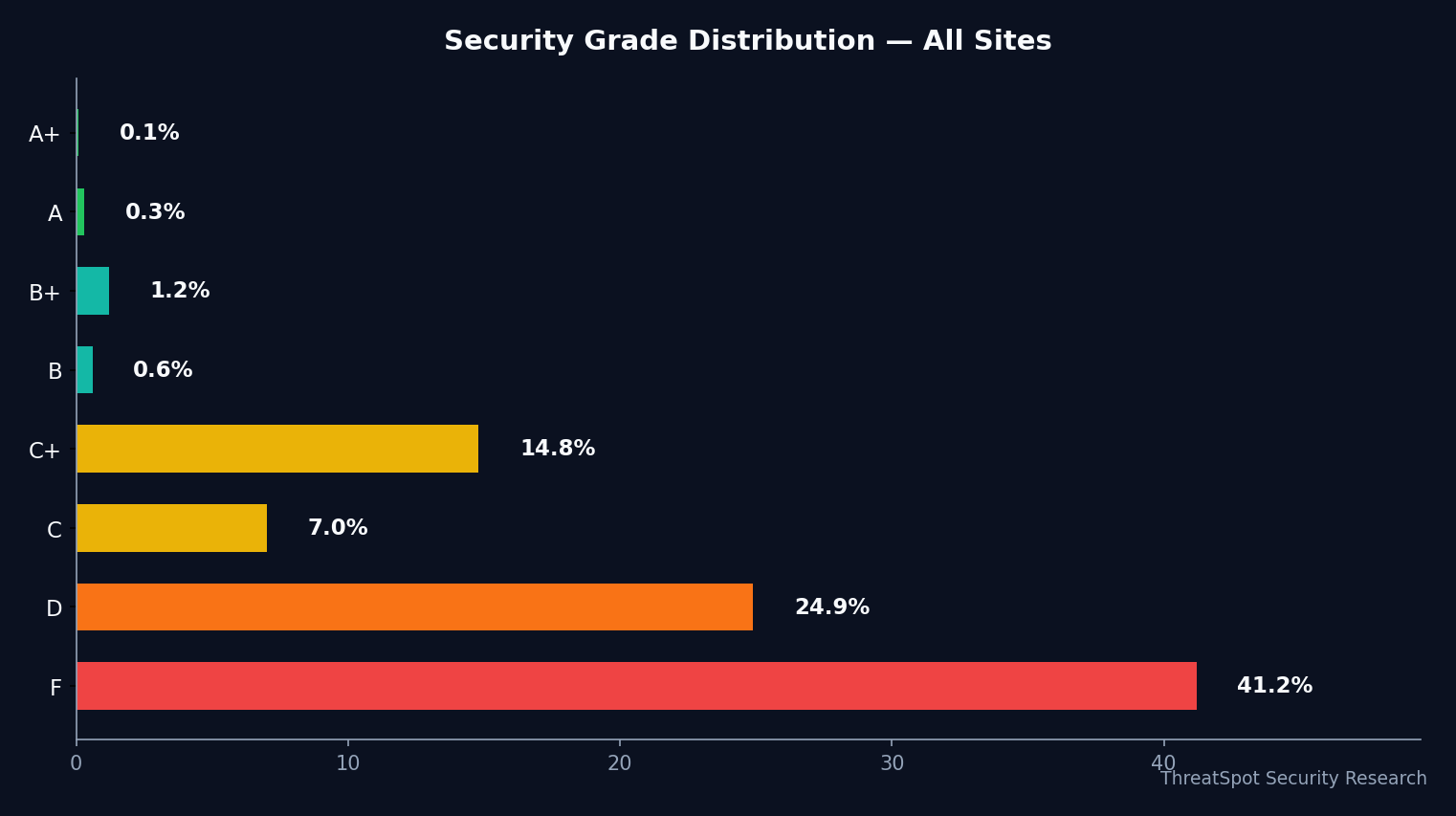
A typical result? The average security grade is only 39.6%. 41.2% of scans landed at F, often for missing security headers and weak SSL configuration. Here’s how you can quickly beat that curve.
Key Takeaways
- 41.2% of WordPress sites failed their security scan (Grade F)
- Fewer than 1 in 1000 sites have all recommended security headers
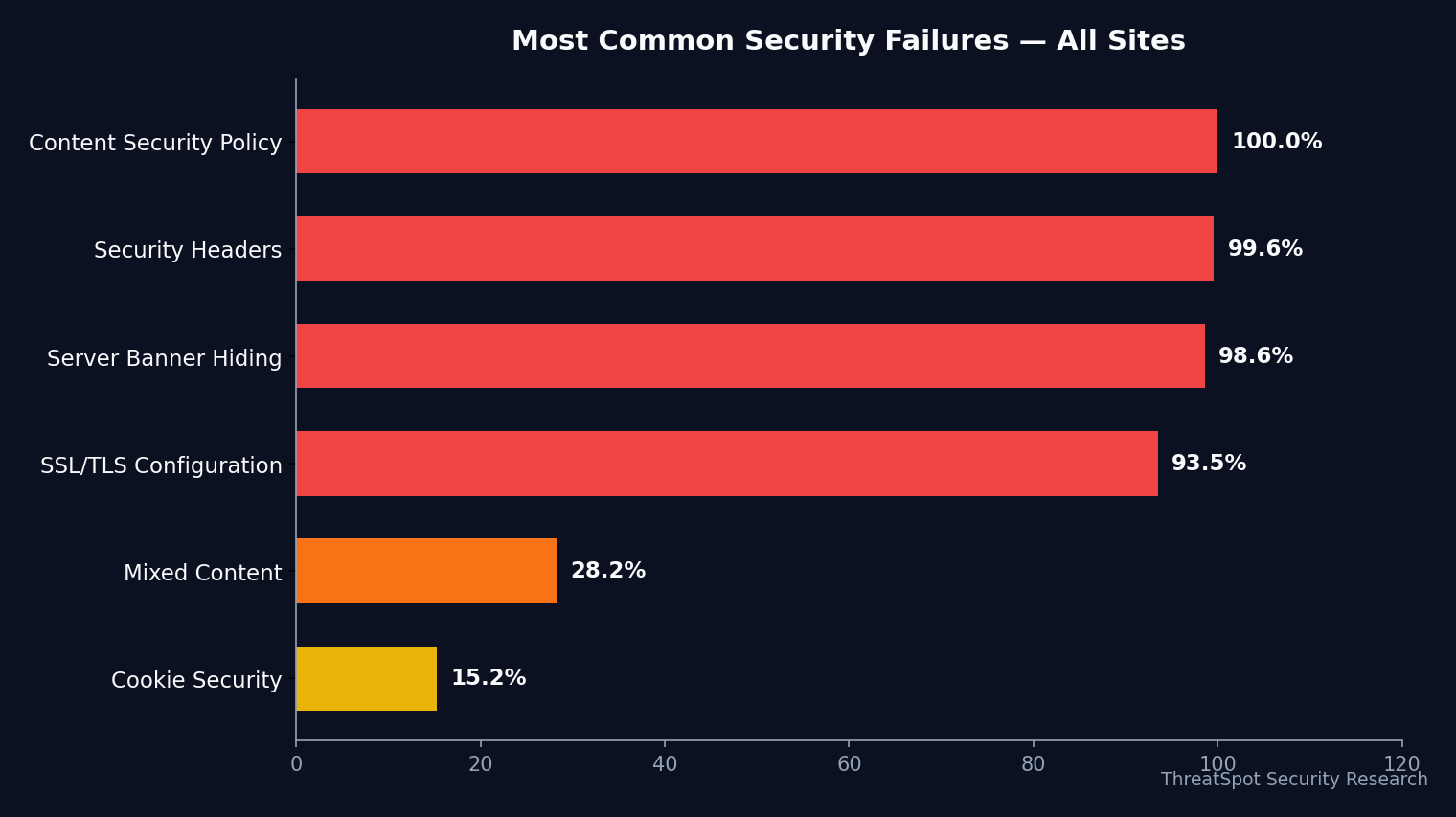
- Most sites have HTTPS, but only 6.5% fully harden SSL/TLS
- 21.1% leak server version info, increasing targeted vulnerability risk
The Complete 3-Minute WordPress Security Health Audit
Audit your site against the six most common failure points seen in 234,521 scans across 100,628 unique small-business WordPress sites.
Fast Audit Checklist Categories:
- SSL/TLS (HTTPS) Hardening
- Critical Security Headers
- Cookie & Mixed Content Hygiene
- Server Version Exposure
SSL/TLS (HTTPS) Hardening
1. Is Your SSL/TLS Configuration Fully Hardened?
Why it matters: Having HTTPS is no longer enough. “Good” SSL means a valid certificate plus HTTP Strict Transport Security (HSTS), a modern TLS protocol, and strong encryption ciphers.
How to check: Use an SSL checker tool or scan your site. Look for HSTS headers and TLS 1.2 or newer.
How to fix: Add HSTS via .htaccess or your control panel, remove old TLS versions, and prefer strong ciphers. Many hosts let you toggle these in dashboard settings. Expect 10 minutes if comfortable with your hosting panel.
Priority: Critical
2. Are All Required Security Headers Present?
Why it matters: Security headers like Content Security Policy (CSP) and X-Frame-Options block entire categories of browser-based attacks—especially on checkout or login pages. Only 0.4% of sites pass all these checks.
How to check: Run an online security header scan. You need at least: CSP, X-Frame-Options, X-Content-Type-Options, and Referrer-Policy.
How to fix: Most WordPress security plugins let you add or edit headers. Alternatively, adjust .htaccess directly (copy/paste from official header guidelines). Allow 10–15 minutes.
Priority: Critical
Cookie & Mixed Content Hygiene
3. Are All Session and Sensitive Cookies Secured?
Why it matters: Proper cookie flags—Secure, SameSite, HttpOnly—reduce session hijacking and cross-site attack risk. 84.8% of sites are “good” here, but missing even one can matter. How to check: Inspect cookies using Chrome DevTools (Application → Cookies). Check flags on any login/session cookies. How to fix: Update WordPress and plugins; recent versions set these flags securely. For custom cookies, set flags in the code. 5 minutes per custom location. Priority: High
4. Is All Page Content Loaded Over HTTPS (No Mixed Content)?
Why it matters: “Mixed content” (loading scripts or images over HTTP on HTTPS pages) can silently undo your HTTPS protection. How to check: Your browser shows a mixed content warning in the console. For a full audit, use an online mixed content scanner. How to fix: Update URLs in theme files, plugins, or database. Plugins like Better Search Replace help update legacy URLs sitewide. 10–20 minutes depending on content. Priority: High
Server Version Exposure
5. Are You Exposing Server or Application Versions?
Why it matters: 21.1% of WordPress sites leak server versions in headers or HTML. This allows automated tools to target sites with known vulnerabilities. For instance, CVE-2021-29447 demonstrated how attackers used public XML-RPC versioning to chain into further exploits.
How to check: Use browser DevTools (Network tab) or a passive scan to look for “Server:” or “X-Powered-By” headers, and check your HTML for generator/version tags.
How to fix: Remove or mask version output. Apply ServerSignature Off and update WordPress’s remove_action('wp_head', 'wp_generator') in your theme or via plugin. 5 minutes.
Priority: High
TLS Protocol Basics (Bonus)
6. Does Your Server Use a Modern TLS Protocol?
Why it matters: 95% of recent scans have modern, secure TLS versions—but if yours is still on TLS 1.0 or 1.1, you risk browser warnings and failed PCI scans. How to check: Use an SSL Labs test or your host’s control panel to view active protocols. How to fix: Instruct your host to disable old TLS protocols if you don’t see this option. Priority: Medium
Quick-Start Summary
| Priority | Action | Time | Impact |
|---|---|---|---|
| Critical | Harden SSL/TLS (HSTS, modern ciphers) | 10 min | Defeats SSL downgrade attacks |
| High | Remove server version leaks | 5 min | Lowers risk of automated targeting |
| High | Enforce cookie security flags | 5 min | Helps prevent session hijacking |
| High | Fix mixed content issues | 10–20 min | Ensures true HTTPS encryption |
Frequently Asked Questions
Q: What is a “WordPress security benchmark” and how is my grade calculated?
A: This benchmark grades your site’s security based on common checks across 234,521 scans, including SSL configuration, security headers, cookie security, and version leaks. Your “grade” reflects how many core best practices are present, not just whether you use HTTPS.
Q: My site has HTTPS. Why is my security grade still average or below?
A: “HTTPS present” is only one factor. Most sites get average or failing grades due to weak SSL configuration, missing security headers, or leaking server version info—even with HTTPS enabled.
Q: How often should I run a WordPress security health audit?
A: At minimum, run this 3-minute audit yearly and after every major plugin, theme, or WordPress core update. Automation helps catch new gaps faster—see our scanner tool for a quick scan.
Q: What do “security headers” actually do?
A: Security headers tell browsers to enforce safer behaviors, such as only loading scripts from trusted sources, blocking framing attempts, and hiding sensitive referrer info. Missing headers are a top cause of failing grades.
Final Thoughts
Completing this WordPress security health audit moves your site well above the average small business benchmark. Remember, over 41.2% of sites fail basic security checks—often from missing headers, incomplete SSL, or leaking version details.
It takes less than 3 minutes to spot and fix gaps that most attackers check first. Run a website security scan now to see your real-world security grade, measure your progress, and get detailed steps tailored to your setup.
Solid security isn’t just for enterprises—small changes can yield major protection, save you downtime, and safeguard customer trust.
Sources
OWASP Secure Headers Project – Authoritative breakdown of security header best practices
WordPress.org Hardening Guide – Official WordPress documentation on security
NIST Special Publication 800-52 – Modern SSL/TLS guidance
CISA Alerts & Bulletins – Ongoing vulnerability and hardening advisories
CVE-2021-29447 – Example of version disclosure contributing to exploitation chains