Key Takeaways
- 65.3% of WordPress sites scored D or F in recent security scans
- Only 1.3% achieved an A-grade security configuration
- 0.4% passed all required security header checks
- 21.3% exposed identifiable server version information
The Numbers
Over the last 90 days, 235,771 automated website security scans were run across 166,692 unique small-business WordPress sites. Focusing on the most recent 18,068 scans as a representative cross-section, we documented scores, pass rates, and common configuration gaps according to a standardized wordpress security benchmark.
Security grades are calculated based on a composite of SSL/TLS configuration, HTTP security headers, cookie hygiene, mixed content exposure, and server banner masking. Each category checks publicly visible site features—no internal access required.
Grade Distribution (Sample: 18,068 Recent Scans)
| Grade | Count | Percent |
|---|---|---|
| C+, C | 6,023 | 33.3% |
| D, F | 11,810 | 65.3% |
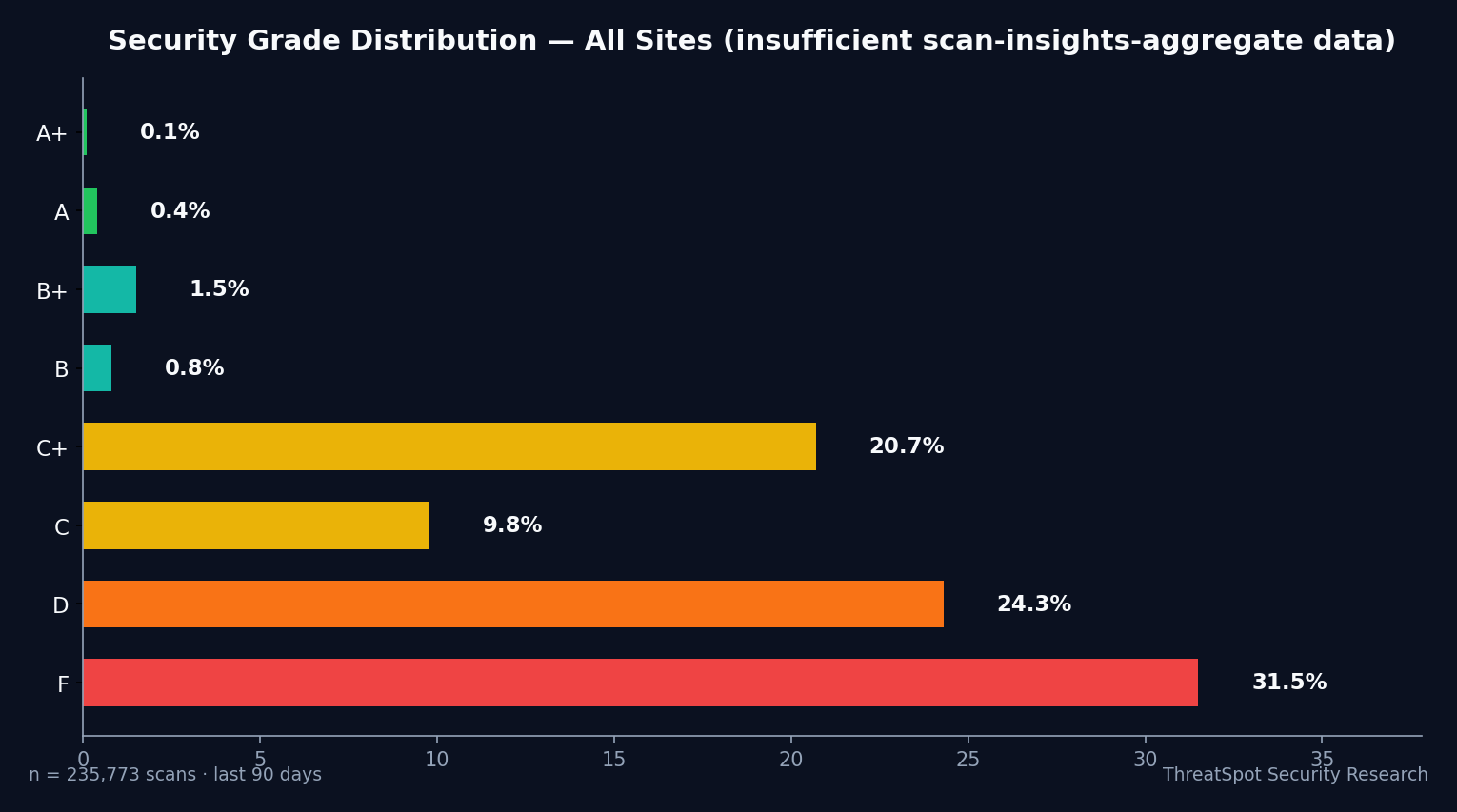
Most sites cluster in the lower-middle or failing tiers. An F grade typically reflects missing multiple best practices; a D indicates partial implementation but major omissions.
📊 Only 1.3% of recently scanned sites earned an A or above.
Configuration Check Pass Rates
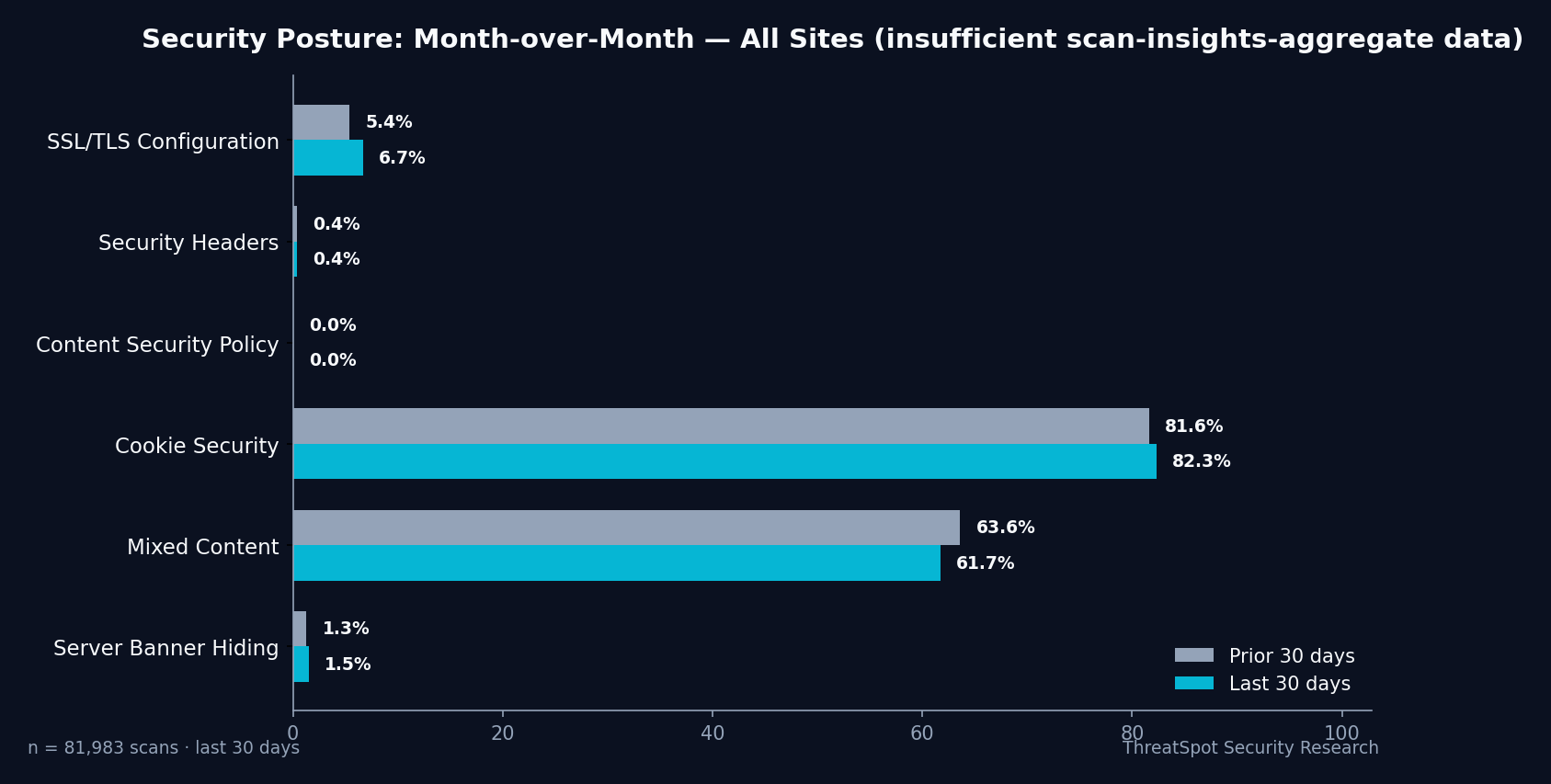
- Cookie Security: 81.3% rated Good (Secure, HttpOnly, SameSite flags)
- Mixed Content: 63.1% rated Good (no HTTP/HTTPS asset conflict)
- SSL/TLS Hardening: 6.2% rated Good (strict validation, HSTS, modern TLS, strong ciphers)
- All Security Headers: 0.4% rated Good (CSP, X-Frame-Options, X-Content-Type-Options, Referrer-Policy present and configured)
- Content Security Policy: 0.0% rated Good (almost always missing)
- Server Banner Masking: 1.5% rated Good (version numbers hidden)
- Version Disclosure: 21.3% expose identifiable server version info
How WordPress Sites Compare
WordPress powers over 40% of all websites, but its security grade distribution lags behind global site benchmarks observed in our total scan population of 235,771 sites.
| Metric | All Sites (90 Days) | WordPress (This Cohort) |
|---|---|---|
| A+ / A-Grade Share | 0.5% | 1.3% |
| D/F Share | 55.8% | 65.3% |
| All Headers Good | 0.4% | 0.4% |
| Cookie Security | 79.2% | 81.3% |
A marginally higher rate of A-grades among these WordPress sites likely reflects recent user education efforts. However, the high D/F rate—65.3%—shows slow adoption of critical hardening steps.
Security header implementation remains a standout gap: just 0.4% of sites passed all four critical header checks. These headers protect users from cross-site scripting, clickjacking, and data leakage in managed and unmanaged WordPress deployments alike.
What This Means for Your Business
Repeated scan failures in core categories—headers, SSL, and version disclosure—create avoidable exposure. This is not an academic exercise: each configuration gap can translate into measurable business risk.
SSL/TLS Weakness
Sites that pass only the basic "HTTPS" check but lack HSTS or modern ciphers are more vulnerable to traffic interception or downgrade attacks. Many SMBs have SSL certificates, but only 6.2% demonstrate full hardening—meaning most are missing protections required by modern compliance standards.Missing Security Headers
A consistent failure point (0.4% passing) is the lack of all required HTTP security headers. Without these, browsers cannot reliably block known web exploits or mitigate malicious behavior on front-end forms and payment flows. Payment and personal data are not automatically exposed—but adding headers is a meaningful risk reduction step.Version Disclosure
21.3% of WordPress sites expose their server version or CMS version banner. Attackers routinely use this information to target platforms with known, unpatched flaws. For example, in the CVE-2021-29447 vulnerability, version disclosure was exploited to identify and automate attacks against unpatched XML-RPC endpoints in select WordPress builds.Reputation and SEO Impact
Poorly configured SSL/TLS and missing browser protections may not only lead to browser warnings that scare off visitors but can also amplify SEO penalties and reduce user trust—directly affecting conversion rates and repeat business.
⚠️ Configuration gaps are rarely the result of a conscious decision—they’re almost always missed by default.
What You Can Do Right Now
Here are concrete, business-aligned steps to close the most common gaps identified in recent scans:
Run an External Security Scan
Review your own site using a website security scan focused on public configuration. This provides an evidence-based starting point.Harden SSL/TLS Configuration
Verify not just the presence of HTTPS, but also enforcement of HSTS headers, up-to-date TLS protocols (1.2+), and strong cipher suites.Add Required Security Headers
Deploy headers including Content Security Policy (CSP), X-Frame-Options, X-Content-Type-Options, and Referrer-Policy. Test them with each update.Mask Server and CMS Version Info
Remove or obfuscate public “Powered-By” and server version banners in HTTP responses. Hide WordPress version meta tags from page source.Fix Mixed Content
Ensure all site assets (scripts, images, CSS) and third-party resources load over HTTPS to avoid browser errors and asset blocking.Strengthen Cookie Security
Set Secure, HttpOnly, and SameSite attributes on all cookies, especially for login and admin sessions.Update and Test Regularly
Make configuration review a quarterly habit. Document any changes or plugin additions, and retest externally.Consult Reliable Sources
For deeper guidance or broader benchmarking, review our FAQ and compare against small business security tips.
Final Thoughts
The headline finding: 65.3% of scanned small-business WordPress sites scored a D or F in independently measured security tests, with only 1.3% achieving an A. The most common weaknesses—missing security headers, partial SSL/TLS hardening, and version disclosure—are widely fixable today.
Remediation doesn’t require deep technical knowledge or a full rebuild. Start with an external website security scan to see your own risk profile, then close the most impactful gaps from the outside in. Consistent, visible security wins build customer trust and help defend your business against avoidable incidents.
FAQ
Q: What is a “website security grade”?
A: Security grades reflect configuration compliance with current best practices, not whether a site is hacked or compromised. Grades are assigned based on SSL/TLS hardening, HTTP headers, cookie flags, and other publicly observable controls.
Q: Does HTTPS guarantee good SSL/TLS?
A: No—most sites use HTTPS, but only 6.2% meet “Good” standards for SSL/TLS configuration.
Q: Isn’t WordPress secure by default?
A: Core WordPress is actively patched, but typical installs need additional server and site-level configuration to close browser and protocol gaps.
Q: Why do I need security headers?
A: Required headers instruct browsers to block common web exploit patterns—without them, both user safety and SEO can suffer.
Q: Is running a security scan safe and legal?
A: Yes, provided you follow safe scanning principles and only test your own websites or those you’re authorized to assess.
Sources:
- 235,771 scan results across 166,692 unique WordPress sites, June 14 – September 12, 2026, anonymized and aggregated.
- OWASP Secure Headers Project
- WordPress Security Resources
For actionable guidance tailored to your site, consider running a website security scan today.