Protect your visitors from malicious scripts and reduce the risk of data theft. This checklist walks you through Content Security Policy (CSP) adoption—step by step—for non-technical owners and agencies.
A recent scan of 89,798 small-business WordPress sites found that zero had Content Security Policy fully configured. This recurring gap has concrete business implications: avoidable exposure to cross-site scripting (XSS) and supply-chain attacks, potential SEO penalties, and damaged customer trust.
Prevent browser-based attacks, increase privacy, and reinforce technical trust—all through a single browser setting. Completing this checklist typically takes 25–60 minutes for a standard WordPress site.
Key Takeaways
- 0% of WordPress sites passed the CSP check in 89,798 recent scans
- CSP blocks unauthorized scripts and reduces XSS risk
- Implementing CSP is a low-cost, high-impact website upgrade
- Most sites miss CSP due to lack of default support in WordPress and plugins
The Complete Content Security Policy Checklist for WordPress
CSP is a browser security header that limits which scripts and resources a browser can load. This prevents many classes of attacks—even if other controls fail.
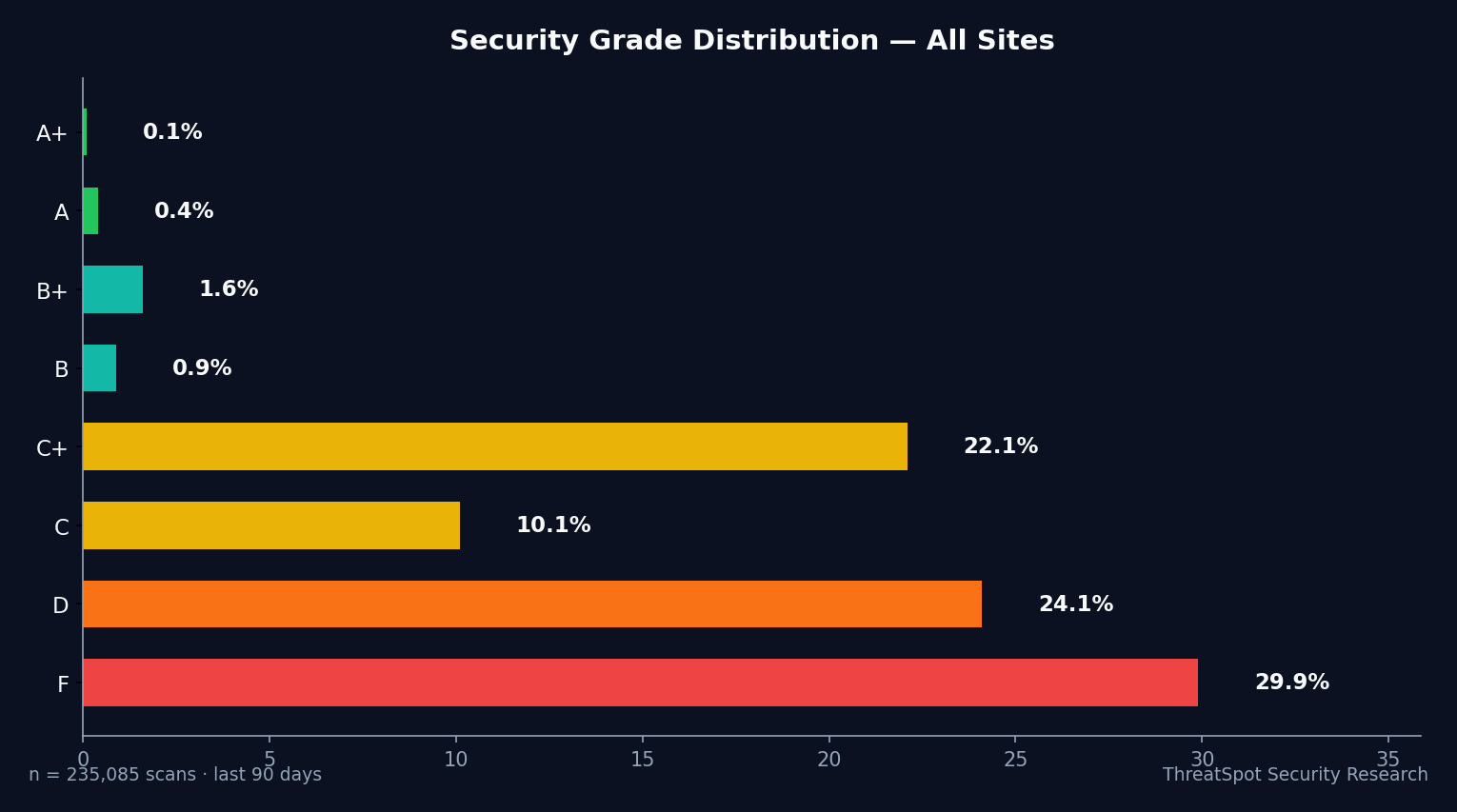
Here is the hard reality as measured:
| Grade | Sites |
|---|---|
| A | 189 |
| B+ | 979 |
| B | 593 |
| C+ | 10,362 |
| C | 5,822 |
| D | 24,371 |
| F | 40,079 |
Scan sample: 89,798 scans across 64,634 unique small-business WordPress sites, May–June 2026.
CSP, SSL, and Headers: Missing Building Blocks
Most security scans check for common browser-side controls:
- SSL/TLS hardening: 6.8% "Good" (requires HSTS, modern TLS, strong ciphers)
- Security headers (CSP, X-Frame-Options, X-Content-Type-Options, Referrer-Policy): 0.4% "Good"
- Content Security Policy (CSP) only: 0% "Good"
- Cookie Security: 88.1% "Good"
- Mixed Content blocking: 77.7% "Good"
The lowest rates by far: CSP and security headers.
HTTP Security Headers
1. Add a Content Security Policy (CSP) Header
Why it matters: CSP prevents browsers from loading scripts, styles, images, or frames from unauthorized domains. This blocks many XSS and supply-chain attacks—even when malicious plugins bypass other controls.
How to check: Use a security scan or browser developer tools to see if your site’s HTTP response includes the Content-Security-Policy header. Most WordPress installs lack this by default.
How to fix: Add a CSP header through your web server configuration, .htaccess, or a trusted WordPress security plugin with header support. Begin with a strict default-src and incrementally allow trusted sources.
Priority: Critical
2. Set X-Frame-Options Header
Why it matters: Stops your site from being embedded in iframes, which can prevent clickjacking attacks.
How to check: Scan your site headers or use browser inspection to check for X-Frame-Options.
How to fix: Configure your server or a WordPress plugin to add X-Frame-Options: SAMEORIGIN.
Priority: High
3. Configure X-Content-Type-Options
Why it matters: Forces browsers to respect the declared MIME type and prevents some types of drive-by download attacks.
How to check: Look for X-Content-Type-Options: nosniff in your HTTP headers.
How to fix: Most web hosts allow adding this via .htaccess or server controls.
Priority: High
4. Add a Referrer-Policy Header
Why it matters: Controls how much referrer information is shared with third parties, limiting privacy leaks.
How to check: Inspect HTTP headers for Referrer-Policy.
How to fix: Set Referrer-Policy: same-origin or strict-origin-when-cross-origin.
Priority: Medium
5. Ensure HTTP Strict Transport Security (HSTS) Is Enabled
Why it matters: Forces browsers to use HTTPS, reducing man-in-the-middle attack risk.
How to check: Look for Strict-Transport-Security in your site headers.
How to fix: Add this header via your server or host; ensure your SSL is fully configured first.
Priority: Critical
WordPress Core and Plugin Practices
6. Keep WordPress Core Updated
Why it matters: Unpatched WordPress sites are more vulnerable to known exploits attacking outdated code. How to check: Check the WordPress dashboard for core update notifications. How to fix: Update WordPress to the latest version. Schedule recurring checks. Priority: High
7. Audit and Update Plugins and Themes
Why it matters: A compromised plugin can bypass browser protections and inject malicious scripts. How to check: Review all installed plugins/themes; check for update notices. How to fix: Remove unused plugins. Keep the rest updated. Priority: High
8. Remove Outdated or Unknown Plugins
Why it matters: Unused or obsolete plugins often introduce vulnerabilities. How to check: List all plugins and themes—remove any with unclear origins. How to fix: Delete, not just deactivate, unnecessary extensions. Priority: Medium
SSL/TLS and Mixed Content
9. Validate SSL/TLS Configuration
Why it matters: Proper SSL enables secure transmission, but weak SSL can be bypassed. "Good" goes beyond HTTPS—it requires HSTS, modern protocols, and strong ciphers. How to check: Use a detailed website security scan, not just "green padlock" checks. How to fix: Upgrade your certificate, enable HSTS, ensure TLS 1.2+ is enforced. Priority: Critical
10. Eliminate Mixed Content (HTTP Resources on HTTPS Pages)
Why it matters: Mixed content degrades security by allowing insecure resources, which can weaken overall site security. How to check: Scan pages for externally loaded scripts, CSS, or images over HTTP. How to fix: Update URLs to HTTPS; use plugins to rewrite resource URLs. Priority: High
Cookie and Server Disclosure Security
11. Secure All Session Cookies
Why it matters: Cookies without Secure, HttpOnly, or SameSite flags are much easier to steal. How to check: Review cookies via browser dev tools for these flags. How to fix: Set Secure, HttpOnly, and SameSite attributes for all cookies via plugin or theme config. Priority: High
12. Remove Server Version Leaks
Why it matters: Leaked version banners help attackers target known vulnerabilities.
How to check: Analyze HTTP headers for lines like Server: Apache/2.4.20.
How to fix: Adjust the server configuration (e.g., Apache, Nginx) to suppress version info.
Priority: Medium
CSP Testing and Maintenance
13. Test Your CSP in Report-Only Mode Before Full Enforcement
Why it matters: Incorrectly implemented CSP can break site layout or functionality. How to check: Set CSP with "report-only" first, then monitor reports for blocked resources. How to fix: Use browser dev tools and online CSP evaluators. Only enforce CSP globally when confident. Priority: Critical
Quick-Start Summary
| Priority | Action | Time | Impact |
|---|---|---|---|
| Critical | Enforce HTTP Strict Transport (HSTS) | 10 min | Prevents SSL downgrade/man-in-the-middle |
| High | Set X-Frame-Options + X-Content-Type | 10 min | Stops clickjacking/MIME type risk |
| High | Secure Cookies | 10 min | Protects session theft |
| High | Remove mixed content | 10–20 min | Ensures all resources are loaded safely |
| Medium | Remove server version disclosure | 10 min | Reduces targeted attack surface |
Frequently Asked Questions
Q: What does Content Security Policy (CSP) do for WordPress sites?
CSP restricts what scripts, styles, images, and frames browsers will load from your site. This blocks most cross-site scripting (XSS) and many malicious third-party scripts—even when a plugin or upload is compromised.
Q: Is HTTPS enough to protect my site from browser-based attacks?
No. While HTTPS encrypts traffic, it does not block harmful scripts or prevent mixed content. Proper SSL/TLS configuration and browser-side protections (like CSP) are both required for comprehensive risk reduction.
Q: Why don’t most WordPress sites have CSP by default?
WordPress core and most themes/plugins do not include CSP or security headers by default. CSP setup requires server configuration or advanced plugin support, and site owners often avoid it out of concern for breaking legitimate functionality.
Q: Will adding CSP break plugins or page builder features?
It’s possible. That’s why testing with "report-only" mode and auditing blocked resources is recommended before enforcing a new policy. Carefully whitelist trusted domains to preserve needed functionality.
Q: How often should I check or update my CSP?
CSP should be reviewed whenever a new plugin, theme, or third-party integration is added. Automated website security scans help flag missing or misconfigured headers on an ongoing basis.
Final Thoughts
Across 89,798 recent scans of small-business WordPress sites, none achieved a "Good" Content Security Policy configuration. This is not a theoretical concern—lack of CSP remains common, avoidable exposure.
Improving browser-side protections is one of the fastest, lowest-effort, and most impactful steps a WordPress owner can take today. Run a website security scan to check your current CSP, header configuration, and SSL/TLS hardening in minutes. For actionable, quick wins, see 5 quick wins to improve your website security.
A modest investment in configuration today reduces XSS risk, enhances user trust, and builds a resilient security foundation for growing your WordPress business.
Sources
- OWASP: Content Security Policy Cheat Sheet – Authoritative guidance on CSP design and pitfalls.
- WordPress.org – Hardening WordPress – Official recommendations for securing WordPress installs.
- NIST SP 800-53 – Trusted federal standards for security controls, including browser-side protection.
- CISA – Defending Against JavaScript Attacks – Government-backed browser security checklist.
- Google: Web Fundamentals – Web Security – Developer-centric resources for modern web security practices.