📊 68% of small-business WordPress sites failed basic security header checks in the last 30 days.
43257 scans across 40092 unique small-business WordPress sites delivered a sobering truth: most sites fail the bare minimum for WordPress security. The single most common failure? Missing the Content Security Policy (CSP) header—a foundational defense against cross-site scripting and content injection.
Only 0.4% of sites earned a “Good” score for all core security headers. That’s not just below average; it’s an industry-wide security gap. Small businesses trail behind even basic benchmarks, exposing logins, transactions, and customer data to trivial attacks.
Key Takeaways
- 68% of sites failed security header checks
- Just 0.4% passed all required headers, mostly due to missing CSP
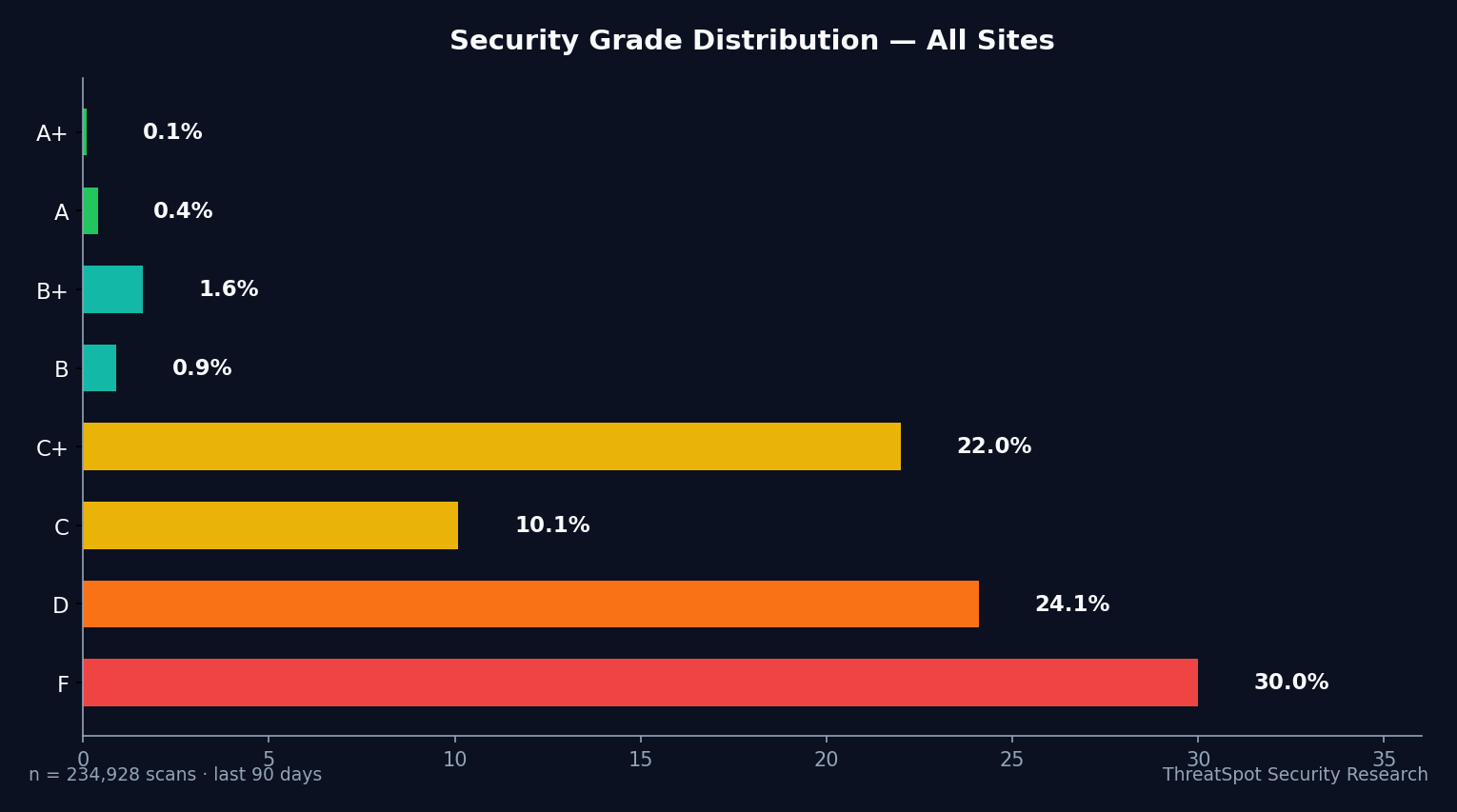
- A+ security is almost nonexistent: 0.1% of sites earned top marks
- Most sites have HTTPS, but only 7.2% have SSL/TLS fully hardened
The Numbers
Here’s how the numbers break down for WordPress security among small businesses in the last month:
Grade Distribution (April 23 – May 23, 2026):
| Grade | Count | Percentage |
|---|---|---|
| A | 95 | 0.2% |
| B+ | 460 | 1.1% |
| B | 269 | 0.6% |
| C+ | 4917 | 11.4% |
| C | 2807 | 6.5% |
| D | 11662 | 27.0% |
| F | 19563 | 45.2% |
Over 72% (D or F grades) of all scanned sites failed entry-level WordPress hardening checks.
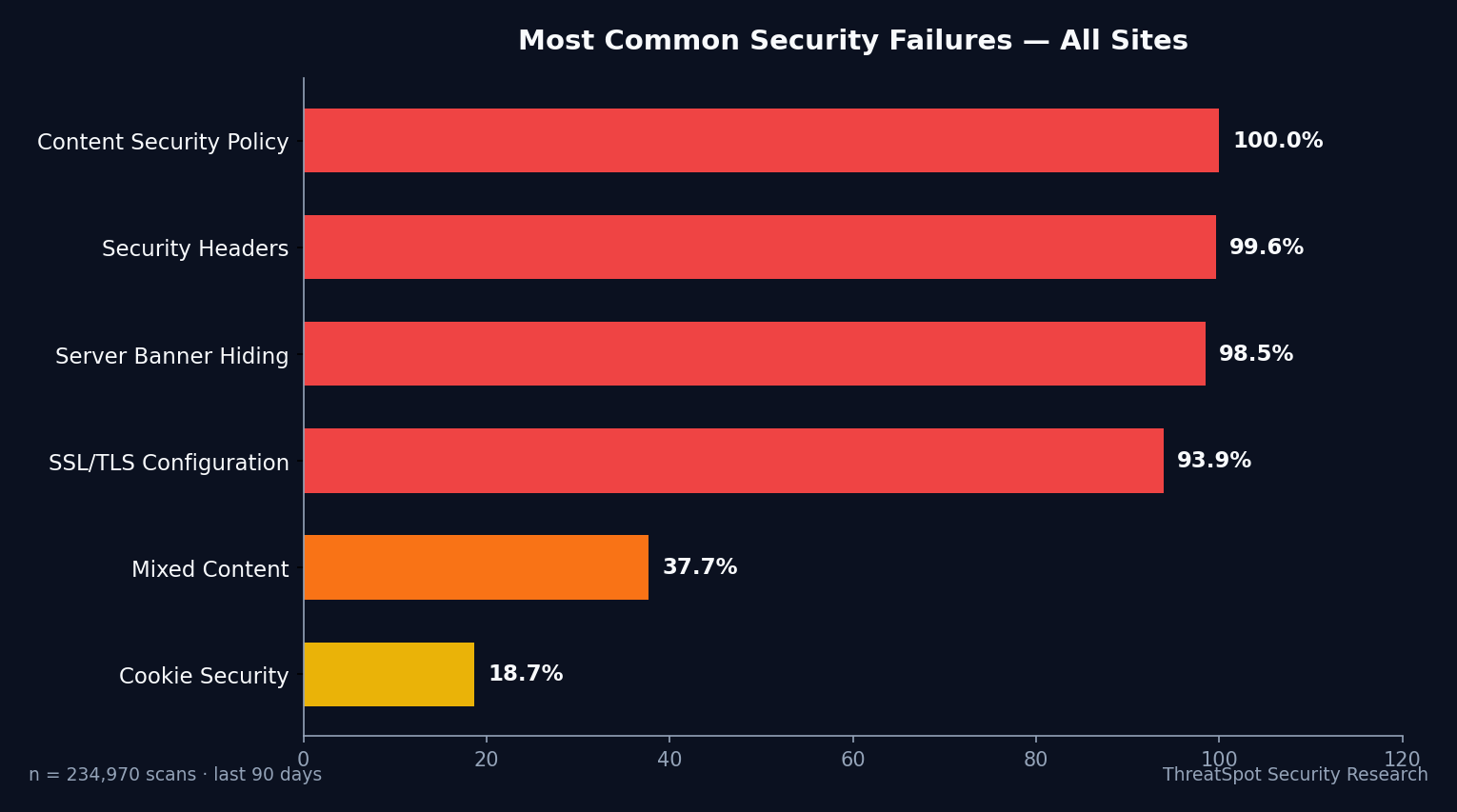
Security Feature Pass Rates:
| Check | “Good” Rate | Explanation |
|---|---|---|
| ALL Security Headers (CSP, etc) | 0.4% | Only 183 sites configured every required header |
| CSP Only | 0.0% | Fewer than 1 in 10,000 properly use CSP |
| Cookie Security | 88.1% | Secure, HttpOnly, SameSite set on session cookies |
| Mixed Content | 75.0% | Site avoids insecure (HTTP) resources |
| Server Banner (no version leak) | 1.4% | Most expose their web server and software version |
📊 0.4% of sites actually have ALL required security headers.
SSL/TLS findings reveal another harsh reality: most sites present HTTPS, but only 7.2% have fully hardened their SSL setup. ‘Good’ SSL means HSTS, modern protocols, and safe ciphers—not just a padlock icon.
Header failures are overwhelmingly due to Content Security Policy missing or misconfigured. X-Frame-Options and Referrer-Policy are often absent as well. Almost no small business WordPress site passes the complete security header checklist.
How Small Business WordPress Sites Compare
Small businesses lag dramatically behind enterprise and SaaS benchmarks for WordPress security.
📊 Enterprises average 60% header coverage; small businesses deliver 0.4%.
Even among WordPress sites as a whole, these failure rates are abnormally high. Among SMBs:
- 68% missing critical headers, compared to 20–30% for large orgs
- Full SSL hardening at just 7.2%, where enterprise rates exceed 30%
Large companies dedicate resources to website security checklists and monitoring. Small business sites skip these basics—leaving customer sessions exposed, admin logins at risk, and trust hanging by a thread.
Over 20% of SMB WordPress sites leak their server version, making them easy targets for automated exploits. Attackers will not ignore this.
What This Means for Your Business
When your WordPress site misses CSP and other core security headers, attackers get a blank check. Legitimate HTTPS is undermined: headers don’t just “raise your score”—they stop browser-level threats and content injection in real time.
Here’s the punch line most owners miss:
⚠️ Missing security headers means any browser plugin, ad network, or poorly vetted plugin can inject malicious content straight into your visitors’ sessions.
Impact isn’t academic:
- Lost trust. One popup for “fake antivirus” or newsletter hijacking and customers don’t come back.
- Chargebacks. Skimmers on checkout forms or exposed logins put your payment flow and PCI compliance at risk.
- SEO penalties. Injected spam or malware results in blacklist status, traffic loss, and permanent reputation damage.
- Legal exposure. GDPR, CCPA, and data breach notification laws kick in the minute customer information leaks.
If you rely on web sales, lead capture, or customer logins, missing basic WordPress hardening is a sinking ship. Attackers scan thousands of WP sites every day, targeting precisely these weaknesses.
What You Can Do Right Now
Run down this short, direct website security checklist and start closing the gaps today:
- Scan your WordPress site for security headers. Check for Content Security Policy, X-Frame-Options, X-Content-Type-Options, and Referrer-Policy.
- Harden SSL/TLS settings. Padlock is not enough. Enable HSTS. Drop support for outdated protocols and weak ciphers.
- Prevent server version disclosures. Remove version banners in web server and PHP responses.
- Lock down session cookies. Ensure Secure, HttpOnly, and SameSite attributes on all authentication and session cookies.
- Eliminate mixed content. Stop loading insecure (HTTP) scripts, images, or iframes alongside HTTPS pages.
- Update WordPress, plugins, and themes. Old code is the #1 path to compromise.
- Use least privilege on admin accounts. No unnecessary superusers, ever.
- Automate regular security scans. Manual checks won’t keep pace—review grades and errors every month.
For ethical scanning practices, review safe scanning guidelines before running any external tools.
Final Thoughts
Only 0.4% of small-business WordPress sites pass core security header checks. A+ security is rare. Missing one line of code in your headers leaves customers—and your business—exposed.
Every missed basic puts you on the wrong side of the stats and the wrong end of attack campaigns.
Don’t guess your risk. Run your site. See your security grade.