Secure checkout is non-negotiable. Failure means exposed customer data, revenue at risk, and a brand reputation that doesn't recover. This checklist cuts through technical jargon. You’ll finish it in under an hour. Every business-grade fix is mapped to real-world consequences—so you know exactly where you stand.
Key Takeaways
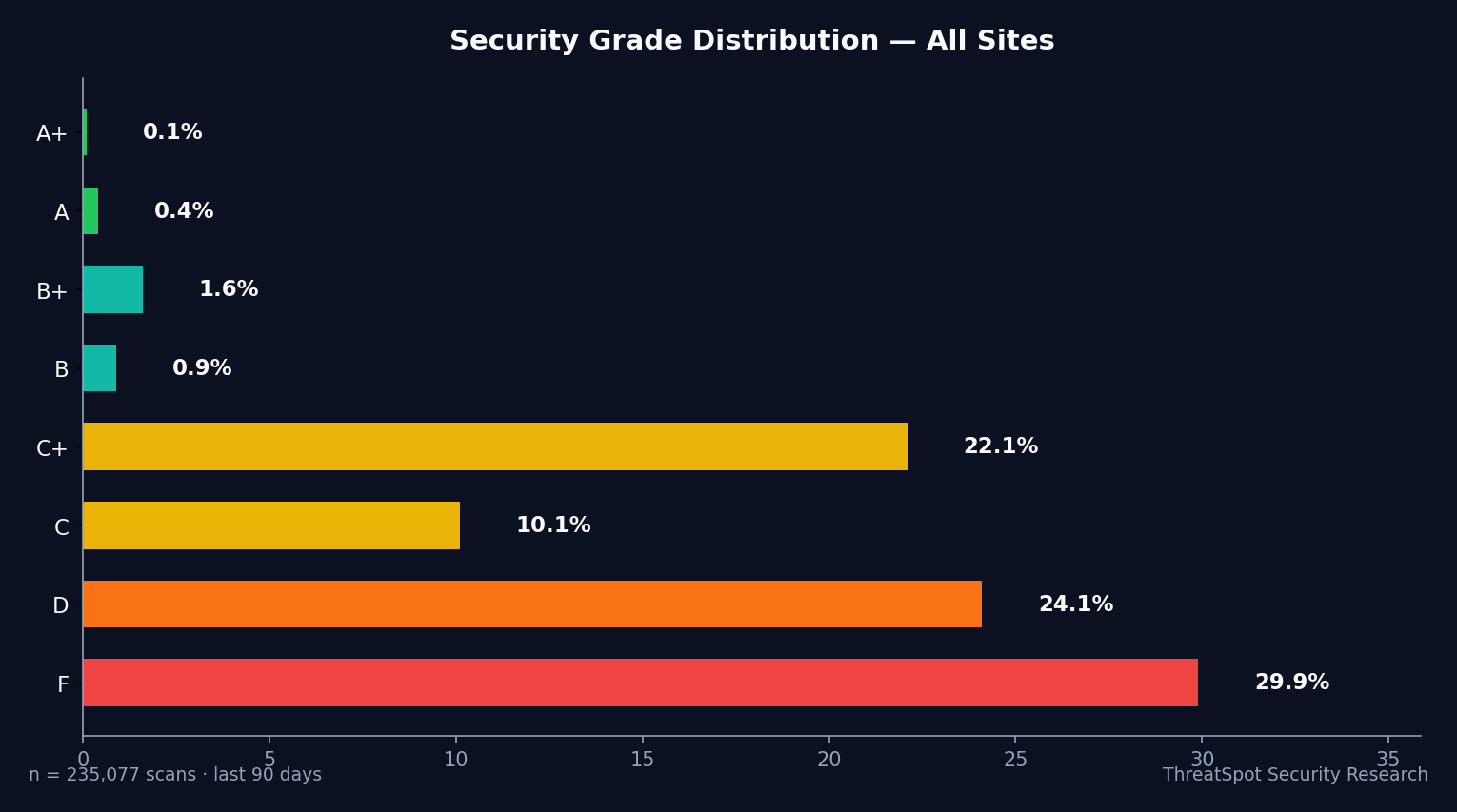
- 50.1% of WooCommerce sites failed D/F security grades
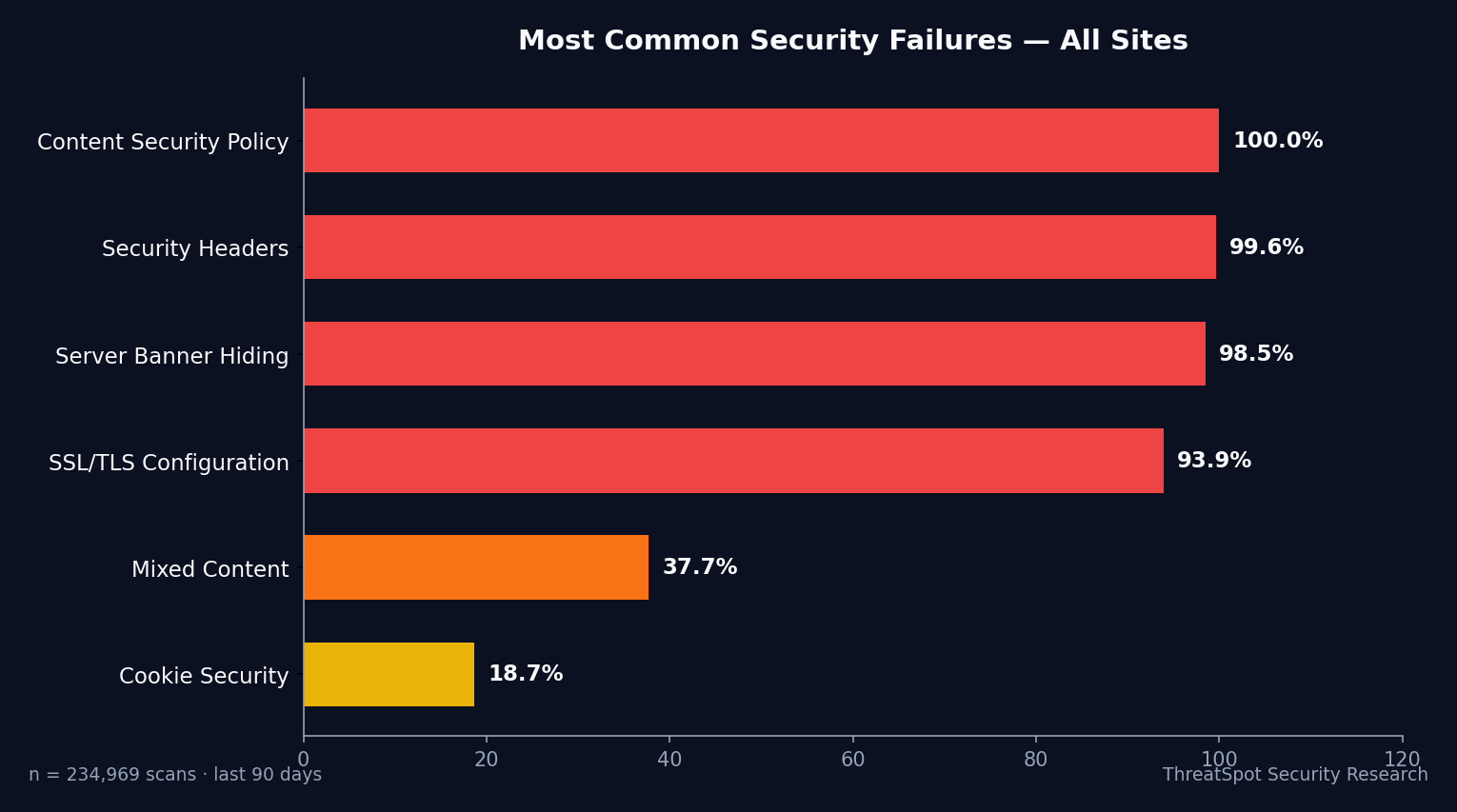
- 99.4% miss basic security headers on checkout
- Missing SSL isn’t rare—89.8% flunk strong encrypted transport
- One gap on checkout risks lost sales, SEO drops, and customer trust
The Complete WooCommerce Checkout Security Checklist
SSL/TLS: Encrypt Every Transaction
1. Enforce HTTPS Site-Wide
Why it matters: Unencrypted connections on checkout leak credit card data and personal info. Google downgrades non-HTTPS sites.
How to check: Visit your site—does every page load with https://? Is the padlock present, no red line?
How to fix: Install a valid SSL certificate, force HTTPS in your hosting settings. Most providers offer free options (10 min).
Priority: Critical
2. Disable Insecure HTTP Access
Why it matters: Attackers intercept traffic if HTTP remains open anywhere—redirects are easily bypassed.
How to check: Load your site over http://. If it works, you’re exposed.
How to fix: Configure a 301 redirect to HTTPS in .htaccess or through your control panel (10 min).
Priority: Critical
Security Headers: Your First Line Against Browser Attacks
3. Implement Strict-Transport-Security (HSTS)
Why it matters: 99.4% lack this header. Without it, browsers fall back to HTTP—exposing customers to hijacking.
How to check: Run a headers scan—look for Strict-Transport-Security in results.
How to fix: Add HSTS in your server config or WordPress security plugin (5 min).
Priority: Critical
4. Add Content-Security-Policy (CSP)
Why it matters: Only 0.2% pass this check. CSP blocks injected JavaScript from skimming card data at checkout. How to check: Scan your checkout page for a CSP header. If missing, your site is wide open to code injection. How to fix: Add CSP header with allowed sources tailored to your payment, images, and scripts (15 min). Priority: High
5. Set X-Content-Type-Options and X-Frame-Options
Why it matters: Missing headers enable clickjacking and drive-by malware. 99.4% fail at least one header.
How to check: Header scans should show both present and set to nosniff and DENY/SAMEORIGIN.
How to fix: Add both via your server or security plugin (10 min).
Priority: High
Cookies: End Weak Session Protection
6. Use Secure and HttpOnly Cookies
Why it matters: Weak cookies spill logins and orders to attackers. 6.2% of sites flunk this basic check.
How to check: Inspect cookies on checkout using Chrome DevTools—look for both Secure and HttpOnly flags.
How to fix: Force cookies to use these flags in wp-config.php or via plugin (10 min).
Priority: Critical
7. Isolate Session Cookies to HTTPS Only
Why it matters: Mixed cookies escalate to account hijacking—even with HTTPS enabled.
How to check: Cookies with Secure flag appear only in HTTPS, never HTTP.
How to fix: Ensure session cookies don't leak into HTTP traffic in plugin/host configs (10 min).
Priority: High
Mixed Content: Eliminate Weak Chain Links
8. Block All Mixed (HTTP) Content
Why it matters: 37.2% of WooCommerce scans show resources loading over HTTP—destroying SSL, leaking payment info and triggering browser warnings. How to check: Chrome DevTools > Console on checkout. Any ‘Mixed Content’ errors are fails. How to fix: Use a plugin like ‘Really Simple SSL’ or manual search/replace to enforce HTTPS (15 min). Priority: Critical
Server & Plugin Exposure: Stop Tech Leakage
9. Hide Your Server Banner
Why it matters: 98.4% leave server version details exposed. Attackers match exploits to these banners. How to check: Header scan—look for ‘Server’ string (e.g., Apache/2.4.29) in responses. How to fix: Mask or remove server banner via server config or host dashboard (10 min). Priority: High
10. Suppress WordPress Version in Page Source
Why it matters: Exposing your version number connects you with every known exploit in that range. How to check: View page source; search for ‘generator’ meta tag. How to fix: Use a security plugin or theme snippet to remove (5 min). Priority: High
WordPress Core: Patch Your DNA
11. Update WordPress Core
Why it matters: 49% of WordPress sites run outdated core—top CVE target for automated exploits. How to check: WP Dashboard > Updates; any updates listed is a fail. How to fix: Update core through the dashboard (10 min). Priority: Critical
12. Run Current PHP Version
Why it matters: Outdated PHP rots security from the inside. Hosts often skip updates by default. How to check: Tools > Site Health > Info > Server. How to fix: Request a PHP upgrade with your host (15 min). Priority: High
Plugins & Themes: Kill Your Attack Surface
13. Remove Unused Plugins and Themes
Why it matters: 97% of WP vulnerabilities are plugin-driven. Anything unused is a silent open door. How to check: Plugins > Installed Plugins; Themes > Appearance > Themes. How to fix: Delete, don’t just deactivate, all unused items (10 min). Priority: Critical
14. Patch All Active Plugins (Especially Checkout/Payment)
Why it matters: Checkout plugins and Elementor add-ons surfaced as common, high-risk targets. How to check: Dashboard > Plugins > Update Available. How to fix: Update immediately; set auto-updates for all payment-related plugins (10 min). Priority: Critical
Checkout Hygiene: Trust Signals That Prevent Abandonment
15. Use a Valid, Trusted SSL Certificate
Why it matters: SSL errors trigger browser ‘Not Secure’ messages—killing conversions on checkout. How to check: Test with SSL Labs. Any warning or red X is a fail. How to fix: Issue a new cert from a reputable CA (5 min if automated). Priority: Critical
16. Show Trusted Payment Badges
Why it matters: Missing or fake badges drive up cart abandonment and destroy trust. How to check: Review your checkout page—real badge, not a JPG from Google Images. How to fix: Use validated images from your payment provider only (5 min). Priority: Medium
17. Display Clear Privacy Policy and Terms on Checkout
Why it matters: GDPR and CCPA mandates aside, customers need visible assurance of their rights. How to check: Is there a visible link or inline mention during checkout? How to fix: Add both with explicit, plain-language links (10 min). Priority: Medium
Admin Controls: Lock Down Access
18. Use Strong, Unique Admin Passwords
Why it matters: Password reuse destroys SMBs. Credential stuffing works fastest against default admin logins. How to check: Test your password—8+ characters, symbols, no personal info; check for unique use. How to fix: Use password managers and random generators (5 min). Priority: High
19. Remove Unused Admin Accounts
Why it matters: Ghost admins lurk as attack vectors long after staff turnover. How to check: Users > All Users; remove all admins currently not in use. How to fix: Delete or downgrade extra admin accounts (5 min). Priority: High
Backups & Monitoring: Your Recovery Plan
20. Set Up Automated Daily Backups
Why it matters: Breach or failure without backup equals permanent data loss and catastrophic downtime. How to check: Does your site auto-backup at least daily? How to fix: Configure backups via host or plugin (10 min). Priority: High
21. Enable Automatic Security Monitoring
Why it matters: One new critical CVE can surface without warning. Continuous scans catch them before an attacker does. How to check: Confirm your monitoring tool scans at least weekly for vulnerabilities and configuration issues. How to fix: Activate monitoring with alerting (10 min). Priority: High
Compliance: Prevent Fines Before They Happen
22. PCI DSS: Isolate and Encrypt Payment Data
Why it matters: Processing payments on checkout makes you legally liable for cardholder data leaks. How to check: Audit: Are you storing any credit card info? Are payment forms handled by Stripe/PayPal offsite? How to fix: Never store card data directly. Use hosted forms or payment plugins that never pass raw card info through your server (10 min). Priority: Critical
23. Document Your Security Policies
Why it matters: Courts and processors ask to see evidence. Lack of basic policy = default judgement. How to check: Do you have written security and privacy policies, even if basic? How to fix: Draft brief internal docs outlining update/backup responsibility (15 min). Priority: Medium
Quick-Start Summary
| Priority | Action | Time | Impact |
|---|---|---|---|
| Critical | Add missing security headers | 5 min | Stops browser attacks, boosts trust signals |
| Critical | Patch WordPress core/plugins | 10 min | Closes known exploits, meets compliance |
| Critical | Block all mixed content errors | 15 min | Stops SSL breaking, preserves transactions |
| Critical | Remove unused plugins/themes | 10 min | Shrinks attack surface, slashes breach risk |
| High | Hide server and WP version info | 10 min | Stalls automated attacks |
| High | Set secure, HttpOnly cookies | 10 min | Prevents session hijacking |
| High | Enable daily backups + monitoring | 10 min | Ensures real recovery, alerts to new risks |
Frequently Asked Questions
Q: Why do so many WooCommerce sites miss security headers?
Only 0.6% pass all basic headers on checkout pages. Many themes or hosts skip these by default, even though browsers expect them. This oversight leaves stores open to data theft and customer distrust with every transaction.
Q: My checkout uses HTTPS—does that mean I’m secure?
HTTPS alone doesn't cover gaps. 89.8% fail strict SSL/TLS enforcement. Without security headers and fully patched core/plugins, browser bugs and exposed server info leave data up for grabs—even with the padlock displayed.
Q: Are plugins the main source of WooCommerce site infections?
Yes. 97% of all WordPress vulnerabilities tie directly to plugins. Every unused, unpatched, or obscure plugin magnifies breach risk. The easiest win: delete what you don’t use, update the rest immediately.
Q: Can missing SSL or headers affect my Google rankings?
Absolutely. Google lowers the search position of non-HTTPS or visibly compromised sites. Checkout errors or browser ‘Not Secure’ tags torpedo conversion rates and long-term trust, putting customers—and revenue—at permanent risk.
Final Thoughts
50.1% of WooCommerce sites failed this security grade. Your checkout page is either a trust builder or a breach waiting to happen. Every missed header, SSL gap, or lingering admin account hands attackers another opportunity—and sends customers straight to the competition.
Run through this checklist now. Don’t let your livelihood ride on luck. Scan your site. See your grade. Every step you complete shrinks attack risk, future-proofs your business, and turns checkout into your strongest sales asset.
Sources
- OWASP Secure Headers Project (https://owasp.org/www-project-secure-headers/) – Authoritative guidance on web security headers
- WordPress.org Security Team (https://wordpress.org/about/security/) – Official security best practices
- Patchstack State of WordPress Security 2024 (https://patchstack.com/reports/state-of-wordpress-security-2024/) – Plugin vulnerability landscape
- Sucuri Website Threat Research Report 2024 (https://blog.sucuri.net/website-threat-research-report-2024/) – Infection and vulnerability trends
- Scott Helme Security Headers Survey 2025 (https://securityheaders.com/) – Industry-wide header adoption stats
Regular security scans help expose risks before they cost you business. Visit our features page for a deep dive into how automated scans catch what most owners miss. For more essential fixes, check the 5 quick wins for website security.