Over the past 90 days, 240,415 scans across 100,605 unique small-business WordPress sites revealed most sites rely on basic HTTPS for the appearance of security—but proper SSL/TLS hardening is rare. Just 6.5% of sites achieved a “Good” SSL/TLS configuration, while common gaps like missing HTTP security headers and exposed server versions remain unsolved. These failures cluster around three checks: strong SSL/TLS posture, security headers, and server version disclosure. This is the line between baseline and genuine website security.
The Four Metrics
| Metric | Value | Status |
|---|---|---|
| SSL/TLS Configuration | 6.5% Good | 🔴 Critical |
| Security Headers | 0.4% Good | 🔴 Critical |
| TLS Protocol Security | 95.0% Good | 🟢 Pass |
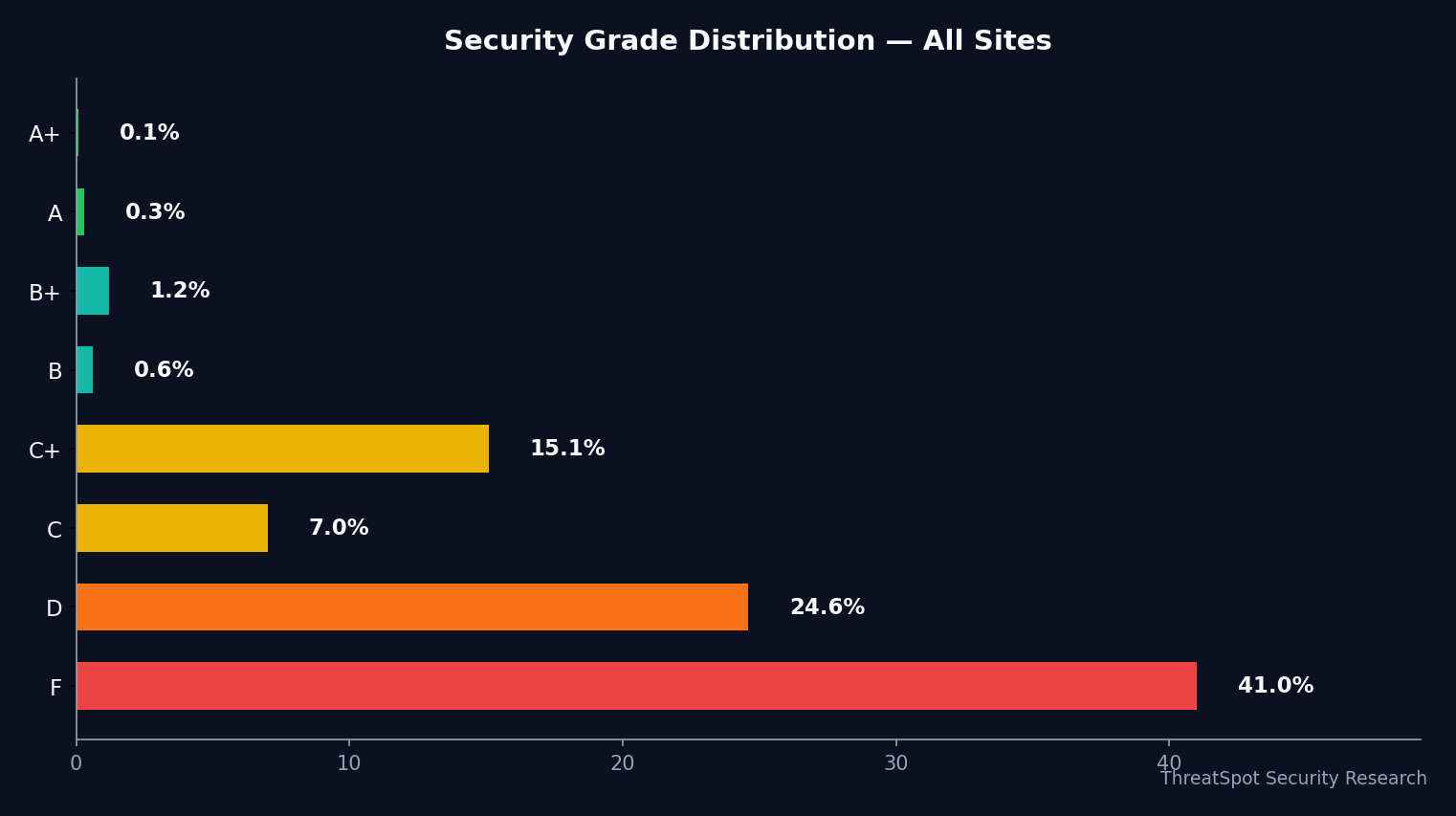
Metric 1: Security Grade (D-F, 65.6%)
- Value: D or F for 65.6% of sites
- Status: 🔴 Critical
- What it means: This is a combined score from automated scans. Most sites fall short, mainly due to weak SSL/TLS, missing security headers, or both.
- How to fix: Start with proper SSL/TLS hardening and address HTTP header gaps (2-4 hours with guidance).
Metric 2: SSL/TLS Configuration (6.5% Good)
- Value: 6.5% rated Good
- Status: 🔴 Critical
- What it means: "Good" requires a valid certificate, HSTS, only modern TLS versions, and strong cipher suites. Most sites have HTTPS enabled but lack these upgrades.
- How to fix: Review hosting panel or CDN for SSL settings. Enable HSTS and disable outdated SSL/TLS versions (1-2 hours, hosting support may help).
Metric 3: Security Headers (0.4% Good)
- Value: 0.4% rated Good
- Status: 🔴 Critical
- What it means: Very few sites include all of: Content Security Policy (CSP), X-Frame-Options, X-Content-Type-Options, and Referrer-Policy. These protect users from common attacks.
- How to fix: Add recommended headers in your .htaccess or via a trusted security plugin (1 hour; test changes before going live).
Metric 4: TLS Protocol Security (95.0% Good)
- Value: 95.0% rated Good
- Status: 🟢 Pass
- What it means: Most sites already block known-vulnerable TLS protocols (e.g., TLS 1.0/1.1). A win for nondisruptive security—but it does not address broader SSL/TLS hardening.
- How to fix: Check and restrict allowed TLS versions if your host allows; confirm TLS 1.2+ only (30 minutes; some hosts enforce this by default).
What These Numbers Mean Together
These four checks define a site’s browser-facing security posture. Grade D or F is rarely the result of a single miss—rather, it reflects a layered problem: basic HTTPS without hardened SSL/TLS, missing or partial HTTP headers, and sometimes exposed server meta-data.
The biggest cascade starts with incomplete SSL/TLS:
- SSL/TLS Configuration: Failing here means not just the potential for browser trust warnings, but also missed protections like HSTS—which tells browsers to never downgrade to HTTP, blocking some phishing and downgrade attacks.
- Security Headers: These block clickjacking, content type mixups, and unintended data leaks. Almost all failures are due to missing two or more headers.
- TLS Protocol Security: The good news is this check is mostly passed; only a small minority still allow vulnerable legacy connections.
- Server Version Disclosure: With 21.1% of sites leaking detailed server version info, attackers can target known CVEs specific to those environments.
No single fix solves all four, but SSL/TLS configuration and headers work together to reduce risk across data in transit, browser trust, and attack surface.
Grade Distribution Table (Apr 30 - Jul 29, 2026)
| Grade | Site Count | Percent (%) |
|---|---|---|
| A | 694 | 0.3 |
| B+ | 2984 | 1.2 |
| B | 1556 | 0.6 |
| C+ | 36417 | 15.1 |
| C | 16946 | 7.0 |
| D | 59083 | 24.6 |
| F | 98563 | 41.0 |
Takeaway: Only 2.2% of sites scored B or above. More than 65% landed in D-F territory, driven by SSL/TLS and header misconfigurations.
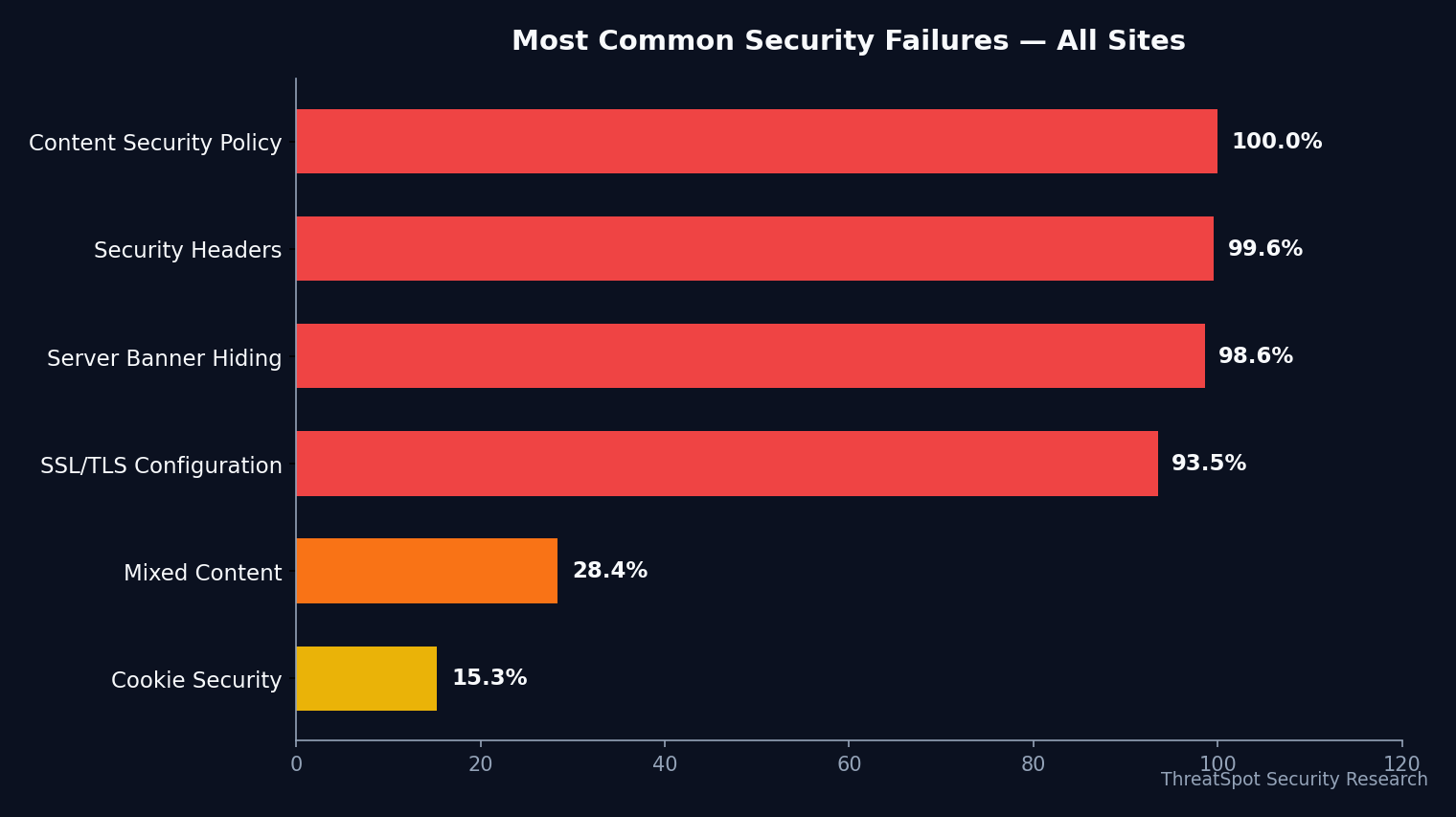
Core Security Check Rates (Last 90 Days)
| Check | Percent with "Good" |
|---|---|
| Security Headers (all) | 0.4% |
| Cookie Security | 84.7% |
| Mixed Content | 71.6% |
| Server Banner (no version) | 1.4% |
Context: “Good” SSL/TLS requires more than basic HTTPS. Almost all sites miss HSTS or allow weak TLS versions/ciphers. For headers, full compliance is especially rare.
Why SSL/TLS Hardening Matters for WordPress
Definition:
TLS protocols govern how encrypted connections negotiate which versions and methods are allowed between browsers and servers.
SSL/TLS configuration means setting not just a valid certificate, but also enabling “strict transport” (HSTS), supporting only modern TLS versions (usually 1.2 or 1.3), and using strong cipher suites.
Risks:
- Outdated TLS versions (1.0/1.1) are vulnerable to attacks like POODLE and BEAST because they allow weak encryption.
- Without HSTS, browsers may accidentally connect over plain HTTP—making downgrade and interception possible.
- Weak cipher suites can allow attackers to decrypt or manipulate encrypted traffic.
- Exposed server versions make it easier for attackers to match your environment to known exploits. For example, in the well-documented CVE-2019-11043, NGINX and PHP version exposure enabled attackers to identify targets for remote code execution.
SSL/TLS hardening closes off these “known” avenues, even if an attacker is scanning thousands of targets at once.
FAQ
Is having HTTPS enough?
No. Automated scans show most sites pass basic HTTPS, but only 6.5% have modern TLS, HSTS, and strong ciphers. Many "HTTPS" sites can still be downgraded or negotiated to weak encryption.
What’s the difference between SSL/TLS Configuration and TLS Protocols?
SSL/TLS configuration is a broad look: certificate validity, protocol versions, ciphers, and HSTS. TLS protocol check is narrower: does the server allow insecure TLS? Passing the protocol check does not mean the SSL/TLS posture is fully hardened.
Does WordPress itself handle SSL/TLS?
No. SSL/TLS is handled by your server or CDN, not WordPress directly—but WordPress plugins or .htaccess can set HSTS and HTTP headers.
How does this affect SEO and user trust?
Browsers warn visitors when certificates are expired or encryption is weak. Inconsistent HTTPS/HSTS may also weaken SEO signals due to user experience issues.
What about compliance (PCI, GDPR)?
Strong SSL/TLS and security headers are required under many compliance standards for handling sensitive or personal data. See more: How Automated Security Scans Help With Compliance
Fix Path
Review SSL/TLS configuration:
Ensure your host enables only TLS 1.2+ and disables older SSL versions. Apply HSTS.Strengthen security headers:
Deploy at least X-Frame-Options, X-Content-Type-Options, and Referrer-Policy. Work toward a Content Security Policy—start with a strict default.Verify cookie security:
Confirm session cookies use Secure, SameSite, and HttpOnly.Check for version disclosure:
Remove or mask server software/version banners.Test for mixed content:
Ensure all assets load via HTTPS; this also helps eliminate browser padlock warnings.
Final Thoughts
95% of WordPress sites block weak TLS protocols, but only 6.5% achieve full SSL/TLS hardening. Security headers are nearly absent at scale, and exposed server banners remain a routine oversight. Most sites look secure on the surface but miss these deeper, browser-facing layers that harden against opportunistic and targeted attack vectors.
A practical next step: run your own website security scan to see exactly how your TLS protocols and SSL/TLS configuration grade in real-time. Prioritize closing gaps flagged by your scan—each resolved issue puts your site closer to real security, not just the appearance of it.