If you run a small business, agency, or operate a single critical WordPress site, these findings serve as a measured wake-up call: most WordPress sites leave baseline protections incomplete, even if HTTPS is present.
Key Takeaways
- 75.2% of recent scans graded D or F; only 0.6% scored an A.
- Only 0.4% had all recommended security headers.
- 1 in 5 sites expose server version info, aiding automated attacks.
- Cookie security check was the highest passing category at 84.5%.
The Numbers
Across 22,928 recent WordPress security scans, the average security score was just 41.5%. These scans assessed each site across a set of passive checks—no penetration or intrusion attempts—including SSL/TLS configuration (beyond simple HTTPS), HTTP security headers, content isolation (no mixed content), server and technology version leaks, and cookie security.
The grade distribution paints a clear picture:
| Grade | Count | Share (%) |
|---|---|---|
| A | 67 | 0.3 |
| B+ | 260 | 1.1 |
| B | 117 | 0.5 |
| C+ | 4,376 | 19.1 |
| C | 1,946 | 8.5 |
| D | 5,986 | 26.1 |
| F | 11,153 | 48.7 |
Grade boundaries are based on objective, evidence-based configuration checks. Only 0.6% of sites (A and A+) demonstrated well-rounded, hardened setups.
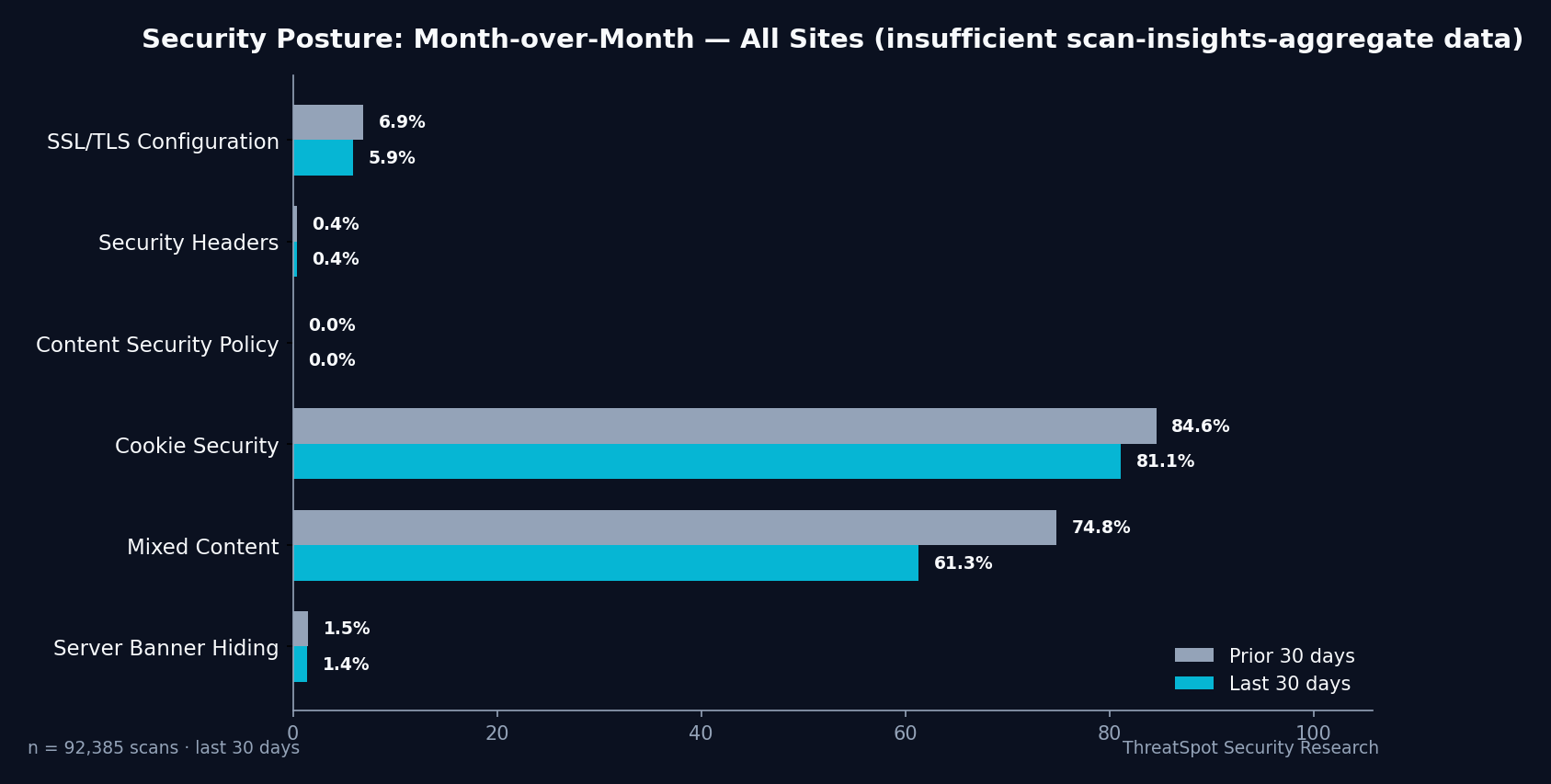
Checks with the strictest pass requirements saw the highest fail rates. For example, only 0.4% of sites passed the "all recommended security headers present" benchmark. These headers—specifically Content Security Policy (CSP), X-Frame-Options, X-Content-Type-Options, and Referrer-Policy—reduce browser-based attack risk and limit the fallout from plugin or theme vulnerabilities.
SSL/TLS configuration was another weak point. While most WordPress sites use HTTPS, only 5.9% scored ‘Good’ on SSL/TLS configuration—meaning they have a valid certificate, modern protocol support, strong cipher selection, and HTTP Strict Transport Security (HSTS) enforced. HTTPS without these elements leaves room for downgrade and interception attacks.
Mixed content (enforcing all resources loaded over HTTPS) passed at 61.3%. Cookie security—checking that session cookies have Secure, SameSite, and HttpOnly flags—was the outlier, with 81.1% passing. This is a positive trend, supported by modern browser defaults and managed hosting environments.
On the server version front, 22.1% of sites exposed explicit server or platform version information (e.g., Apache, NGINX, PHP), which allows attackers to automate targeting based on known vulnerabilities.
How WordPress Stacks Up Against Industry Benchmarks
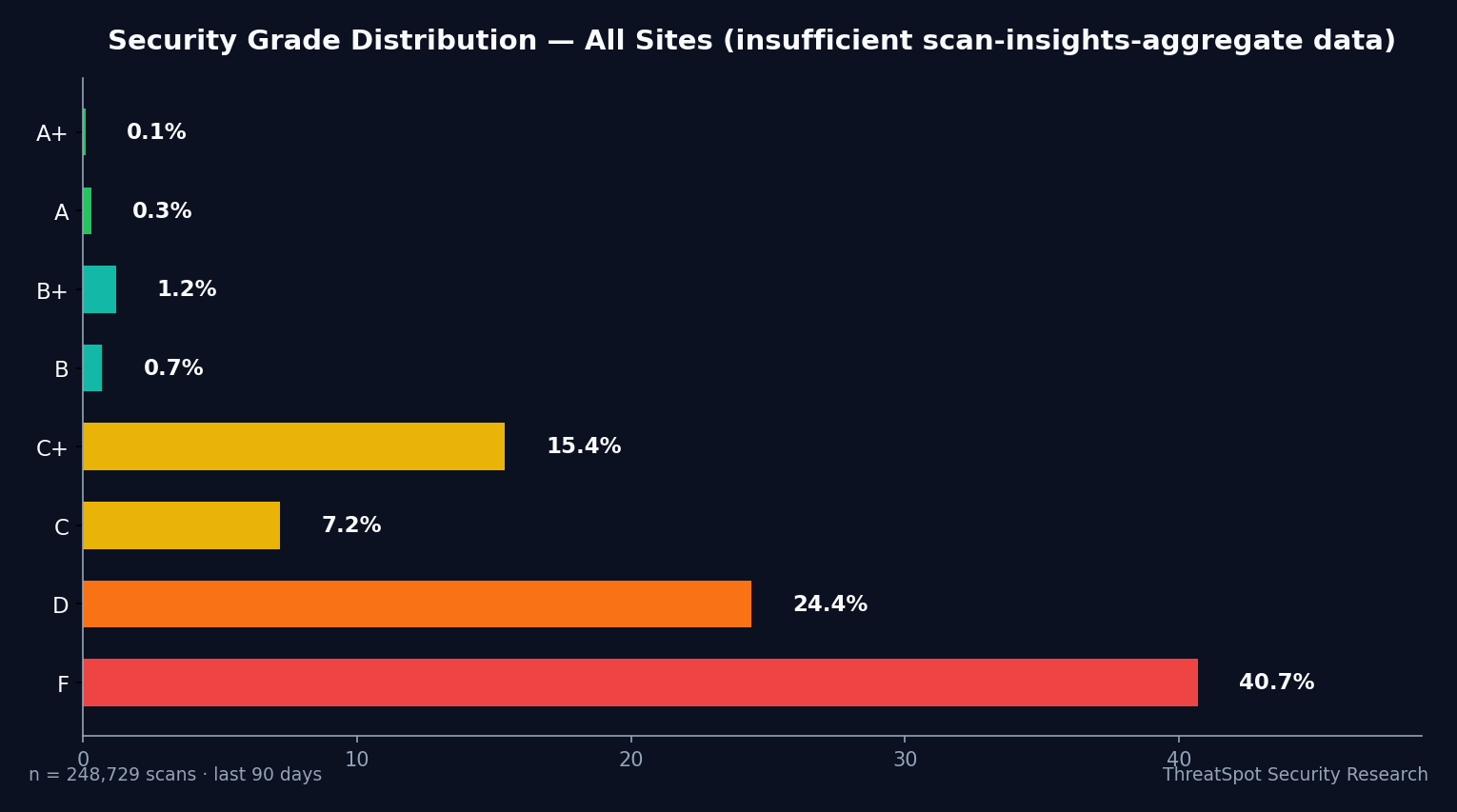
The WordPress ecosystem’s scan profile closely shadows the broader small-business web average. In the past 90 days, aggregate industry scans (248,724 checks across 103,095 unique sites) averaged a 39.8% security score, with only 0.4% passing the full security header check and just 6.5% passing SSL/TLS hardening.
Grade distribution in that window:
| Grade | % of Sites |
|---|---|
| A | 0.3 |
| B+ | 1.2 |
| B | 0.7 |
| C+ | 15.4 |
| C | 7.2 |
| D | 24.4 |
| F | 40.7 |
Recent WordPress scans at 41.5% average and 0.6% at A/A+ suggest marginal improvement, but the majority still stall in the D/F range. Most concerning is the persistently low rate of full security header adoption—0.4% WordPress, exactly tracking the industry—and the stubborn exposure of version information (over 1 in 5 sites in both cohorts).
Cookie security remains the standout, with WordPress sites leading the larger dataset (81.1% vs. 84.5%). This is encouraging, but does not compensate for the structural limits in browser-based mitigation and trust signaling.
What This Means for Your Business
A failing or barely passing security benchmark is not an automatic sign your site is compromised. But it does mean your site is more likely to be targeted by automated scanning tools and opportunistic attacks—simply because attackers use the same public-facing signals and configuration gaps to triage their targets.
The most direct business risks tied to low WordPress security grades are:
SEO penalties: Sites flagged for poor security headers or mixed content lose trust with browsers, users, and search engines. Modern browsers may even display warnings for misconfigured protection, increasing bounce rates.
Customer trust and conversion: Missing HTTPS hardening or visible “not secure” warnings can cause cart abandonment and erode credibility, especially in e-commerce or lead-gen businesses.
Version exposure, for instance, is a known precursor to targeted attacks. Publicly disclosed server or WordPress versions allow attackers to look up matching exploits. CVE-2021-29447 is a real-world example: attackers used version exposure in XML-RPC to facilitate remote file inclusion attacks on unpatched WordPress installations. While exposure itself is not an exploit, it shortens the attacker’s research phase—making automated compromise more likely if other conditions are present.
When these benchmarks remain unresolved, your site may be part of “soft target” lists maintained by opportunistic threat actors scanning for easy wins.
What You Can Do Right Now
Bringing your WordPress site up to—or above—the median security grade is a practical, stepwise process. Here’s where to start:
Check your site’s configuration status with a reputable, non-intrusive scan.
Automated website security scans highlight these benchmarks using the same techniques as attackers, without crossing any compliance or legal boundaries.Harden SSL/TLS beyond basic HTTPS.
Ensure your server enforces HSTS, supports only modern TLS versions, and disallows weak ciphers. Most managed hosts provide guidance or tools for these upgrades.Implement missing security headers.
Prioritize deploying Content Security Policy, X-Frame-Options, X-Content-Type-Options, and Referrer-Policy. These can often be configured at the host or via a trusted plugin.Suppress server and technology version disclosure.
Remove or obfuscate server, PHP, and WordPress version information from HTTP responses and public meta tags.Fix mixed content issues.
Update hard-coded asset URLs (stylesheets, scripts, images) to use HTTPS, or use a migration tool to enforce scheme consistency.Verify cookie security flags.
Confirm all session and authentication cookies set the Secure, HttpOnly, and SameSite attributes, especially if plugins handle login or e-commerce functionality.Establish routine monitoring.
Set up recurring scans or monitoring so misconfigurations are identified early—before attackers do.Document security grades over time.
Track your progress against the WordPress security benchmark to avoid regression and demonstrate improvements to stakeholders or clients.
Final Thoughts
75.2% of recent WordPress security scans landed in the D or F range, with failed security header checks and incomplete SSL/TLS hardening as the most common drivers. This is not a sign of imminent compromise—but it does create predictable, avoidable exposure that opportunistic attackers exploit at scale.
Closing these basic security gaps is fully achievable, even for non-technical operators. Start by running a current website security scan; address top failing checks, and monitor for recurring issues. Raising your WordPress security grade is a matter of practical risk reduction, not luck.
FAQ
What does my WordPress security grade actually mean?
It’s a measure of how well your site’s public-facing configuration matches objectively defined best practices: SSL/TLS, essential security headers, no mixed content, and minimal tech version leaks.
Is HTTPS enough to earn an A-grade?
No. Only sites with HSTS, modern TLS, and strong ciphers pass the full SSL/TLS check. “HTTPS present” ≠ “SSL hardened”.
Can security headers be added without breaking my site?
Usually yes, but always test on a staging environment first. Some plugins and themes may require configuration tweaks.
What do I risk by exposing my WordPress version?
Attackers use version info to target known exploits. Hiding your version won’t make you invincible, but it makes automated attacks less likely to succeed.
How often should I run a security scan?
Monthly at minimum, and after major updates or hosting changes.
For a clear, evidence-based assessment of your WordPress site, run a website security scan today and benchmark your results against the numbers above.