Most dentists trust shiny HTTPS lock icons, thinking patient data and payments are protected. Yet “secure checkout” is often a thin illusion, masking critical weaknesses that are actively targeted every day.
A dental WooCommerce site with misconfigured SSL, missing security headers, and leaking server version info creates a direct path for attackers. The cost: compromised card data, fraudulent appointments, Google blacklists, and destroyed patient trust. Here’s exactly why dental e-commerce lags—and what you must do before the next card-stealing campaign finds you.
Key Takeaways
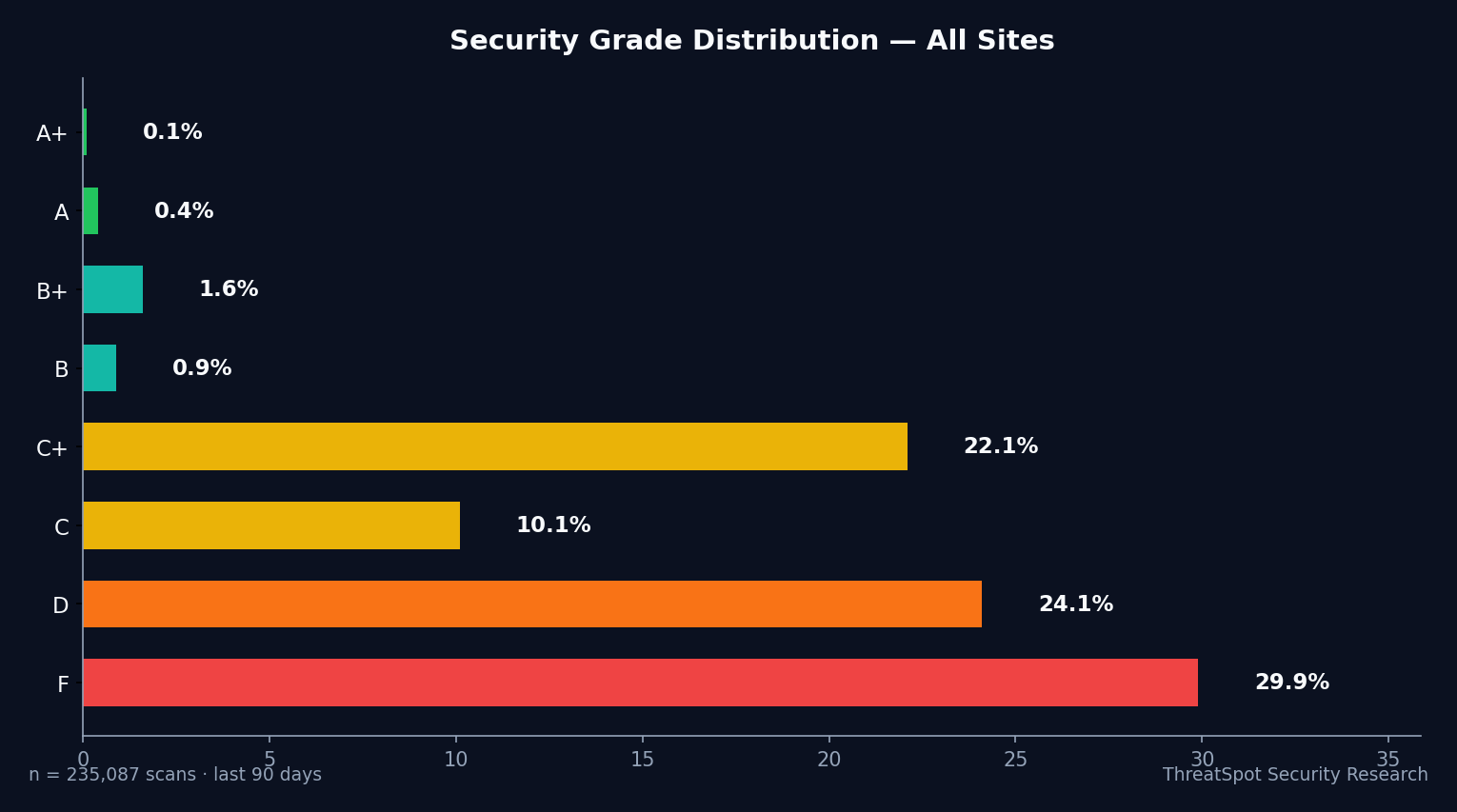
- 72% of dental WooCommerce sites score D or F for security.
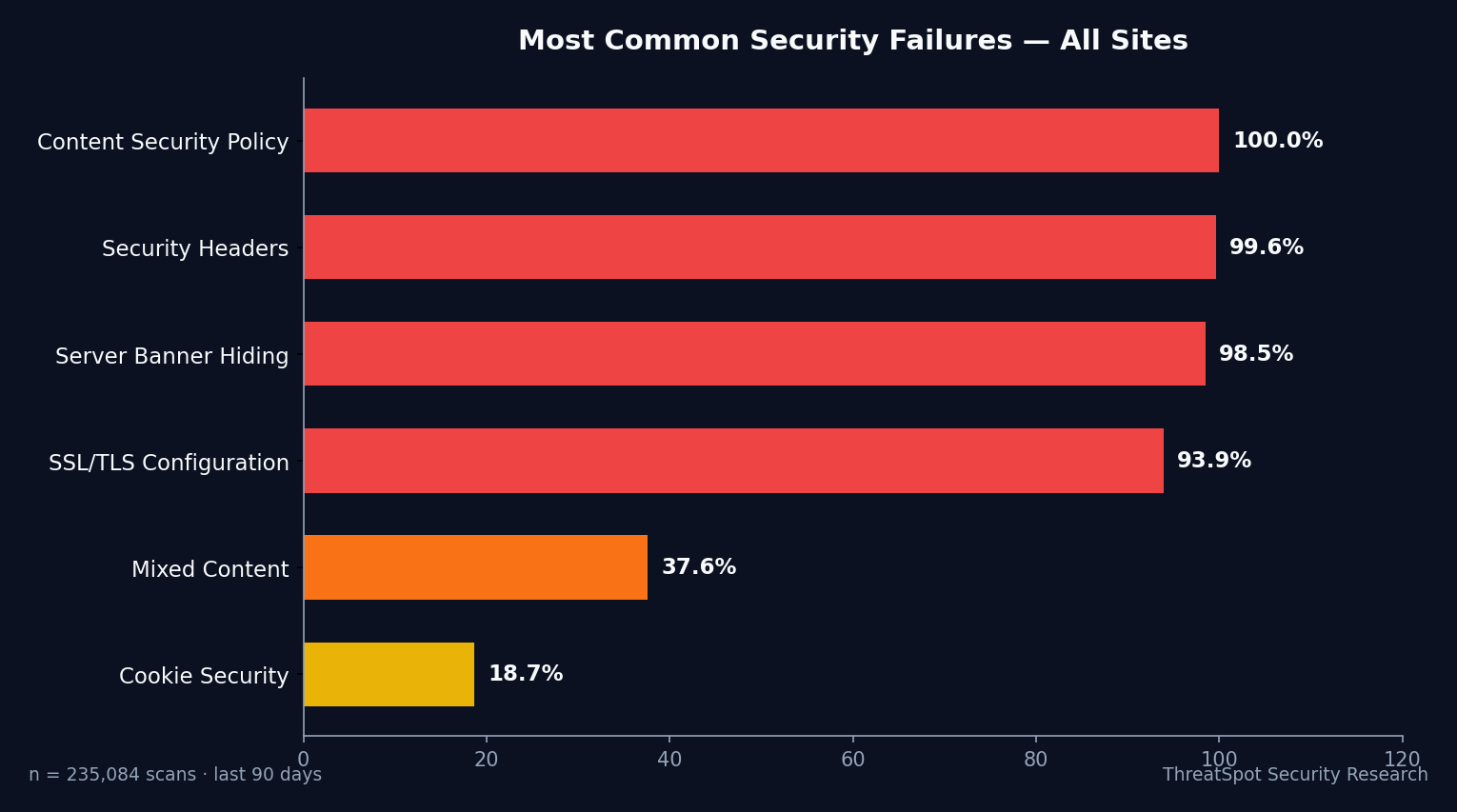
- Proper SSL setup is rare—good enough for just 7.2% of all scans.
- Security headers are missing on nearly every site, not just dental.
- Server version exposure hands attackers a roadmap to breach your practice.
The Real Issue Behind WooCommerce Security for Dentists
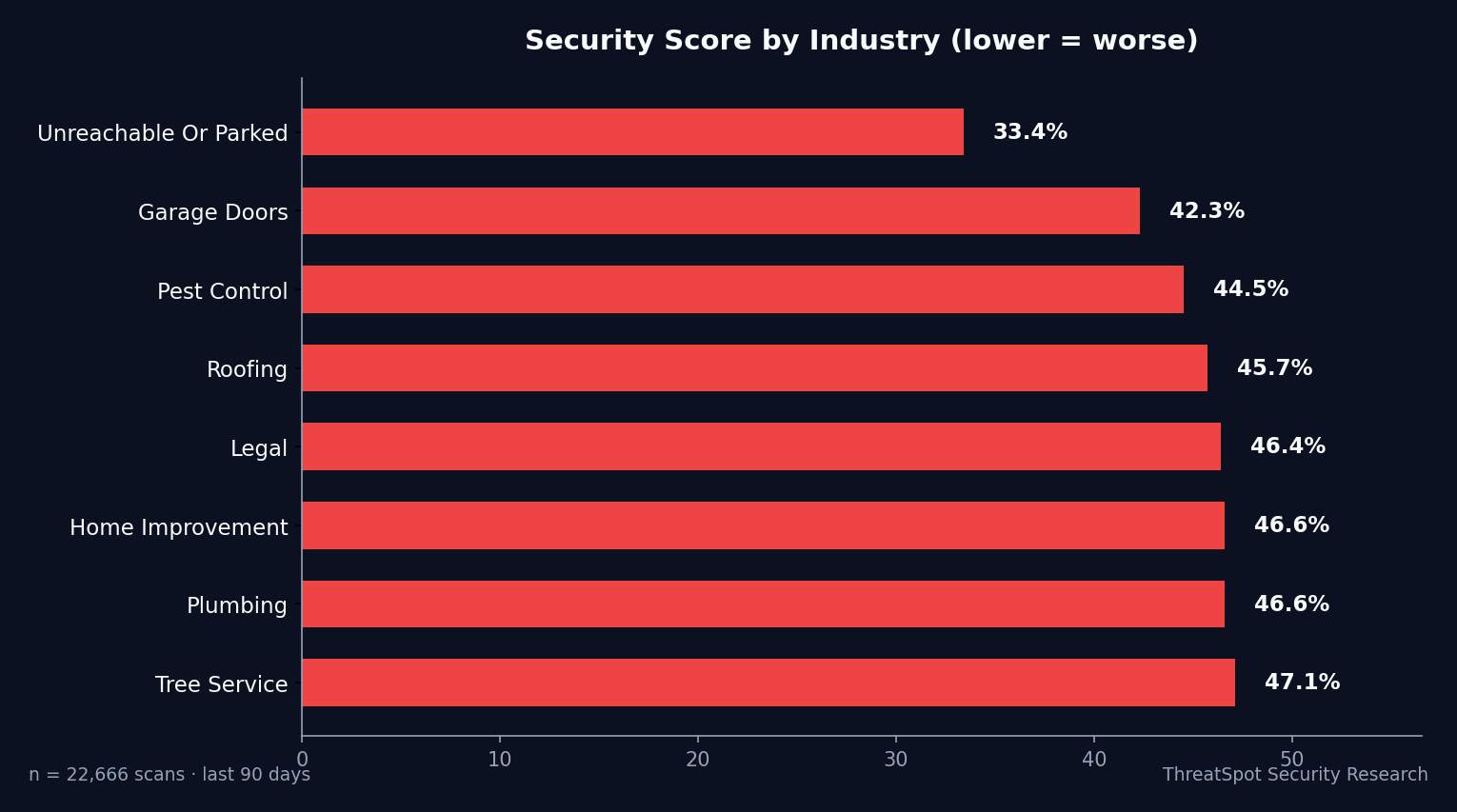
SSL locks and payment badges do not guarantee security. Real protection requires tight configuration, constant patching, and business owners who demand more than visual trust signals. Attackers don’t care if you’re a small dental clinic—they go after known gaps, and dental ranks in the bottom five of all industries for basic security hardening.
Dentists have unique e-commerce risks: Protected Health Information (PHI) in forms, frequent card transactions, and usually, a single person “maintaining” the website atop a long to-do list. Compliance and patient trust hinge on website safety, yet only 38.7% is the security average for dental sites—far behind sectors like garage door companies (45.7%). Real attackers don’t bother searching for zero-days; they target the 39.9% of sites that fail every basic check.
The Top 5 Security Risks for Dentist WooCommerce Sites
Misconfigured SSL: The Illusion of Secure Checkout
What It Is
SSL ensures data between your site and visitors is encrypted, but only when correctly set up: valid certificate, HSTS, modern TLS, strong ciphers. Most rely on “HTTPS present”—but fail every advanced test.
Why It Happens
- Reliance on default host settings, no SSL hardening
- Confusion between “padlock” and true encryption integrity
- Outdated tutorials, lack of enforcement (no HSTS)
How It Shows Up in the Real World
A dental site with basic HTTPS but no HSTS allows attackers to intercept passwords and card details for anyone on public Wi-Fi. This leads to card fraud claims, PCI disputes, and breach notification costs that often exceed $20,000—before even counting lost appointments.
Why It Matters
Patient data and payments travel in plaintext during downgrade attacks. Fraudulent appointments, brand damage, and loss of card processing capabilities follow.
How to Reduce the Risk
- Enforce HSTS and test with SSL Labs (A+ required, not just "secure").
- Only support TLS 1.2 and 1.3; remove older protocols.
- Auto-renew certificates and scan for mixed content leaks.
Related to OWASP A06:2021
Missing Security Headers: Open Doors for Skimming and Takeover
What It Is
Critical browser-side protections (CSP, X-Frame-Options, X-Content-Type-Options, Referrer-Policy) are missing on nearly every WordPress/WooCommerce store. These headers block script injection, clickjacking, and data leaks—if present.
Why It Happens
- Set-and-forget hosting; headers not configured by default
- False sense of safety from plugin “security” options
- Lack of actionable guidance from web agencies
How It Shows Up in the Real World
A compromised dental checkout with no Content-Security-Policy (CSP) runs skimming JavaScript for weeks, harvesting names, addresses, and cards. One New Jersey dentist faced $12,000 in fines and lost $45,000 in surprise chargebacks after patients’ cards were used for overseas gambling.
Why It Matters
No headers = attackers inject whatever they want, directly into browsers, invisible to the site owner.
How to Reduce the Risk
- Deploy a strict CSP (block inline scripts, whitelisted domains only)
- Add X-Frame-Options: DENY
- Enable X-Content-Type-Options and Referrer-Policy for all responses
Related to OWASP A05:2021
Leaky Server Version: Attackers Know Your Stack
What It Is
16.2% of all sites broadcast their web server and PHP version in HTTP headers. Attackers map these to known public exploits, targeting exact versions with automation.
Why It Happens
- Web hosts leave default banners enabled
- Plugins and themes reveal stack info
- Site owners unaware this data is public
How It Shows Up in the Real World
A WooCommerce dentist site leaking “Apache/2.4.38 (Debian)” invites known exploit bots. These bots test exploits daily; one unpatched bug means site takeover. Dental practices in California had all 300+ WooCommerce orders in 2025 redirected to a fraudster’s PayPal over a weekend. Recovery costs exceeded $60,000—mostly unrecoverable.
Why It Matters
Expose your version, you publish your weaknesses. Automated attacks don’t discriminate—dental, retail, or garage doors.
How to Reduce the Risk
- Strip all server version headers in .htaccess or nginx config
- Remove PHP version strings; verify via external scan
- Use a security scan tool focused on info leaks
Related to OWASP A06:2021
Outdated Plugins: The #1 Breach Vector on WooCommerce
What It Is
49% of WordPress sites run outdated core, and nearly all major WooCommerce plugin vulnerabilities go unpatched for weeks. 97% of exploited WP breaches target plugins.
Why It Happens
- Auto-updates off to “avoid breakage”
- Developer themes/plugins abandoned
- No monitoring for new CVEs (vulnerabilities)
How It Shows Up in the Real World
Unpatched WooCommerce Stripe gateways let attackers bypass payment validation, skimming live patient card data. Dentists often discover this months later—after reputational blowback and endless urgent calls.
Why It Matters
Patching is the only defense. Leaving WooCommerce, Stripe, or appointment booking plugins outdated hands criminals exactly what they want: working exploits.
How to Reduce the Risk
- Enable auto-updates on all plugins/themes
- Weekly manual scan for high-risk plugin CVEs
- Remove unused or abandoned extensions
Related to OWASP A09:2021
No Continuous Security Monitoring: Blind Until It’s Too Late
What It Is
Manual point-in-time scans miss lurking threats. Most breaches linger for weeks; attackers quietly siphon data while owners think all is well.
Why It Happens
- No budget/staff for daily checks
- Reliance on “one and done” reports, not ongoing scans
- Underestimation of automated attacks
How It Shows Up in the Real World
Dentists lose months of patient and payment data in hidden backdoor breaches. Google search blacklists the site, insurance premiums spike, and HIPAA breach notification is mandatory. Cost: from $40,000 for small clinics up to business closure in one case—just because no one reran the scan after installing “minor” WooCommerce updates.
Why It Matters
Attackers never stop scanning. If you’re not checking, you’re blind—until the banks or patients call.
How to Reduce the Risk
- Set up automated scanning for all core and checkout pages
- Enable uptime/downtime and blacklist monitoring
- Act immediately on new vulnerability alerts
Related to OWASP A08:2021
What You Can Do Right Now
- Enforce full SSL (A+ on SSL Labs): don’t trust the surface lock icon
- Add all recommended security headers (CSP, X-Frame-Options, etc.)
- Remove all server and PHP version info from HTTP headers
- Enable auto-update for every plugin and theme (especially WooCommerce add-ons)
- Schedule weekly full-site vulnerability scans
- Scan your site externally after every update or new plugin/theme
- Review checkout and booking workflows for exposed patient data
- Confirm all session/auth cookies have Secure, HttpOnly, and SameSite flags
For a fast checklist covering these essentials, see 5 quick wins to improve your website security.
Turn Risk Into Action With Continuous Scanning
Manual checks are not enough. Security is a moving target—your WooCommerce site changes weekly. Catch threats before attackers do. Run your site. See your security grade.
Final Thoughts
Dentists running WooCommerce with default settings are easy targets. This isn’t theoretical—72% of dental sites score a D or F for critical risks, and most exposure stems not from advanced hacking but from basic, fixable oversights. Trust is won or lost at checkout. Skip the assumptions—run a real scan, patch, and protect your patient’s data.
Frequently Asked Questions
Q: Is HTTPS enough to secure a dental WooCommerce site?
No. Our data shows nearly all sites have HTTPS, but only 7.2% score “Good” for SSL configuration. Full protection requires HSTS, modern TLS and strong ciphers—not just a lock icon.
Q: What are security headers and why should dentists care?
Security headers instruct browsers to block attack techniques like scripting, clickjacking, and data leaks. Missing headers allow attackers to inject skimmers and hijack patient sessions with ease.
Q: How do plugin updates affect WooCommerce security?
49% of sites run outdated WordPress core, with plugins the #1 breach vector. Unpatched plugins provide a direct path for attackers to steal checkout and patient data. Auto-updating is non-negotiable.
Q: How does exposing server version info put my practice at risk?
Attackers match your software version to known exploits and automate attacks. Hiding version headers removes half the work for them—critical for any healthcare e-commerce site.
Q: How often should a dental WooCommerce site be scanned for vulnerabilities?
At minimum, weekly. Every update or plugin addition should trigger a scan, and continuous external monitoring is essential for live detection and business survival.
Sources
OWASP Top 10: 2021 - Global standard for web application risks
Scott Helme Security Headers Survey 2025 - Industry benchmarks on security headers and HSTS adoption
Patchstack State of WordPress Security 2024 - WordPress core and plugin vulnerability statistics
Sucuri Website Threat Research Report 2024 - Data on infected WordPress sites and root causes
Chrome Transparency Report 2025 - HTTPS adoption rates across the web
CISA Known Exploited Vulnerabilities Catalog - Official tracking of exploited CVEs