Business owners think HTTPS seals the deal. It doesn’t. Most hacked sites had SSL visible in the browser—but missing key protections that attackers target daily.
The result? Customers lose trust, payments get intercepted, and Google rankings drop. You’re one incident away from lost revenue—and you won’t get a warning before it hits. Run your security grade and see if your store is already at risk.
Key Takeaways
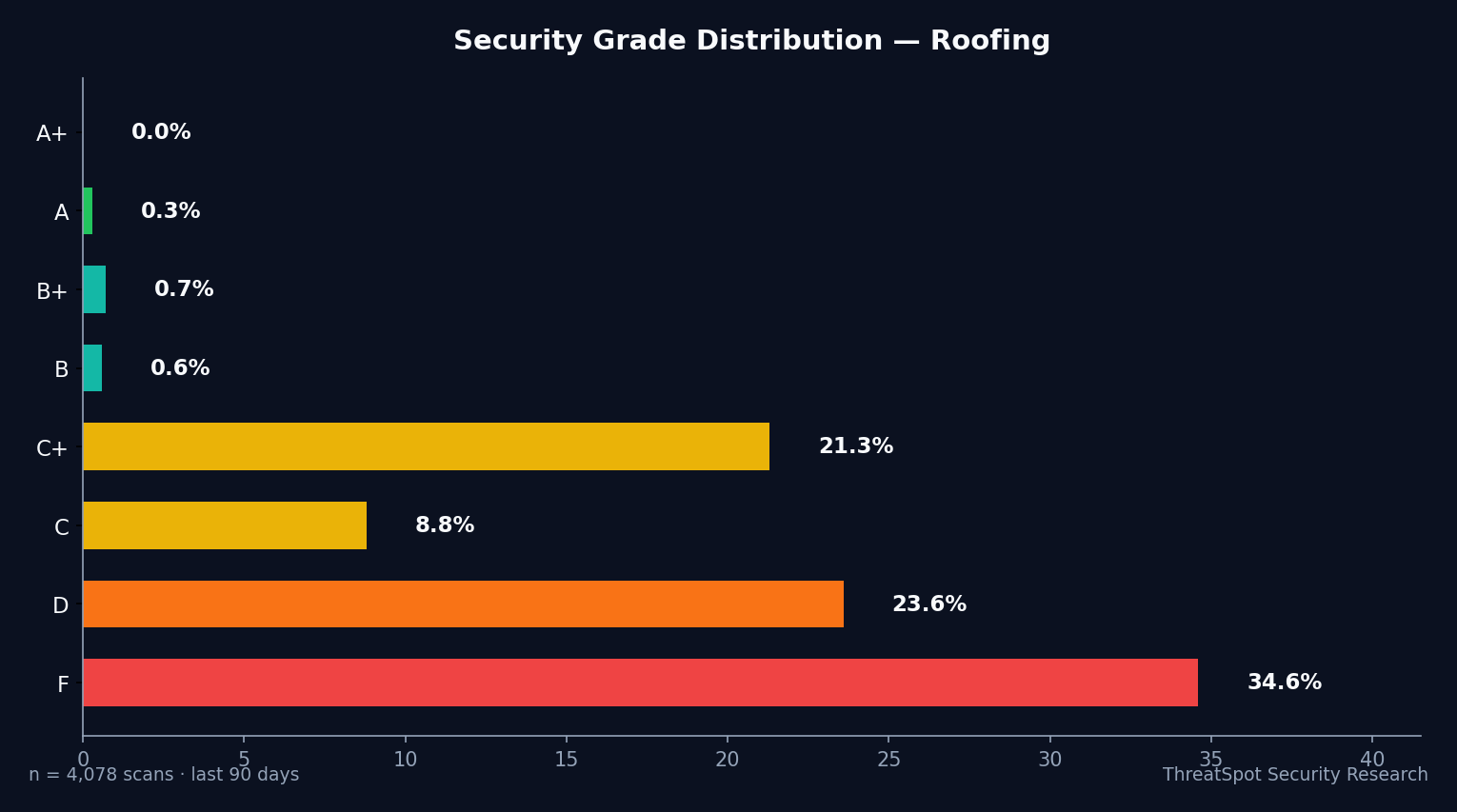
- 84% of roofer WooCommerce sites earned a D or F security grade
- Most sites fail basic SSL/TLS and security header checks—HTTPS alone isn't enough
- Missing protections expose checkout pages and customer data to real-world attacks
- One breach shreds customer trust, costs real money, and tanks search rankings
The Real Issue Behind WooCommerce Security for Roofer Websites
Roofer sites running WooCommerce think WordPress handles security out of the box. The reality: default setups leave checkout pages and customer data exposed. Attackers thrive on these gaps. If your site misconfigures SSL or skips a single security header, automated scans find you in seconds.
40610 scans across 34533 unique small-business WordPress sites prove this isn’t theory—it’s what’s waiting below the surface. Less than 1% of sites meet modern standards for SSL/TLS or browser protection.
Digital trust isn’t optional. One missed patch or hidden misconfiguration leads to silent card skimming, abandoned carts, or weeks of SEO damage. The foundational risks aren’t obvious, but every day they drive real-world financial loss.
1. Incomplete SSL/TLS Configuration
What It Is
Your site shows a padlock, but attackers exploit unfinished SSL setups: old TLS, missing HSTS, or weak ciphers.
Why It Happens
- Site owners stop at a basic certificate install
- Hosts don’t enforce modern settings by default
- HSTS not enabled; browser fallback attacks open up
How It Shows Up in the Real World
A roofer WooCommerce site lets customers add a new roof estimate to cart. A man-in-the-middle attacker on public Wi-Fi downgrades TLS and silently intercepts payment details. Cards get skimmed—and the customer blames your brand.
Why It Matters
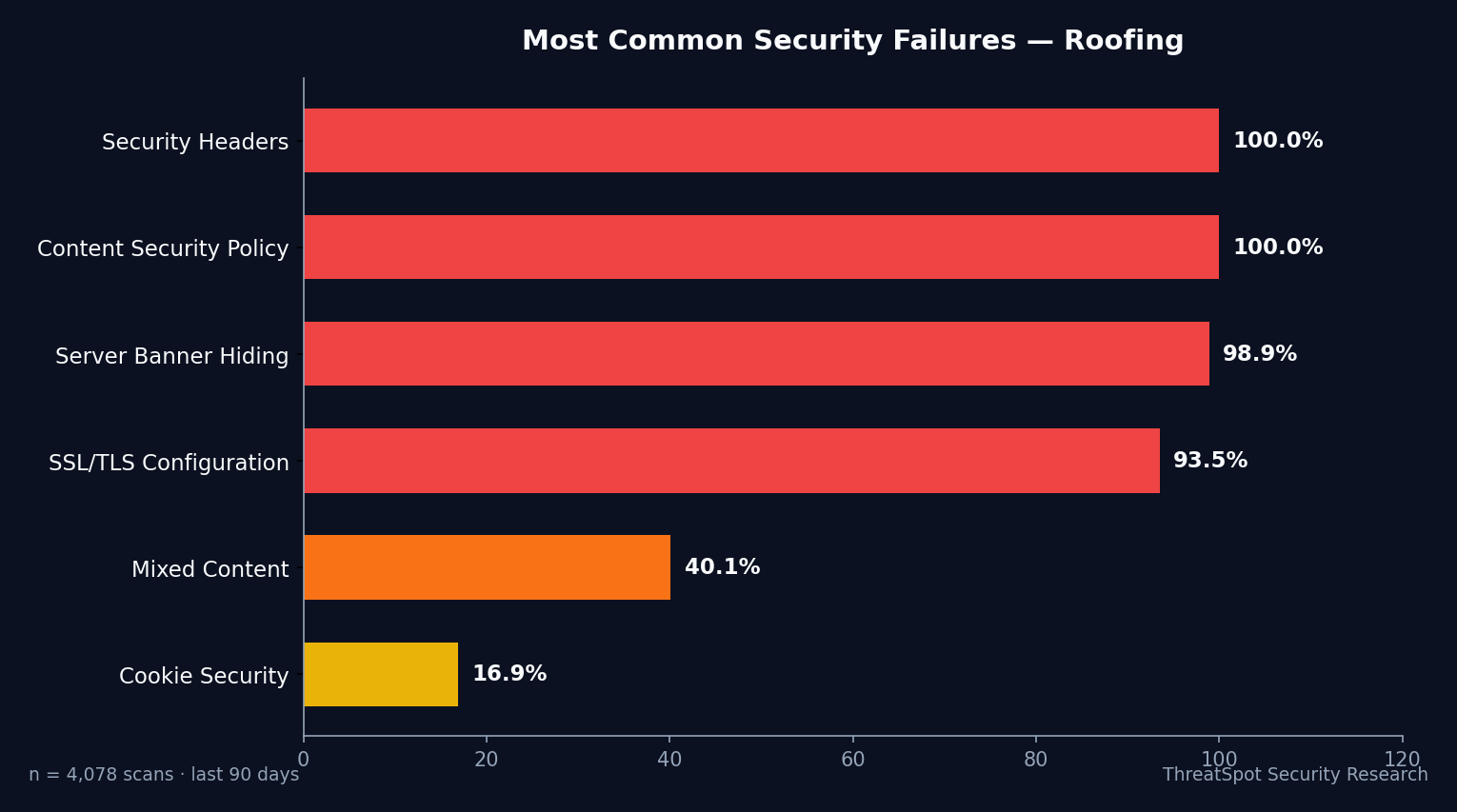
Only 7.2% of scanned sites have “Good” SSL: valid cert, HSTS set, modern TLS and strong ciphers. HTTPS presence is nearly universal, but weak configuration means checkout security fails.
How to Reduce the Risk
- Enable HSTS with a minimum 6-month window
- Use only TLS 1.2 or newer, disable legacy protocols
- Scan your site for SSL implementation gaps
2. Missing Security Headers
What It Is
Browser security headers act as an invisible firewall. Missing them lets attackers inject scripts, hijack sessions, and run phishing overlays on real checkout pages.
Why It Happens
- No default support in WordPress or WooCommerce
- Site owners unaware of CSP, X-Frame-Options, etc.
- Common “quick setup” plugins skip header best practices
How It Shows Up in the Real World
A competitor or bot injects code that copies every customer’s billing info at checkout. Your receipts look real. Attackers collect hundreds of credit cards before you notice a single chargeback.
Why It Matters
Only 0.4% of scanned sites deploy all key headers (CSP, X-Frame-Options, X-Content-Type-Options, Referrer-Policy). That’s 99.6% letting browsers drop the shield completely.
How to Reduce the Risk
- Deploy a full Content Security Policy blocking inline scripts
- Set X-Frame-Options to DENY
- Use plugins or server rules to enforce all recommended headers
Related to OWASP A05: Security Misconfiguration
3. Outdated Plugins and Core Vulnerabilities
What It Is
Every missed update is a published security hole. Attackers automate scans for known plugin exploits—97% of WordPress vulnerabilities come from plugins.
Why It Happens
- Store owners delay updates for “compatibility”
- WooCommerce extensions aren’t tracked carefully
- No automated update workflows or security scans in place
How It Shows Up in the Real World
A WooCommerce shipping calculator extension gets a public vulnerability. Within days, bots flood your site—installing skimmers, redirecting checkout traffic, or launching brute-force login attempts that bring your site down entirely.
Why It Matters
49% of WordPress sites run outdated core. If your roofer store lags behind, patch releases = live attack timeline. Your checkout and order data become a public target as soon as a CVE drops.
How to Reduce the Risk
- Enable automated core updates in WordPress
- Only use extensions updated in the last 6 months
- Regularly scan for plugin vulnerabilities and remove unused code
Related to OWASP A06: Vulnerable and Outdated Components
4. Information Disclosure and Server Version Leaks
What It Is
Your server banner reveals the exact software and version—giving attackers the blueprint for known exploits.
Why It Happens
- Hosting defaults don’t hide version info
- Lack of awareness; “why does it matter?” mindset
- Misconfigured .htaccess or Nginx settings
How It Shows Up in the Real World
An attacker scans for Apache/2.4.49 (public exploit since 2022). 15.8% of WordPress sites leak exactly this info. After finding your exposed version, automated tools customize the exploit and breach your payment pipeline with zero warning.
Why It Matters
Exposed versions speed up attacks. Attackers skip guessing and jump straight to “one click, full access.” Manual discovery is dead—leaked banners drive automated WooCommerce shop takeovers.
How to Reduce the Risk
- Remove or mask all server version headers
- Use web application firewalls to strip response banners
- Regularly check external scans for leaked server fingerprints
Related to OWASP A01: Broken Access Control
5. Unprotected Checkout and Session Cookies
What It Is
Checkout sessions rely on secure cookies. Weak cookie flags let attackers hijack carts, logins, and saved customer data.
Why It Happens
- Older plugins don’t set Secure, HttpOnly, SameSite flags
- Developers overlook browser cookie management
- SaaS integrations sidestep site-wide cookie policies
How It Shows Up in the Real World
A customer starts booking a $3,200 re-roofing job via WooCommerce. Their checkout session gets stolen (no HttpOnly or SameSite set). Attackers hijack the order, inject their own payment link, and you lose the sale, the customer, and the trust.
Why It Matters
15.6% of sites fail basic payment and session cookie hygiene. Checkout security becomes window dressing—one hijacked session brings real chargebacks, refund headaches, and a threat to your merchant account.
How to Reduce the Risk
- Scan for cookies lacking Secure, HttpOnly, and SameSite flags
- Use managed plugins that strictly enforce session hygiene
- Audit third-party widgets for compliance with modern cookie policies
What You Can Do Right Now
- Check your SSL/TLS: verify HSTS is set and only modern ciphers are active
- Scan your store for missing CSP, X-Frame-Options, and other headers
- Run an automated update check for WordPress, WooCommerce and all plugins
- Strip server version banners in Apache, Nginx, or through your host’s dashboard
- Test all cookies set during checkout: look for Secure, SameSite, and HttpOnly
- Remove or replace plugins not updated in the last 6 months
- Schedule recurring external scans for new vulnerabilities every week
Security Isn’t Static—You Need Continuous Monitoring
Manual checks catch yesterday’s vulnerabilities. New exploits drop weekly, targeting active plugins and misconfigured stores. Continuous, automated website security scans keep you ahead—finding what attackers see before customers, Google, or your bank find out. Run your site. See your security grade.
Final Thoughts
Most roofer WooCommerce sites fail basic security, exposing payment flows, customer data, and business reputation. This isn’t abstract risk—it hands attackers the keys to your store, one misconfiguration at a time. Don’t wait for a breach. Scan your site now and fix what’s exposed before it costs you revenue, rankings, and trust.
Frequently Asked Questions
Q: Does HTTPS mean my WooCommerce checkout is secure?
No. Only 7.2% of scanned sites have complete SSL/TLS protection, including HSTS and modern protocols. Most sites show HTTPS but miss critical steps, leaving checkout traffic at risk.
Q: How can I prevent plugin vulnerabilities from exposing my store?
Enable automatic updates, only use recently updated plugins, and regularly scan your extensions for security advisories. Outdated plugins are the #1 source of WordPress breaches.
Q: What are security headers and why do they matter for payment protection?
Security headers instruct browsers to block dangerous scripts, stop clickjacking, and secure checkout forms. Without them, attackers can inject code or hijack sessions—putting payments and customer logins at risk.
Q: Are server version leaks really dangerous for a small business roofer site?
Yes. Exposing your server version hands attackers a ready-made playbook. Public exploits target exact versions—removing banners shuts the door on easy, automated attacks.
Q: What’s the fastest way to find my current WooCommerce security risks?
Start with a full automated scan targeting SSL, headers, outdated plugins, cookie flags, and server leaks. You’ll see exactly where your checkout and login flows need immediate fixes.
Sources
OWASP Top 10 - 2025 Edition - Global web application risks Sucuri Website Threat Research Report 2024 - Real-world hacked site data Scott Helme Security Headers Survey 2025 - Browser security header adoption Patchstack State of WordPress Security 2024 - Core/plugin vulnerability data Chrome Transparency Report 2025 - Industry-wide HTTPS adoption rates