Every gap leaves invoice payments, client data, and your reputation exposed. Good intentions—and even HTTPS—aren’t enough when misconfigurations are this rampant. Hidden technical issues don’t stay technical after a breach: lost trust translates to lost clients, chargebacks, and brand damage that lingers for years.
You depend on WooCommerce for seamless payments. Attackers depend on the same weak spots—missing headers, outdated plugins, soft SSL setups—to hijack payment flows. The only realistic answer: verify your site before someone else does.
Key Takeaways
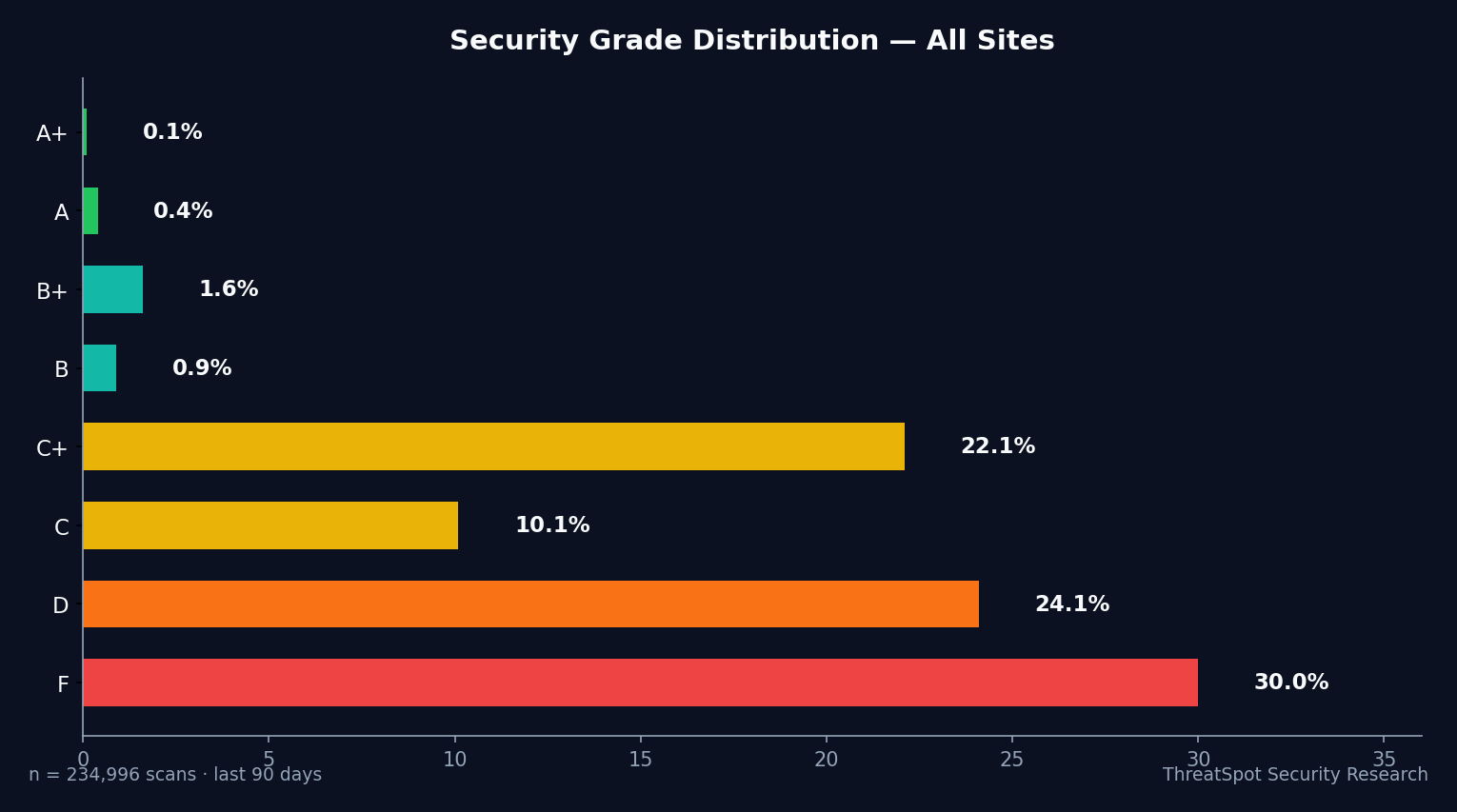
- 72% of small business WordPress sites fail critical security checks
- Only 0.4% have all basic security headers deployed
- ‘HTTPS’ by itself doesn’t equal payment protection
- Outdated plugins drive 97% of real-world WordPress exploits
The Real Issue Behind WooCommerce Security for Accountants
Trusting WooCommerce out of the box is a losing bet. Secure payment flows require more than platform defaults or visible HTTPS pads. Sophisticated attacks target what defenders miss—misconfigured SSL/TLS, missing browser protections, and version leaks revealing exact weak points.
For accountants handling high-value transactions, the stakes compound: one breach means exposed tax IDs, payroll data, private invoices. Most security failures trace back to silent gaps—not the absence of obvious defenses, but incomplete, default, or poorly maintained configurations. Your checkout process, payment forms, and client logins are only as safe as your weakest overlooked setting.
Top 5 Risks Exposing Accountant WooCommerce Sites in 2026
1. Weak SSL/TLS Configuration (Not Just HTTPS)
What It Is
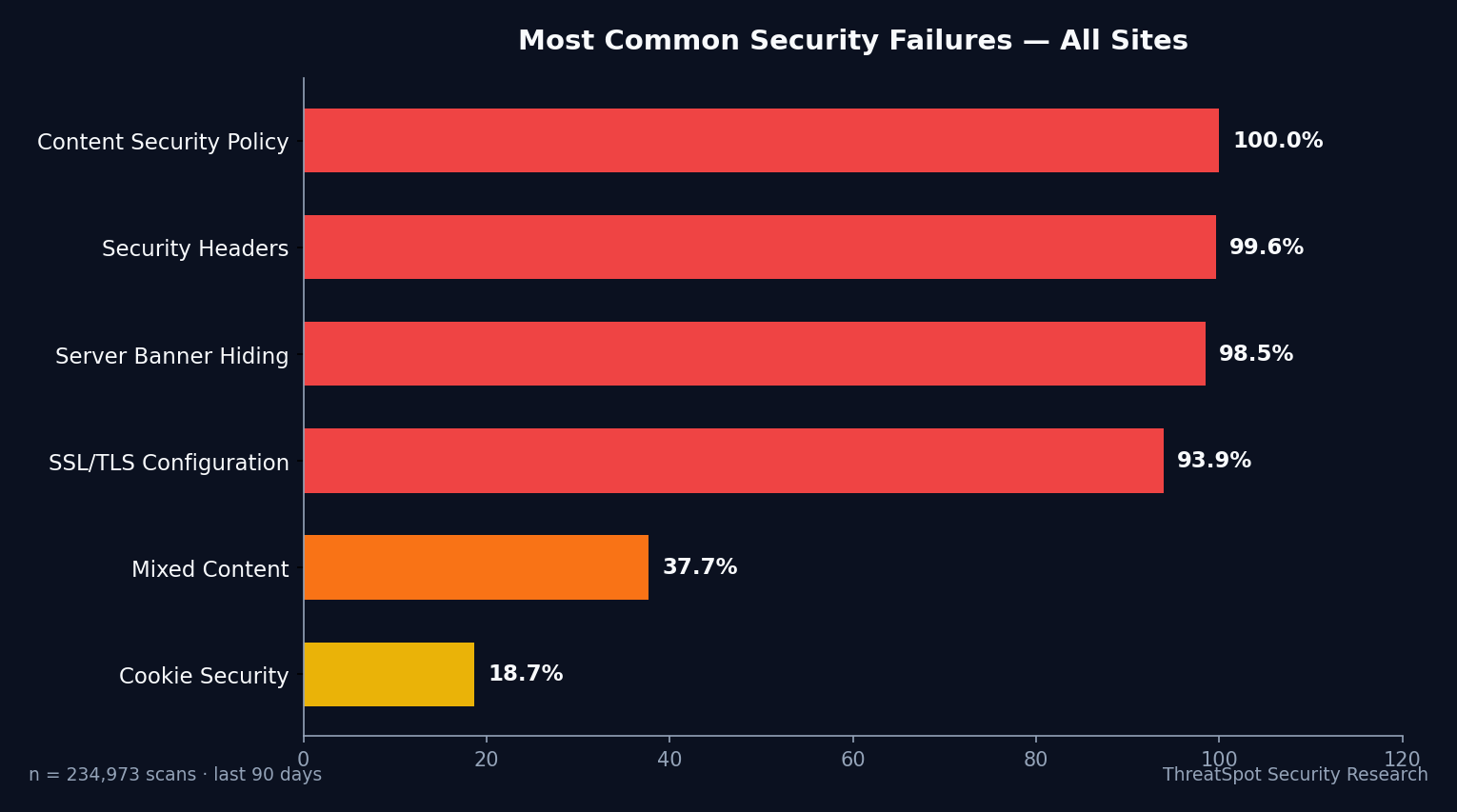
‘Secure’ padlocks hide rampant misconfigurations. Only 7.1% of scanned sites deliver properly set up SSL: a valid certificate, HSTS, strong ciphers, and forced modern TLS. Attackers intercept data or undermine even “secure” logins if these aren’t locked down.
Why It Happens
- Reliance on hosts’ default SSL without reviewing actual policies
- Lack of HSTS enforcement lets attackers downgrade to insecure connections
- Outdated server settings keep old protocols and ciphers enabled
How It Shows Up in the Real World
A client pays a quarterly retainer via your WooCommerce checkout on hotel Wi-Fi. Without robust SSL—including HSTS—an attacker intercepts the session, stealing payment and login credentials. Your firm’s financial data is now at risk for $10K+ in fraud and reputational loss.
Why It Matters
‘HTTPS’ alone doesn’t stop interception. Weak encryption and missing enforcement open every client login to exposure on public networks, nullifying compliance and privacy standards.
How to Reduce the Risk
- Enforce HSTS on every domain and subdomain
- Disable outdated TLS versions and legacy ciphers in hosting control panel
- Test SSL with trusted external tools to confirm full protection
Related to OWASP A06:2021 - Vulnerable and Outdated Components
2. Missing Security Headers
What It Is
Browsers trust sites to set protective headers against cross-site scripting, clickjacking, and data leaks. Only 0.4% of sites in the scan deploy all recommended headers (CSP, X-Frame-Options, Referrer-Policy, X-Content-Type-Options). Missing headers leave every client session open to hijack.
Why It Happens
- Popular hosting “wizards” skip security header setup
- Plugins rarely enforce all critical headers by default
- Non-technical site owners don’t know headers exist—let alone how to set them
How It Shows Up in the Real World
An attacker embeds a script via blog comments or invoices. Without a strict CSP, that code silently exfiltrates client payment details. Clients report fraud, and the breach gets traced back to your site—costing $25K+ in notification costs, lost contracts, and regulatory scrutiny.
Why It Matters
Without headers, any browser accessing your site is on its own. Session hijacks, payment skimming, and silent redirects become trivial.
How to Reduce the Risk
- Deploy a tested Content-Security-Policy to block rogue scripts
- Set X-Frame-Options to ‘DENY’ for all pages with payment or login flows
- Add Referrer-Policy and X-Content-Type-Options to prevent data leaks
Related to OWASP A05:2021 - Security Misconfiguration
[For a rapid primer on high-impact changes, see: 5 quick wins to improve your website security.]
3. Outdated Plugins and Themes
What It Is
97% of successful attacks on WordPress start with outdated plugins. WooCommerce extensions powering tax calculators, payment gateways, or client dashboards receive regular vulnerability disclosures. Delayed updates mean known attacks are always just a scan away.
Why It Happens
- Fear of breaking site functionality by updating core WooCommerce pieces
- Dependency on third-party plugins with unpredictable update cycles
- No automated update or alerting system in place
How It Shows Up in the Real World
A bookkeeping agency’s site runs an old WooCommerce PDF Invoice plugin vulnerable to data export. Attackers use a public exploit to download all tax histories and payment logs. Agency faces $50K+ in liability and loses every client whose data was leaked.
Why It Matters
Every day on an exposed version is a free window for attackers. Missing one update can undo all other defenses.
How to Reduce the Risk
- Enable auto-updates for WooCommerce, core plugins, and payment extensions
- Remove abandoned, unmaintained plugins—especially those not vital for client service
- Monitor sources like Patchstack or WPScan for public exploits linked to your tools
Related to OWASP A06:2021 - Vulnerable and Outdated Components
4. Exposed Server and Software Versions
What It Is
16.2% of sites openly reveal WordPress, PHP, or server version details in HTTP headers or HTML. Attackers search these disclosures to instantly match attack techniques with your exact stack.
Why It Happens
- Default settings on hosting environments leave version banners public
- Site owners don’t know these details are visible (or exploitable)
- Many ‘security by obscurity’ myths persist in the SMB agency world
How It Shows Up in the Real World
A local CPA unknowingly exposes Apache and WordPress versions. Attack bots parse this info, deploying automated exploits linked to known WooCommerce plugin flaws. Within 48 hours, all stored invoices and payment logs are compromised—rupturing six months of P&L records in a single attack.
Why It Matters
If attackers know your exact WordPress or server version, they skip guesswork and go straight to tested exploits. This leapfrogs any generic defense.
How to Reduce the Risk
- Suppress all software version headers on web servers and WordPress
- Regularly scan your site’s HTTP response headers from an external network
- Replace default ‘generator’ meta tags or banners in theme templates
5. Insufficient Checkout Security (Mixed Content and Cookie Gaps)
What It Is
Checkout and login flows break security when forms load assets (scripts, styles, images) over insecure HTTP. 42.1% of scanned sites still have mixed-content flaws. At the same time, 14.8% of sites misconfigure session cookies—failing to use Secure, HttpOnly, or SameSite flags to protect payment sessions.
Why It Happens
- Mismatched asset URLs or legacy plugins forcing HTTP resources on HTTPS pages
- Poorly written themes that don’t enforce secure cookie practices
- Partial HTTPS migrations that skip critical checkout endpoints
How It Shows Up in the Real World
An attacker loads a malicious checkout script via an HTTP image link. Without cookie security, they hijack logged-in sessions and harvest client payment records. Fraudulent wire transfers and stolen tax IDs appear days later—leading to $20K+ in dispute costs for a single breach.
Why It Matters
Unprotected forms and cookies turn payment and login pages into attack entry points. Every transaction and login is a new risk.
How to Reduce the Risk
- Audit all site assets and enforce HTTPS-only delivery—especially for payment and invoice forms
- Review session cookie flags: Secure, SameSite (Strict or Lax), and HttpOnly should be default
- Test every WooCommerce extension and custom theme for asset leaks or unprotected session data
For responsible scanning principles, see our safe scanning policy.
What You Can Do Right Now
- Audit your SSL/TLS configuration with an independent scanner: verify more than just the ‘secure’ padlock
- Deploy all recommended HTTP security headers—CSP, X-Frame-Options, Referrer-Policy, X-Content-Type-Options
- Enable auto-updates for WordPress, WooCommerce, and every client-facing extension
- Remove abandoned plugins and scan for vulnerabilities tied to what you use
- Suppress software and platform version disclosures from headers and meta tags
- Manually check all payment, login, and sensitive forms for mixed HTTP/HTTPS content
- Default to Secure, HttpOnly, and SameSite flags on session cookies—especially at checkout
- Establish a monthly review or automated scan to catch new risks as they emerge
Manual checks fail at scale. The reality is: new vulnerabilities and configuration drift demand continuous monitoring. Automated security scans give you real-time visibility, every change and every plugin update.
Run your site. See your security grade.
Final Thoughts
Accountant WooCommerce sites fail at the basics—72% get a D or F, with only 0.1% acing the test. HTTPS on its own doesn't protect your payments or your clients. Attackers target silent gaps—missing headers, weak SSL, outdated plugins—knowing most sites delay or skip essential steps. Don’t trust assumptions. Test them. Run your scan and fix what the padlock hides.
Frequently Asked Questions
Q: Is HTTPS enough to secure client payments on WooCommerce?
No. HTTPS presence does not equal complete SSL/TLS security. Most attacks bypass basic encryption using protocol downgrades or misconfigured certificates. Robust SSL requires HSTS, strong ciphers, and up-to-date server settings.
Q: How do security headers protect my site’s checkout process?
Headers like CSP, X-Frame-Options, and X-Content-Type-Options prevent browser-based attacks that can hijack sessions, inject malicious scripts, or steal payment information during checkout. Missing them leaves every transaction exposed.
Q: How often should I update WooCommerce plugins?
Enable auto-updates to minimize risk and proactively patch vulnerabilities. Manual updates leave critical gaps and expose your accounting site to real-world exploits discovered daily.
Q: Why do exposed software versions make my site a target?
Attackers scan for visible server, PHP, and WordPress versions to match proven exploits. Publishing these lets attackers automate attacks against your exact stack, drastically increasing breach probability.
Q: What’s the fastest way to check if my WooCommerce site is at risk?
Run an automated security scan focused on SSL configuration, header deployment, plugin status, and version leaks. Address failed checks immediately and schedule recurring scans to stay ahead of new threats.
Sources
- OWASP Application Security Top 10 (2021) — Industry security risk standards
- Scott Helme Security Headers Survey 2025 — HTTP header adoption rates and failures
- Sucuri Website Threat Research Report 2024 — WordPress infection rates
- Patchstack State of WordPress Security 2024 — Outdated core and vulnerable plugin statistics
- Chrome Transparency Report 2025 — HTTPS adoption benchmarks
- CISA Known Exploited Vulnerabilities Catalog — Real-world exploited flaws and risk prioritization