Make these 3 checks this week to stop making your site an easy target.
Boost your grade. Shield your customer data. Dedicate 30 minutes—see your risk for yourself.
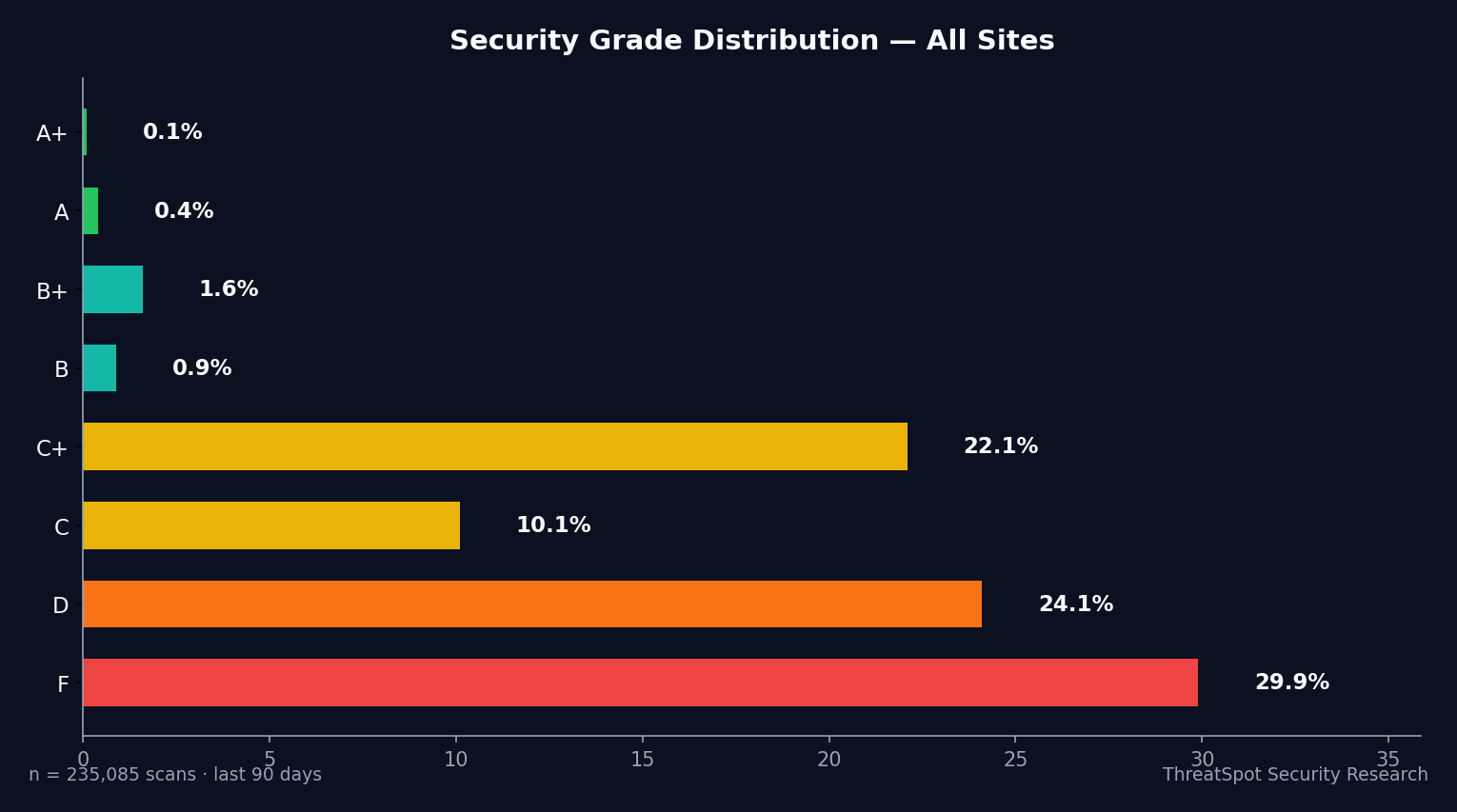
Average security score: 39.1%
| Grade | Number of Sites | % of Total |
|---|---|---|
| A | 127 | 0.2% |
| B+ | 562 | 1.0% |
| B | 329 | 0.6% |
| C+ | 6,286 | 11.7% |
| C | 3,221 | 6.0% |
| D | 14,148 | 26.4% |
| F | 24,662 | 46.0% |
Key Takeaways
- 46% of small-business WP sites outright fail basic security checks
- Security headers protection is missing on 99.6% of sites
- 'HTTPS' alone leaves 93% exposed due to weak SSL/TLS
- Fixing these gaps prevents revenue loss and public trust failure
The Complete 3-Point WordPress Security Checklist
Every item below reflects the biggest, most impactful weaknesses in real-world WordPress security for small businesses. The difference between passing and failing means customer data exposure, lost sales, and Google penalties.
SSL/TLS Configuration
1. Harden Your SSL/TLS Beyond “HTTPS”
Why it matters: HTTPS is not enough. 93% of sites stop at a valid certificate but skip the steps attackers target—like HSTS and modern TLS versions. Weak SSL/TLS puts customer logins, payment info, and admin sessions at risk.
How to check:
- Go to SSL Labs’ SSL Test
- Enter your site URL
- Review your grade. Look for:
- HSTS enabled (HTTP Strict Transport Security)
- TLS 1.2 or higher
- Strong ciphers (no “weak” labels)
How to fix:
- Enable HSTS in your web server config or .htaccess file (time: 5–10 min)
- Confirm host uses TLS 1.2 or higher in their SSL settings
- Remove insecure ciphers (“export”, “RC4”, “3DES”) from config
- Test again until you reach an A grade
Priority: Critical
HTTP Response Headers
2. Set Security Headers—Stop Browser Attacks at the Door
Why it matters: 99.6% of small-business WP sites miss key security headers. Without these, attackers bypass browser restrictions, inject code, or hijack user sessions. Missing headers expose passwords and payment info before your site’s code sees a threat.
How to check:
- Visit Security Headers scan
- Enter your site URL
- Look for:
- Content Security Policy
- X-Frame-Options
- X-Content-Type-Options
- Referrer-Policy
How to fix:
- Add these headers to your .htaccess, NGINX config, or with a reputable security plugin:
- Content-Security-Policy: e.g.
Content-Security-Policy: default-src 'self'; - X-Frame-Options: e.g.
X-Frame-Options: SAMEORIGIN - X-Content-Type-Options: e.g.
X-Content-Type-Options: nosniff - Referrer-Policy: e.g.
Referrer-Policy: no-referrer-when-downgrade
- Content-Security-Policy: e.g.
- Check plugin settings for built-in security header support
Priority: Critical
WordPress Core, Plugins, and Updates
3. Eliminate Server Version Exposure—Stop Advertising Your Weaknesses
Why it matters: 1 in 5 WordPress sites reveal exactly what software they run and which version. Attackers use version fingerprints to target exploits proven to work on that exact setup, turning your site from random target into low-hanging fruit.
How to check:
- Use a browser or Security Headers to view response headers
- Look for
Server:header leaking version info (e.g., “Apache/2.4.41”) - Or run
curl -I https://yoursite.comin a console and look for version numbers in headers
How to fix:
- Edit your web server config (not visible from inside WP):
- Apache: Set
ServerTokens ProdandServerSignature Off - NGINX: Use
server_tokens off;
- Apache: Set
- Ask your host to turn off version disclosure if you don’t have config access
- Check that the “Server” header no longer reveals a version
Priority: High
| Category | Checked Item | % Fully Secured (Good) | Sites at Risk |
|---|---|---|---|
| Security Headers | All Required Present | 0.4% | 99.6% |
| Server Banners | Version Not Exposed | 1.4% | 98.6% |
⚠️ Warning: Most sites marked as “HTTPS” fail full SSL/TLS checks—don’t trust a green padlock alone.
Quick-Start Summary
| Priority | Action | Time | Impact |
|---|---|---|---|
| Critical | Add security headers | 10–15 min | Prevents browser-based malware/workarounds |
| High | Remove server version leak | 10 min | Stops targeted exploits, hides sensitive details |
Frequently Asked Questions
Q: Why isn’t HTTPS enough for WordPress security?
HTTPS blocks attackers from snooping, but most sites skip HSTS and strong TLS ciphers. This leaves encrypted traffic open to downgrade and cookie theft attacks. Full hardening closes the gap.
Q: What happens if my site leaks server version details?
Attackers use leaked version info to launch attacks tailored to your hosting setup. If your software runs a version with known flaws, you’re advertising your weakest link to anyone scanning for quick wins.
Q: Aren’t plugins enough for WP security?
Most plugins focus on login protection or malware. They rarely set proper SSL/TLS or security headers—and many still leak banner info. You must fix these server-wide weaknesses directly.
Q: How fast can I fix the most critical gaps?
All three items—SSL/TLS, HTTP headers, and server banners—can be checked and improved in under 30 minutes. If your host manages server configs, send them this checklist to speed up fixes.
Final Thoughts
The shocking reality: out of 53,572 recent scans across 47,539 real-world WordPress sites, only 0.1% passed the hardest checks. That means your competition is probably failing this too—and attackers know it.
Every unchecked box is an open invitation to data theft, lost revenue, and SEO blacklists.
Run your site. See your grade. Complete this checklist: harden SSL/TLS, set security headers, and stop leaking version info. Business risk drops instantly. Don’t wait.
Explore more website security checklist tips and get answers in our website security FAQ.
Sources
OWASP Security Headers Guide – Security header definitions and usage examples
WordPress.org Hardening Guide – Official steps to lock down your site
NIST TLS Guidelines – Crypto standards for secure web traffic
CISA Securing Web Servers – Best practices for web server configuration
SSL Labs SSL Server Test – Free public tool to check SSL/TLS hardening