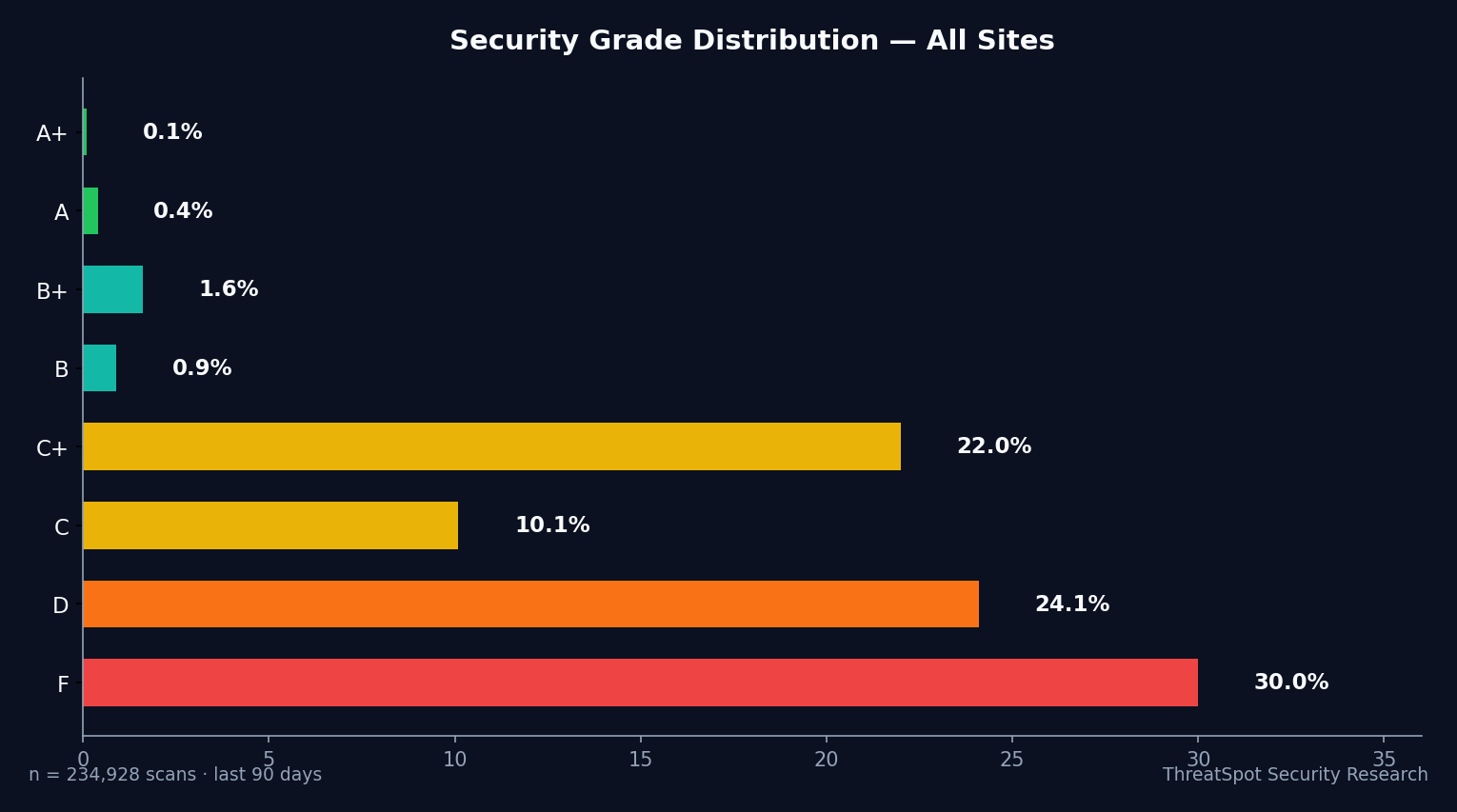
We analyzed 25,531 security scans across 12,081 unique legal websites built on WordPress. The results were clear: 18,784 scans (73.6%) in the legal industry received a D or F security grade. Only 2.2% of all graded scans achieved A or B.
This snapshot matters. When security best practices are missing at scale, legal sites risk the trust, uptime, and privacy required for their business, their clients, and their standing in Google results. These gaps often stem from missed basics—like misconfigured SSL/TLS, absent browser protections, or server information unintentionally disclosed.
While few legal site scans showed signs of active compromise, this uneven baseline creates avoidable risk. Most of these shortcomings are simple to fix but have outsized business consequences if left unaddressed.
Why This Benchmark Matters
Legal websites process confidential inquiries, schedule consultations, and often collect personal details for follow-up. Yet, most are failing the same fundamental benchmarks as everyday small business sites. The average security score for U.S.-based legal websites landed at 40.7%—putting them near the center of a 45-industry security ranking, closer to pet services and plumbing than to finance or healthcare.
Security headers, SSL/TLS, and server banners all showed significant gaps. Only 6.8% of legal site scans passed on modern SSL/TLS configuration. Even starker: just 0.3% of legal site scans had a robust set of browser security headers. The Content-Security-Policy (CSP) header, used to mitigate a range of common web exploits, was missing from 100% of scanned legal sites.
These configuration gaps don't indicate an ongoing breach—but they do create more opportunity for automated scans, targeted phishing, or browser-based attacks if vulnerabilities in WordPress core or plugins emerge.
Legal clients expect trust by default. Security baselines that trail the web average send the opposite signal.
Who Is Most at Risk
Which Legal Sites Face the Largest Gaps?
The majority of these surveyed legal sites are based in the United States (19,978), but the pattern holds across all top countries scanned (Germany, UK, Canada, Ukraine). Most sites rely heavily on third-party plugins like Contact Form 7 or Under Construction Page, both of which require regular updating and careful configuration.
Small to mid-sized law firms—particularly those without dedicated technical staff—stand to benefit most from closing these gaps. If your firm’s WordPress site powers intake, referrals, or client resources, missing foundational protections may quietly erode client confidence.
Legal sites also face greater reputational stakes: a misconfigured or low-trust web presence can turn away prospective clients long before a breach occurs. For firms collecting data via forms, operating corporate email through their sites, or using online payment add-ons, solid browser-side defenses are table stakes.
Sites using out-of-date plugins or defaults—common when managed by generalist agencies or freelancers—are especially at risk of opportunistic attacks that use public scan data (like missing SSL configurations) to identify soft targets.
Legal Site Security Failures, by the Numbers
| Check | Pass Rate | Failure Rate |
|---|---|---|
| Mixed Content | 81.2% | 18.8% |
| SSL/TLS Configuration (Strong) | 6.8% | 93.2% |
| Security Headers (all critical) | 0.3% | 99.7% |
| CSP Header Present | 0.0% | 100.0% |
| Server Banner Hidden | 1.2% | 98.8% |
Security header adoption is the most persistent gap. This includes settings like X-Content-Type-Options, X-Frame-Options, and Strict-Transport-Security—all crucial to modern browser-based defense. According to broader web benchmarks (Scott Helme, 2025), 4-6% of all websites have the full recommended header set. Legal sites in our scan scored far below this threshold.
SSL/TLS configuration also lagged. While ~95% of the general web now uses valid HTTPS (Chrome Transparency Report, 2025), just 6.8% of scanned legal sites met criteria for a “good” modern SSL/TLS configuration. This low pass rate reflects not just lack of certificates but also issues like weak cipher suites, deprecated protocols, or missing HSTS.
The relative bright spot is cookie security: 90.9% of legal scans passed with HttpOnly and Secure flags, meeting common browser security standards. Mixed content (ensuring HTTPS is not undermined by insecure subresources) also performed better than average at 81.2%.
How Legal Compares to Other Industries
Legal sites are roughly middle-of-the-pack within the 45 industries studied—edged out by healthcare, finance, and security, but on par with small business verticals like cleaning, real estate, and plumbing.
| Industry | Avg. Security Score (%) | Sample Size |
|---|---|---|
| Insurance | 43.6 | 419 |
| Hospitality | 43.1 | 5,576 |
| Legal | 40.7 | 25,531 |
| Nonprofit | 39.7 | 5,026 |
| Professional Services | 38.0 | 22,723 |
The 20-point spread between the best (Manufacturing, 44.6%) and worst (Parked domains, 24.5%) highlights the competitive gap. Higher scores increasingly correlate with in-house technical resources and regular scanning programs—less common in solo practitioner legal sites.
What You Can Do
For most legal sites, raising your security grade is about eliminating low-hanging fruit. Here are concrete next steps, each with a realistic time estimate:
- Add critical security headers (10–20 minutes with most managed WordPress hosts): Apply headers like X-Content-Type-Options, X-Frame-Options, and Strict-Transport-Security. Many hosts and security plugins offer one-click activation or preset bundles.
- Update SSL/TLS configuration (30–60 minutes): Move to the latest TLS version (1.2 or preferably 1.3), disable outdated protocols, and enforce HSTS if your site is consistently on HTTPS.
- Ensure plugin hygiene (15 minutes/week): Remove unused plugins, verify your contact form and newsletter add-ons are current, and schedule monthly core/plugin updates.
- Run an automated passive security scan (5 minutes): Use a non-invasive scanner to surface configuration issues, version leaks, or unexpected exposures—without impacting site uptime or violating any scanning policies.
Most of these improvements don’t require advanced technical knowledge or unscheduled downtime. Focus on incremental improvement, prioritizing browser-facing controls over obscure settings.
Final Thoughts
Over the last 90 days, 18,784 out of 25,531 scans for legal industry WordPress sites (73.6%) landed at D or F. The overwhelming majority of these failures traced back to missing browser security headers and outdated SSL/TLS settings—not active breaches, but silent configuration gaps affecting trust, compliance, and risk posture.
For small law firms and solo practices, addressing these core issues is both achievable and impactful. Start with a passive scan to see where you stand, then close the top gaps one by one. This approach keeps your site, your client data, and your reputation on stable ground.
Ready to see your grade? Scan your legal WordPress site now.
Frequently Asked Questions
Why does my security score matter if I haven’t been hacked?
Security misconfigurations are early indicators of risk, not proof of compromise. Attackers use these signals to automate scans for easy targets. A low security score means you’re more likely to be flagged—unnecessarily—by attackers, compliance tools, and some browsers.
What are “security headers”?
Security headers tell browsers how to handle content and block certain classes of attacks (like clickjacking, MIME sniffing, or mixed content). Examples include X-Frame-Options and Strict-Transport-Security (HSTS). They’re vital for legal sites because of the sensitive nature of web-based inquiries.
How do I fix missing headers on WordPress?
Many managed WordPress hosts offer one-click header settings. You can also use trusted plugins to add recommended headers, or configure them through .htaccess if you have access. Prioritize headers flagged by your most recent scan.
Is public version info a risk for my legal site?
Exposed version numbers allow attackers to match your setup with known vulnerabilities. This is especially relevant for WordPress, where outdated plugins are the leading source of vulnerabilities (97% of known WP vulns stem from plugins).
Does improving my security grade help SEO?
Google flags insecure sites in Chrome and may penalize repeat offenders or chronic misconfigurations. Securing SSL/TLS and headers directly benefits user trust and indirectly supports your ranking.