Your patients see the HTTPS padlock and trust your dental WooCommerce site. They put their health history, payment details, and personal info into forms and payment checkouts daily.
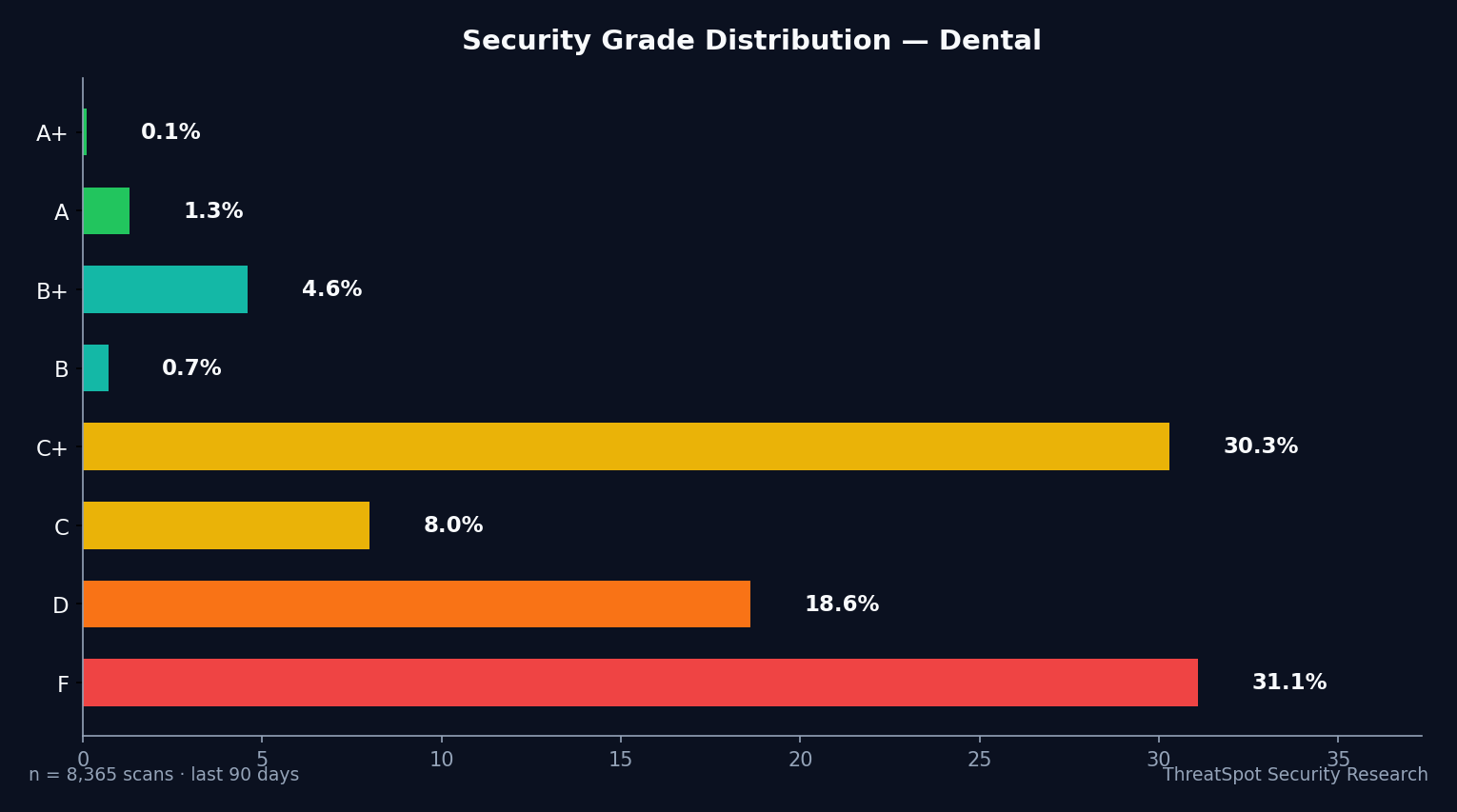
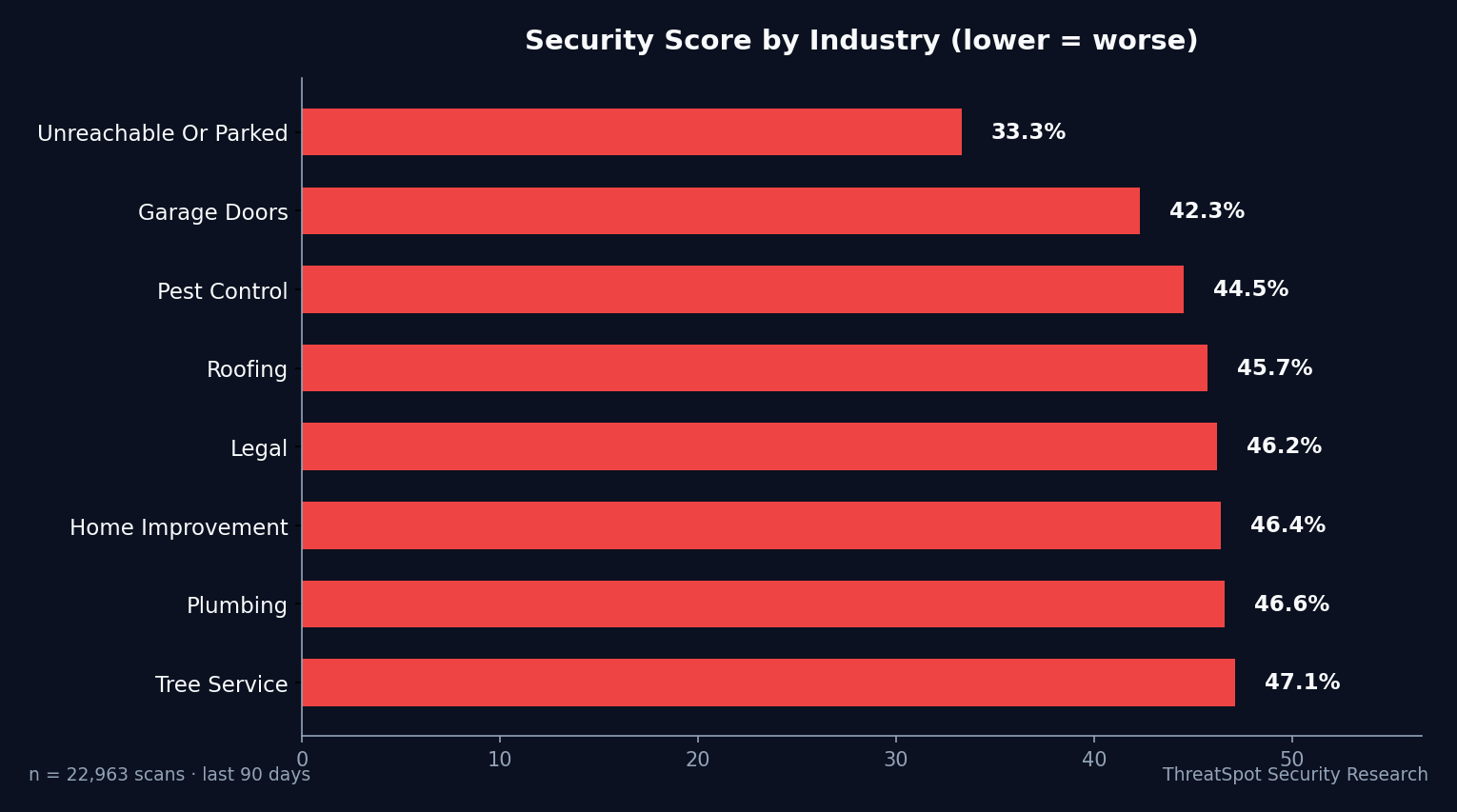
But the data shows the padlock is not enough. Behind the scenes, the average dental website scores just 37.5% on real-world security checks—barely more secure than the lowest-ranked industries. Even top-performing dental practices leave live checkout pages exposed, allowing attackers to siphon data, intercept payments, or steal identities without a trace.
Most dental business owners only find out after customer card fraud, chargebacks, or reputation loss. The gap is wide, the risks are real, and generic advice won’t fix what’s missing. This is what you must check—and act on—right now.
Key Takeaways
- 40.7% of sites outright fail basic WordPress security scans
- Only 0.4% implement all required checkout security headers
- SSL configuration is dangerously behind: just 7.1% pass minimum payment protection standards
- Exposed server versions and weak plugins lead directly to data theft and lost trust
The Real Issue Behind WooCommerce Security for Dental Sites
Most dental WooCommerce sites appear secure to patients and staff. The visual signs—HTTPS, branded checkout, modern design—create trust. Attackers don’t care. They target dental businesses because you store more sensitive personal and payment data in one place, and they know most SMB owners never look beneath the surface.
Robust woocommerce security means more than a valid SSL certificate. It means closing every gap—headers, software versions, and payment protections—that attackers use to slip past your visual defenses. Simple oversights in checkout security or plugin updates equal visible business damage: chargebacks, fraud, angry patients.
Here’s how dental WooCommerce sites fail, with real risks you cannot ignore.
Risk #1: Incomplete SSL/TLS Protection
What It Is
SSL/TLS secures the transmission of all data between your patient’s browser and your server—this includes payment info, logins, and health data. "Properly configured" means not just having HTTPS, but strong ciphers, HSTS, up-to-date protocols, and blocking downgrade attacks.
Why It Happens
- Relying on hosting defaults that stop at a basic SSL cert
- Lack of HSTS, leaving encrypted sessions vulnerable to interception
- Outdated or weak encryption settings not reviewed by site owners
How It Shows Up in the Real World
A dental storefront uses HTTPS, but attackers exploit the missing HSTS header during a patient’s visit on shared Wi-Fi. They force a downgrade, intercept login or card details before they’re encrypted—resulting in breached patient trust and risk of HIPAA violation fines.
Why It Matters
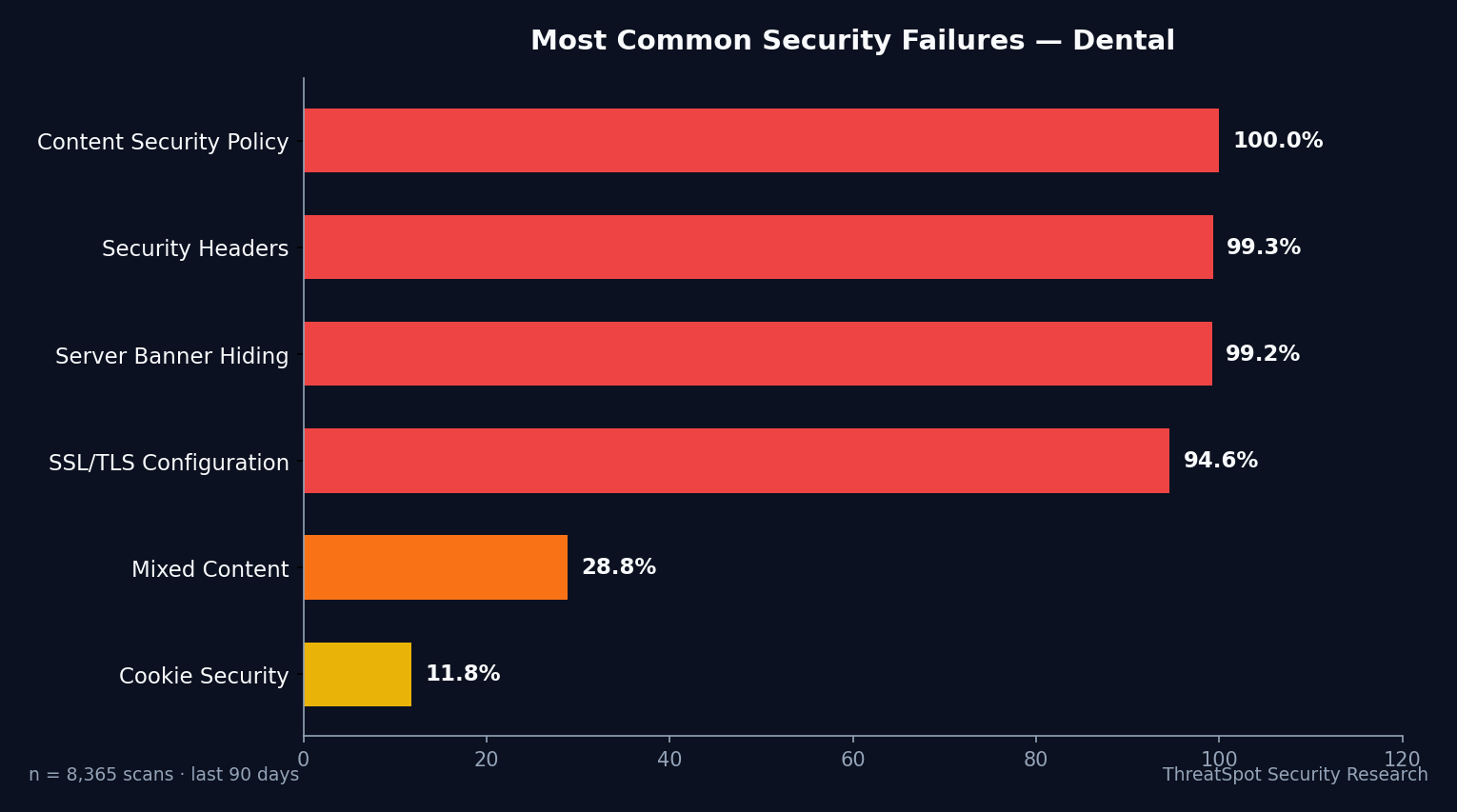
Payment protection is only as strong as your SSL/TLS setup. 92.9% of SMB sites lack proper configuration. This means attackers bypass the padlock and target your most valuable transactions.
How to Reduce the Risk
- Enable HSTS on all public domains
- Limit TLS support to version 1.2+ with strong ciphers
- Audit all SSL/TLS settings with every WooCommerce update
A weak SSL grade directly exposes your patient’s payment and health data to interception. Massive legal and business consequences follow one breach.
Risk #2: Missing Security Headers at Checkout
What It Is
Security headers (CSP, X-Frame-Options, X-Content-Type-Options, Referrer-Policy) tell browsers how to handle your site’s code and content, blocking malicious scripts, iframe theft, and data leaks during checkout.
Why It Happens
- Misconception that HTTPS alone secures everything
- Themes and plugins don’t add headers by default
- Agencies skip header configuration during launch
How It Shows Up in the Real World
A dental practice’s WooCommerce checkout is loaded in a hidden iframe on a phishing site. Without the right X-Frame-Options header, attackers record keystrokes and card numbers—costing the business thousands in fraud and lost patient confidence.
Why It Matters
Only 0.4% of scanned WordPress sites pass this test. Without these headers, browsers cannot block serious attacks before they strike. Customer sessions, payment info, and sensitive details are harvested in silence.
How to Reduce the Risk
- Add all recommended headers site-wide, not just on the homepage
- Confirm checkout uses a Content Security Policy blocking inline and external scripts
- Regularly review headers after plugin or WooCommerce updates
Learn more about quick security wins for headers.
Risk #3: Exposed Server and WordPress Version Info
What It Is
Server and CMS version disclosure embeds exact software details in headers or meta tags. Attackers use scanners to detect your version and pair it with known exploits in minutes.
Why It Happens
- Shared hosting rarely hides version banners by default
- WordPress or plugin updates leave behind legacy meta tags
- Most owners don’t know this data is public
How It Shows Up in the Real World
A dental WooCommerce site exposes "Apache/2.4.41 (Ubuntu)" and "WordPress 6.1.1" in headers. Attackers match this with a 2024 vulnerability, run an automated exploit, and take over admin accounts fast—just as scheduling software connects with WooCommerce orders.
Why It Matters
16.2% leak vulnerable configurations. This isn’t hypothetical: attackers filter for easy-to-breach targets and avoid security-hardened sites. The exposed version is a road map for criminals.
How to Reduce the Risk
- Remove all generator meta tags and server banners
- Regularly run passive site scans for headers and leaks
- Stay ahead by updating early—before exploits are widely known
Risk #4: Outdated or Vulnerable WooCommerce Plugins
What It Is
Every WooCommerce extension or plugin increases your attack surface. Nearly all WordPress attacks (97%) come from insecure plugins—especially those connected to payment or patient data.
Why It Happens
- Agencies install “feature” plugins but skip hardening
- Businesses forget or delay plugin updates, fearing site breakage
- Plugin vulnerabilities spike: 47+ CVEs now impact popular add-ons
How It Shows Up in the Real World
A dental site runs an obsolete form builder extension to capture new patient intake. Attackers use a publicly-known exploit to upload malware, steal submissions, and redirect patients to fake payment portals. By the time chargebacks and complaints arrive, the business faces $10K+ in losses—and regulatory scrutiny.
Why It Matters
Public exploit scripts rapidly target specific plugin versions. Any delay in patching gives attackers free access to your payments and records.
How to Reduce the Risk
- Limit plugins to essentials, remove unused ones
- Enable auto-updates for WooCommerce and all add-ons
- Monitor vulnerability feeds or use automated scans to catch exposed plugins
A single outdated extension is enough for sitewide compromise of your checkout and patient health data.
Risk #5: Weak Cookie Security During Checkout
What It Is
Cookies store session tokens for logged-in users—particularly sensitive during checkout or patient portal use. Secure, HttpOnly, and SameSite attributes prevent theft by scripts or interception in cross-site attacks.
Why It Happens
- Some checkout flows customize or bypass default WooCommerce cookie handling
- Add-ons or tracking scripts create insecure cookies
- Older WooCommerce templates lack updated cookie settings
How It Shows Up in the Real World
An insecure session cookie on your dental WooCommerce site lets an attacker, via a phishing email, hijack a logged-in admin’s session—gaining instant access to patient schedules, billing addresses, and stored card data.
Why It Matters
While 85.4% pass basic cookie checks, every failed site is leaving admin or patient sessions exposed. One compromised session equals a data breach with direct liability and possible HIPAA exposure.
How to Reduce the Risk
- Check all cookies for Secure, HttpOnly, SameSite attributes
- Test every checkout and patient login flow under different devices
- Remove third-party scripts that drop insecure cookies
Related to OWASP A09
What You Can Do Right Now
- Check your full SSL/TLS setup—enforce modern protocols, HSTS, and strong ciphers
- Deploy all essential security headers on every page, especially checkout and login
- Hide server and WordPress version info from all public headers and source code
- Remove unused plugins and update WooCommerce/extensions weekly
- Run a cookie audit and patch every insecure setting
- Scan your site for visible leaks, outdated software, and header gaps
- Update all user and admin passwords to unique, long phrases
- Enable 2-factor authentication for all staff and admin accounts
Manual Checks Won’t Scale—Automate Security Monitoring
Attackers automate. So should you. Manual checks quickly fall behind new plugins, WooCommerce updates, or changing standards. Automated scanning instantly exposes hidden gaps before criminals strike. Run your site. See your security grade.
Final Thoughts
HTTPS padlocks and modern design don’t protect dental WooCommerce sites from automated attacks. 92.9% fail critical payment protections. Missing headers, exposed versions, weak plugins—these are not technical hassles, they’re invitations for data theft and ruined trust. Treat woocommerce security as business survival. Run a real-world scan. Fix what matters before your next patient checks out.
Frequently Asked Questions
Q: Is having HTTPS enough to secure my dental WooCommerce store?
No. Only 7.1% of SMB sites have fully secure SSL/TLS configurations. Attackers can bypass basic HTTPS using downgrade or man-in-the-middle attacks on misconfigured sites. Full configuration—including HSTS—is mandatory for real protection.
Q: How often do I need to update WooCommerce plugins for security?
Updates must be applied as soon as they’re available. Most WooCommerce and WordPress exploits target known, unpatched plugin versions. Enable auto-update where possible, and review all active extensions weekly.
Q: What security headers are absolutely required for payment protection?
Content-Security-Policy, X-Frame-Options, X-Content-Type-Options, and Referrer-Policy are essential. Less than 1% of dental sites have these fully configured. Without them, checkouts are wide open to silent data theft.
Q: How do attackers find my site's plugin or server version?
Attackers use automated scanners to check for exposed version info in HTTP headers or meta tags. If they detect old software, they launch targeted attacks within minutes. Removing these tells and updating early is critical.
Q: Where can I get an ethical, real-world security scan for my dental WooCommerce website?
Passive, external scans check what’s visible to attackers without crossing ethical or legal boundaries. See our details on safe scanning practices for more.
Sources
OWASP Top 10 - Authoritative list of web security risks
Patchstack State of WordPress Security 2024 - Plugin vulnerability and update data
Sucuri Website Threat Research Report 2024 - WordPress infection rates
Scott Helme Security Headers Survey 2025 - Latest adoption rates for key HTTP headers
CISA Known Exploited Vulnerabilities Catalog - Reference for publicly exploited web vulnerabilities